token_fetch
The token_fetch transform replaces the extracted value, normally the recorded Authorization header, with a token it requests itself during the replay. It sends either an OAuth 2.0 client credentials request or a token request you describe (method, URL, headers and body), reads the token from the response, and caches it for every vUser in the generator until shortly before it expires.
The generator sends the token request straight to the token URL. The identity provider does not have to appear in the recorded traffic, and it is never mocked or retargeted to the service under test.
Replace credentials builds this transform for you from the dashboard or proxymock web, for its OAuth client credentials, curl command and Postman request sources. Write it by hand when you edit transforms directly or keep blueprints in a proxymock workspace.
- Transform type name (config/API):
token_fetch.oauth_client_credentialsis the same transform withgrantset toclient_credentials, kept so existing chains keep working. - Side: request side, in generator chains.
- Requires: Speedscale v2.5.1198 or later, including the operator in the replay cluster, so the generator it starts includes the transform.
From the dashboard
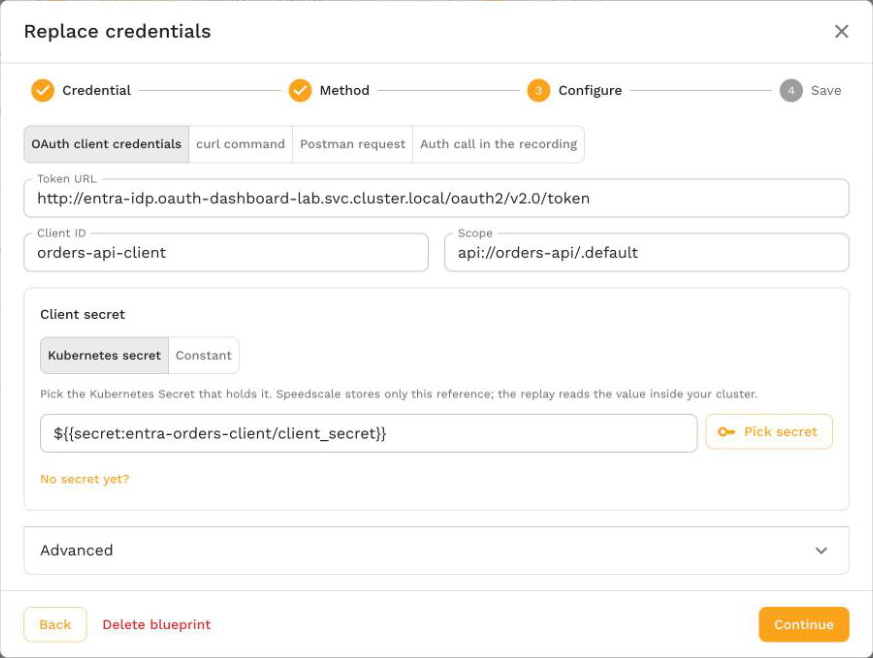
You rarely need to write this transform by hand. Open the snapshot's Credentials tab, select Replace credentials on the credential, choose Fetch a fresh token, and pick OAuth client credentials, curl command or Postman request. Speedscale saves a credential blueprint with a token_fetch chain and adds it to every replay of matching traffic. The Replace credentials guide walks through each field.
Write it by hand
To add the chain yourself, in the transform editor or a proxymock blueprint, request a token with the client credentials grant and send it as the Authorization header. The client secret comes from the Kubernetes Secret orders-client in the replay namespace:
{
  "extractor": { "type": "http_req_header", "config": { "name": "Authorization" } },
  "transforms": [
    {
      "type": "token_fetch",
      "config": {
        "grant": "client_credentials",
        "tokenUrl": "https://login.microsoftonline.com/<tenant-id>/oauth2/v2.0/token",
        "clientId": "<client-id>",
        "clientSecret": "${{secret:orders-client/client_secret}}",
        "scope": "api://orders-api/.default"
      }
    }
  ]
}
Send your own login request instead, with the password read from a secret:
{
  "extractor": { "type": "http_req_header", "config": { "name": "Authorization" } },
  "transforms": [
    {
      "type": "token_fetch",
      "config": {
        "grant": "request",
        "method": "POST",
        "url": "https://auth.example.com/api/login",
        "headers": "{\"Content-Type\":\"application/json\"}",
        "body": "{\"user\":\"svc-replay\",\"password\":\"${{secret:login/password}}\"}",
        "tokenPath": "data.token"
      }
    }
  ]
}
A recorded Authorization: Bearer eyJ... header goes out as Authorization: Bearer <fresh token>.
How It Works
- Skip values that do not need a token. An empty value is returned unchanged, so a request recorded without the header goes out without one and sends no token request. When
prefixis set (Bearerby default), a value that does not start with it, compared without regard to case, keeps its recorded value. ABasicheader on the same host is left alone. - Resolve secrets. For
client_credentials,clientIdandclientSecretare used as written, or read from a secret when the whole value is a${{secret:name/key}}reference. Forrequest, every${{secret:name/key}}reference in the URL, headers and body is replaced with the secret's value. See Secrets. - Reuse a cached token. Tokens are cached per token request and shared by every vUser and chain in the generator. See Caching and Refresh.
- Request a token. On a cache miss,
client_credentialssendsPOST <tokenUrl>with a form body ofgrant_type=client_credentials,client_id,client_secretand, when set,scope.requestsends the configured method, URL, headers and body as they are. When the body is set and noContent-Typeheader is given, it is sent as JSON when the body is valid JSON and asapplication/x-www-form-urlencodedotherwise. - Read the token. The token is read at
tokenPath(defaultaccess_token) from a JSON response, or from a response header whentokenPathisheader:<name>.expiresInPath(defaultexpires_in), when present in a JSON response, sets the token's lifetime. - Replace the value. The extracted value becomes
prefix + token.
In analysis mode the transform returns the recorded value unchanged and never sends a token request, so analyzing a snapshot does not reach your identity provider.
Configuration
| Parameter | Required | Default | Description |
|---|---|---|---|
grant | No | client_credentials when tokenUrl is set, request when only url is set | client_credentials or request. |
tokenUrl | For client_credentials | none | The token endpoint. An absolute http or https URL. |
clientId | For client_credentials | none | The OAuth client ID, as a literal or a ${{secret:name/key}} reference. |
clientSecret | For client_credentials | none | The OAuth client secret, as a literal or a ${{secret:name/key}} reference. |
scope | No | not sent | Sent as the scope form field as written. Separate several scopes with spaces. |
url | For request | none | The token request URL. An absolute http or https URL. |
method | No | POST | The token request method. |
headers | No | none | A JSON object of header names to values, as a string, for example {"X-Api-Key":"${{secret:auth/key}}"}. |
body | No | none | The token request body. |
tokenPath | No | access_token | JSON path of the token in the response, for example data.token, or header:<name> to read a response header. |
expiresInPath | No | expires_in | JSON path of the token's lifetime in seconds. |
ttl | No | 5m | How long to reuse a token whose response has no lifetime, as a duration such as 10m. |
prefix | No | Bearer | Written before the token. When set, only values that already start with it are replaced. Set it to an empty string to replace every non-empty value with the bare token. |
name | No | none | A label for people reading the config. It is never sent. |
Chain initialization fails with a message such as tokenUrl is required, url is required, clientSecret is required, headers must be a JSON object of header names to values or ttl must be a positive duration such as 10m when a field is missing or invalid.
Caching and Refresh
- One token per token request. The cache key covers the grant, method, URL, body, token path and lifetime path after secrets are resolved. Every vUser and chain in a generator that sends the same request shares one token. Each generator replica keeps its own cache.
- Refresh before expiry. A token is refreshed 60 seconds before it expires, or at half its lifetime if that is shorter.
- Default lifetime. With no lifetime in the response, a token is reused for
ttl, 5 minutes by default. - Failure backoff. A failed token request is remembered for 10 seconds. Requests in that window keep their recorded value without another token request, then the next request retries.
- Timeouts and limits. Each token request times out after 15 seconds. The response body is read up to 1 MiB.
When the transform cannot get a token, the request keeps its recorded value and the transform reports an error, so the service under test usually answers with a 401.
Errors
Errors name the token URL without its query string or user information, the HTTP status, and the provider's OAuth error and error_description when the response has them. They never include a secret or a token. Client credentials errors start with oauth token, and request errors with token, for example:
token endpoint https://auth.example.com/api/login returned HTTP 401 (invalid_credentials); check the request, its secrets and the URL
Each affected request carries an error event that starts with transform chain failed:. A blueprint's errors also appear on the replay report's Credentials in this replay card. The oauth_client_credentials errors table lists the common causes and fixes, which apply to both grants.
Secrets
| Where the replay runs | Where ${{secret:name/key}} is read from |
|---|---|
| In a Kubernetes cluster | Key key of the Kubernetes Secret name in the replay namespace. The operator mounts the Secret into the generator pod; if it does not exist, the pod cannot start and Kubernetes reports a FailedMount event. |
| proxymock on your machine | The file <workspace>/proxymock/secrets/<name>/<key>. See proxymock Secrets. |
Trailing line endings in a secret value are removed. Secret values are read at replay time and never stored in the snapshot, the transform config or the report.
token_fetch does not expand other ${{...}} keywords such as ${{env_var:...}} or variable-cache values: they are sent as written. Use constant when the token itself should come from an environment variable or an earlier chain.
When to Use It
| Situation | Use |
|---|---|
| Your service accepts tokens you can request from an identity provider or login endpoint | token_fetch |
| You hold the key that signs the tokens your service accepts, and want to keep the recorded claims | jwt_resign |
| You have a long-lived token that stays valid for the whole replay | constant |
| The recording contains the login, served by the service under test, and later requests should use the token the replayed login returns | smart_replace_recorded |
| The request is signed with AWS SigV4 | aws_auth |
Related
- Replace credentials: save a blueprint that adds this transform to every replay of matching traffic.
oauth_client_credentials: the client credentials form of this transform, with worked Microsoft Entra ID examples.http_req_header: the extractor normally paired with this transform.