Replace Recorded Credentials
A recording captures the exact credentials your clients sent: bearer tokens, JWTs and Basic auth headers. Most tokens expire within minutes or hours, so a replay that resends them gets 401 Unauthorized responses where the recording had 2xx responses, and its goals fail for a reason that has nothing to do with your service.
Replace credentials fixes this once per credential. You pick how the replay should get a valid credential, and Speedscale saves that choice as a credential blueprint. Every later replay of matching traffic applies the blueprint, whether it starts from the dashboard, a schedule, speedctl, proxymock cloud replay or the API. The stored snapshot never changes.
When you need it
- Replayed requests get
401or403responses that the recording did not have. - The snapshot's Credentials tab lists a credential as Expired, with Not covered under Coverage.
- A replay report shows Expired tokens sent to a service on its Overview tab.
- A replay report's recommendations include an expired JWT, with a Fix with Replace credentials button.
Requirements
- Speedscale v2.5.1198 or later, including the Speedscale operator in the cluster the replay runs in. A cluster with an older operator gets a warning on the report and sends the recorded credentials unchanged, because its generator cannot run the transforms a blueprint adds.
- Speedscale v2.5.1268 or later to save a client secret or token as a constant.
Find the credentials in a snapshot
Open the snapshot and select the Credentials tab. A count on the tab shows how many credentials need attention. The tab lists every credential found in the Authorization header of the snapshot's inbound requests:
| Column | What it shows |
|---|---|
| Credential | The kind: Bearer JWT (a signed token with claims), Bearer (opaque) (a bearer token that is not a JWT) or Basic (a username:password header). |
| Where | The service, host and path the credential was sent to. |
| Requests | How many recorded requests carry it. |
| Recorded value | Expired with the expiry time, Valid until, Unknown expiry for opaque tokens, or Static password for Basic auth. |
| Coverage | Not covered, or the name of the blueprint that replaces it. |
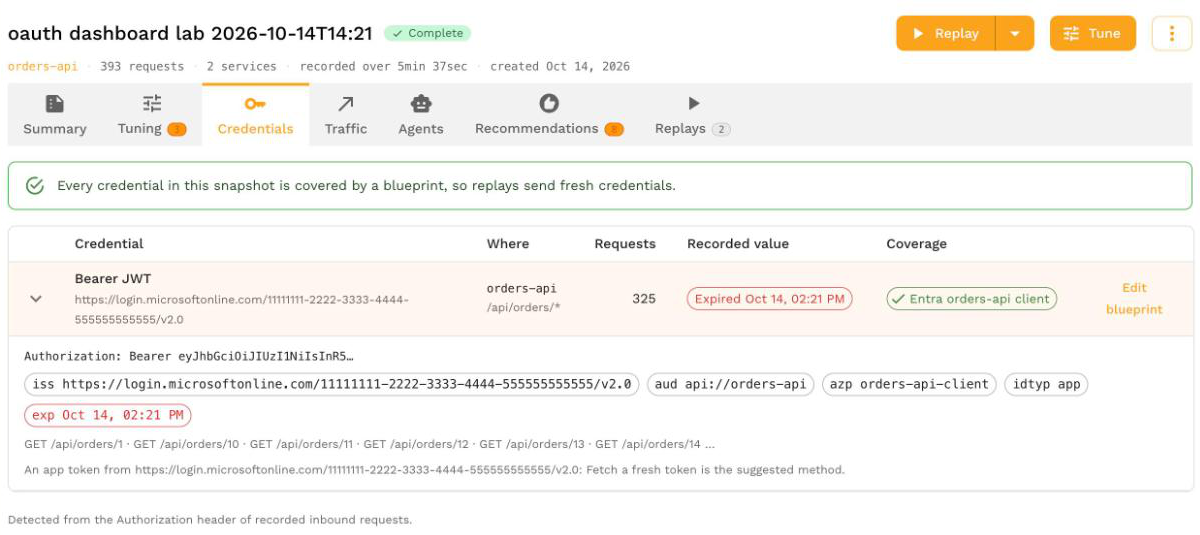
Expand a row to see the token's issuer and claims. For a token from Microsoft Entra ID, Okta or another identity provider that was issued to an app rather than a user, the tab suggests fetching a fresh token.
If the tab says the snapshot was analyzed before credential detection, only JWTs are listed. Reanalyze the snapshot to find Basic and opaque bearer tokens too.
Replace a credential
Select Replace credentials on the credential's row. The wizard has four steps:
- Credential: confirm the kind of credential. It decides which methods apply.
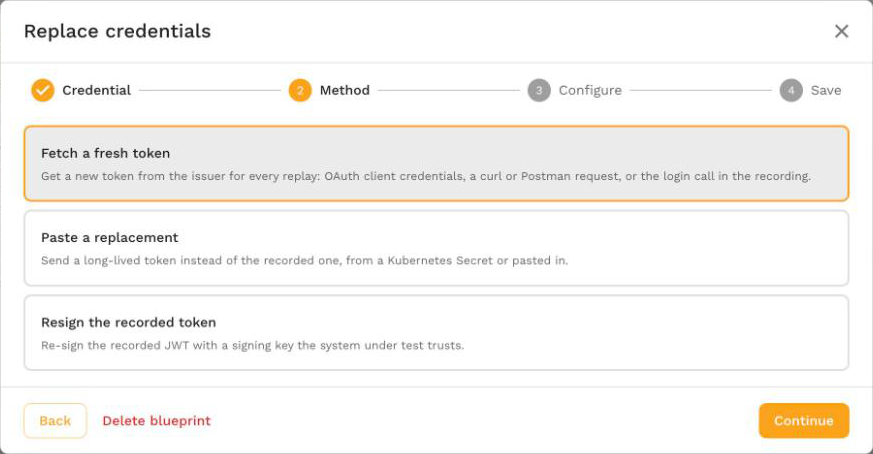
- Method: choose how the replay gets a valid credential. The suggested method is selected for you.
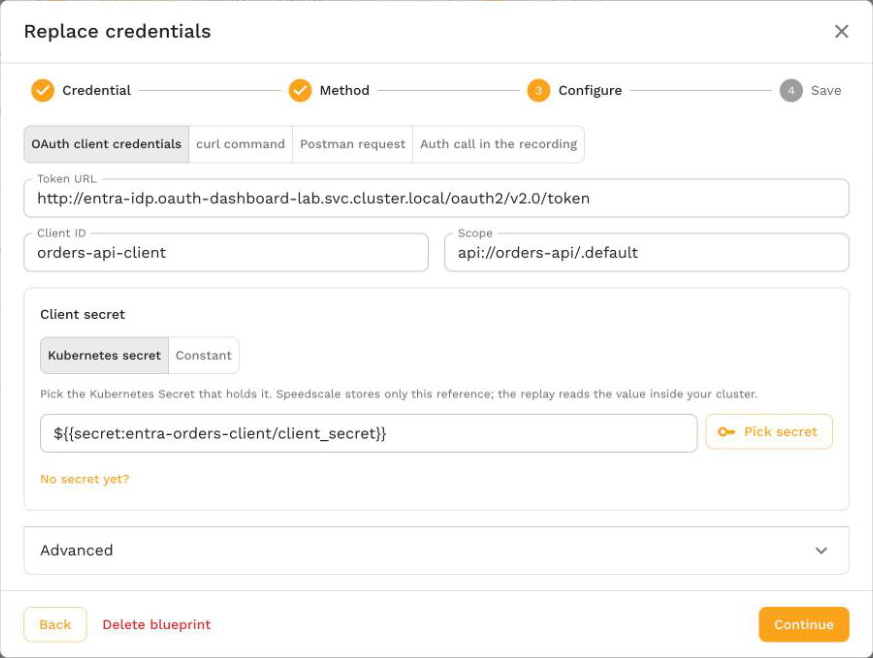
- Configure: fill in the method's settings, described in Choose a method.
- Save: check what the replay will do and which traffic the blueprint applies to, then select Save blueprint, or Save and replay to open the replay wizard for this snapshot.
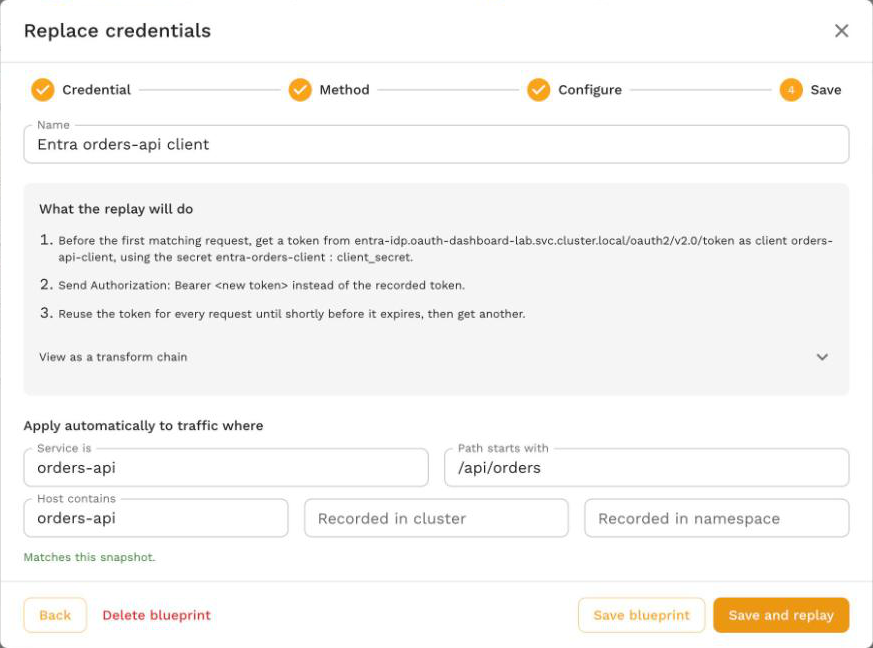
The Save step describes the blueprint in plain words under What the replay will do, and View as a transform chain shows the exact chain it adds. Values you save as constants are masked there. Name is filled in with a default such as Fetch token for orders-api that follows your method and scope until you type your own. The name labels the blueprint in the Credentials tab, on reports and in replay events; it does not change what the blueprint does.
You can also open the wizard from a replay report: from the Credentials in this replay card on the Overview tab, or from Fix with Replace credentials on an expired-JWT recommendation.
Choose a method
The methods available depend on the kind of credential:
| Credential | Fetch a fresh token | Paste a replacement | Resign the recorded token | Swap credentials |
|---|---|---|---|---|
| Bearer JWT | Yes | Yes | Yes | |
| Bearer (opaque) | Yes | Yes | ||
| Basic | Yes |
Fetch a fresh token
The replay requests a new token from the issuer, caches it, and sends Authorization: Bearer <new token> instead of the recorded token. One token is shared by every vUser in a generator and replaced shortly before it expires. The token request goes from the generator straight to the issuer, so the identity provider does not have to be in the recording and is never mocked. Choose where the token request comes from:
| Source | Use it when | What to enter |
|---|---|---|
| OAuth client credentials | Your service accepts tokens from an identity provider (Microsoft Entra ID, Okta, Auth0, Keycloak) and you have a client ID and secret for the client credentials grant. | Token URL, Client ID, Scope and Client secret. For a recorded Entra ID token, the token URL, scope and client ID are filled in from the token's claims; check them before saving. |
| curl command | Getting a token takes a request that is not a standard client credentials call: a login with a username and password, extra headers, or a JSON body. | The token request as a curl command. Write passwords and keys inside it as ${{secret:name/key}} so they stay out of the blueprint. |
| Postman request | You already have the token request in a Postman collection. | Upload the collection and pick the request that returns the token. Folder-level auth is not inherited, and unsupported body modes are reported as warnings. |
| Auth call in the recording | The login is served by the system under test itself and is in the recording. | The login call's Method, Login host and Login path. The recorded login is replayed, and the token in its response replaces the recorded token in later requests. It cannot refresh a token from a third-party identity provider, which is mocked during replay. |
Advanced settings apply to every source:
- Token field in the response: the JSON path of the token in the response,
access_tokenby default. Useheader:<name>to read a response header instead. - Header: the request header that carries the credential,
Authorizationby default. - Reuse a token for: how long to reuse a token when the response has no
expires_in, as a duration such as10m. The default is 5 minutes.
The client credentials, curl and Postman sources all build a token_fetch transform. Only values that already start with Bearer are replaced, so a Basic auth header on the same host is left alone, and a request recorded without the header goes out without it. If a curl command or Postman request carries a password or key in plain text, the Save step warns you to replace it with a secret reference.
Paste a replacement
The replay sends one fixed token on every matching request instead of the recorded one. Use it for a long-lived token, such as a service account or API token, that stays valid for the whole replay. A bare token is sent as Bearer <token> when the header is Authorization.
Paste builds a constant transform. Nothing refreshes the token during the replay, so a token that expires partway through brings the 401s back.
Resign the recorded token
The replay re-signs each recorded JWT with a signing key your service trusts, keeping the recorded claims and setting a fresh expiry. Use it when you hold the key that signs the tokens your service accepts. Enter:
- Signing key: a Kubernetes Secret that holds the key. It must match the token's algorithm, for example a 64-byte key for HS512 or a private key for RS256.
- Key ID (kid) override and Claim overrides (
key=value,key=value), when your service checks them.
Resign builds a jwt_resign transform. It always needs a Kubernetes Secret: a signing key cannot be saved as a constant. For services that validate tokens through a JWKS endpoint, use the per-run JWKS option described in Re-sign JWTs, because a blueprint cannot re-sign on the mock side.
Swap credentials
For Basic auth, the replay sends a replay user and password instead of every recorded user in scope. Enter the Replay user and pick the Kubernetes Secret that holds the Replay password. The password always needs a Kubernetes Secret.
To swap each recorded user for a different replay user from a CSV, use proxymock's Basic auth credentials swap.
Kubernetes secret or constant
Each secret value in the wizard is stored one of two ways.
Kubernetes secret (the default). Speedscale stores only a reference such as ${{secret:orders-client/client_secret}}, and the replay reads the value inside your cluster. Create the Secret in the namespace you replay into before you start the replay; No secret yet? under the field shows the command:
kubectl create secret generic orders-client --from-literal=client_secret='<value>' -n <replay namespace>
Select Pick secret to choose an existing Secret and key. When a replay starts, the Speedscale operator mounts the Secrets its blueprints reference into the generator pod.
Constant. The Fetch a fresh token client secret and the Paste a replacement token can instead be saved as typed. Select Constant and paste the value; the field is masked, with a button to show it. The replay then needs no Kubernetes Secret.
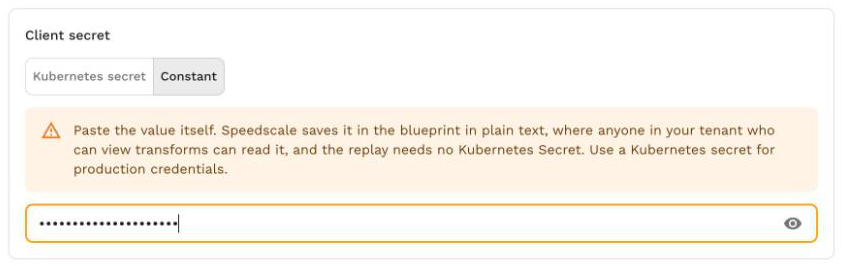
A constant is stored in the blueprint in plain text. Anyone in your tenant who can view transforms can read it. Use a Kubernetes secret for production credentials, and constants for test tokens and quick experiments.
A constant Paste a replacement value can also contain embedded syntax, resolved for every request:
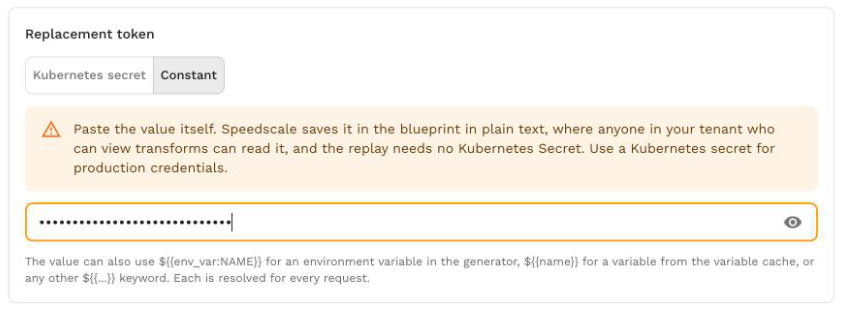
${{env_var:API_TOKEN}}reads an environment variable in the generator.${{name}}reads a variable from the variable cache, for example one an earlier chain stored.${{secret:name/key}},${{file:...}}and the other keywords work too.
The client secret for Fetch a fresh token does not expand these keywords: it is sent to the identity provider exactly as typed, unless it is a ${{secret:name/key}} reference.
Choose which traffic a blueprint applies to
The Apply automatically to traffic where fields on the Save step decide which requests the blueprint changes and which snapshots it applies to. They start from the credential you picked:
| Field | Matches |
|---|---|
| Service is | Requests to this service. |
| Path starts with | Requests whose path starts with this prefix. |
| Host contains | Requests whose host contains this text. |
| Recorded in cluster | Snapshots recorded in this cluster. |
| Recorded in namespace | Snapshots recorded in this namespace. |
Fill in at least one of service, host or path. A blueprint applies to a snapshot when the snapshot has requests that match every field you filled in and carry the credential header. The Save step says whether it Matches this snapshot. In a replay, the blueprint changes only the requests that match its service, host and path.
Narrow the scope when two services on the same host need different credentials. Widen it, for example by leaving out the path, when one token is valid for a whole service.
Where blueprints apply
A saved blueprint applies to every replay of matching traffic that starts through Speedscale cloud:
- replays started from the dashboard, including Save and replay,
- scheduled replays,
speedctlandproxymock cloud replay, and API calls such as CI pipelines.
When a replay starts, Speedscale adds the chains of every enabled blueprint that matches the snapshot to the replay's own copy of the snapshot. The stored snapshot and its transforms are not changed, so editing or deleting a blueprint takes effect on the next replay.
A blueprint does not apply in these cases:
- Replays that bypass Speedscale cloud. A replay started by creating a
TrafficReplayresource directly, for example from GitOps, or withproxymock cluster replay, does not pick up blueprints saved in the dashboard. Add the transforms to the snapshot itself, or forproxymock cluster replaysave the blueprint in the proxymock workspace (see In proxymock web). - Clusters with an older operator. The report shows a warning that the recorded credentials were sent unchanged. Upgrade the operator in that cluster.
- JWKS validation. Re-signing for a service that validates tokens against a JWKS endpoint needs changes on the mock side too, which a blueprint cannot make. Use the per-run option in Re-sign JWTs.
Check a replay
The replay report shows what happened to credentials:
- The Credentials in this replay card on the Overview tab says Replaced with and the blueprint names when every token request worked.
- If a token request failed, the card says could not get a token, with the identity provider's error, and offers Edit blueprint. The replay sent the recorded tokens instead. The secret itself is never shown.
- If requests carried an expired recorded token and no blueprint covered them, the card says Expired tokens sent to the service, with Fix with Replace credentials.
- The report's events include
CredentialBlueprintsAppliedwith the blueprint names, or a warning when blueprints could not be loaded or the cluster's operator is too old.

Transform errors from a blueprint's chains also appear on the report's Transform Issues tab, labeled with the blueprint's name.
Edit or delete a blueprint
On the snapshot's Credentials tab, select Edit blueprint on a covered credential. The wizard opens on the Configure step with the saved settings; a value saved as a constant opens with Constant selected. Save your changes, and the next replay of any matching snapshot uses them.
To stop a blueprint applying, open it with Edit blueprint and select Delete blueprint, then confirm. Replays of matching traffic send the recorded credentials again.
In proxymock web
proxymock web has the same Replace credentials wizard for a local workspace. On the Requests view, select a request that carries the credential, then open Actions and choose Replace credentials. The wizard picks the credential kind and fills in the host and path from the selected request. Set up credentials on the Mocks view and the Sessions readiness view open it too.
The kinds and methods are the same as in the dashboard: Swap credentials for Basic auth, Fetch a fresh token and Paste a replacement for bearer tokens, and Resign the recorded token for JWTs. A few things work differently:
- Secrets stay in your workspace. When you type a client secret or paste a token, proxymock web writes it to
proxymock/secrets/<name>/<key>and the blueprint keeps only the${{secret:name/key}}reference. There is no Constant option. In a curl command or Postman request, write${{secret:name/key}}yourself, as in the dashboard. See proxymock Secrets. - Test token request sends the token request once from your machine and reports whether a token came back and how long it is valid. The token itself is never shown. It is not available for the auth call in the recording.
- Basic auth swaps each recorded user for a replay user from a dataframe you edit. See Basic auth credentials swap.
- Scope is a host and a path prefix. Leave both empty and the blueprint applies to every request in the workspace.
The wizard saves an active blueprint in proxymock/blueprints/. It applies to replays started from proxymock web and to proxymock replay. proxymock cloud replay pushes the snapshot with the blueprint merged in, and proxymock cluster replay merges it into the staged snapshot, except for Basic auth swaps, which read a dataframe; use proxymock cloud replay for those. In a cluster, a ${{secret:name/key}} reference reads the Kubernetes Secret with that name and key in the replay namespace: the files in proxymock/secrets are not uploaded, so create the Secret there first.
Blueprints saved by older proxymock versions that fetched a token from a recorded auth call are converted to the current token request the next time you replay.
Troubleshooting
| Symptom | Likely cause | Fix |
|---|---|---|
The card says the blueprint could not get a token, with invalid_client | The client ID or secret is wrong or expired. | Check the client ID, then update the Secret, or edit the blueprint and paste the new constant. |
invalid_scope | The scope is wrong, or the client may not request it. | For Microsoft Entra ID, use the API's application ID URI followed by /.default. |
| The token endpoint is unreachable | The generator cannot reach the token URL: DNS, a NetworkPolicy, a firewall or a missing egress proxy. | Allow egress from the replay namespace to the token host. The token request honors the generator's HTTPS_PROXY, HTTP_PROXY and NO_PROXY settings. |
The generator pod stays in ContainerCreating with a FailedMount event | A Secret the blueprint references is missing from the replay namespace. | Create the Secret and key in the namespace the replay runs in, or save the value as a constant where that is allowed. |
| The Save step says Does not match this snapshot | The scope does not match any request that carries the credential header. | Check the service, host and path against the Credentials tab's Where column. |
| Requests still get 401s and the report shows no token errors | The blueprint's scope does not cover those requests, the recorded header is not a Bearer header, or the token is for a different audience. | Widen the scope, check the recorded header, and check that the scope or token audience matches what your service expects. |
| A pasted token works at first, then 401s return | The token expired during the replay. | Use Fetch a fresh token so the replay refreshes it. |
| The report warns that the operator is too old | The cluster's Speedscale operator predates credential blueprints. | Upgrade the operator to v2.5.1198 or later. |
Related
- Re-sign JWTs: one-off options for a single replay, including JWKS re-signing.
- JWT handling: the ways Speedscale can handle JWTs.
token_fetch,constant,jwt_resign: the transforms blueprints use.- Embedded syntax:
${{secret:...}},${{env_var:...}}and the other keywords. - proxymock Secrets: local secret files for proxymock replays.