Readiness Settings in the Test Config
What "ready" means is part of the test config.
The Readiness tab of the test config editor, after Goals, holds every setting; the same settings live in the config's JSON under readiness for speedctl and proxymock users.
A test config without a readiness section grades with the Speedscale defaults.
The editor writes the section only once something differs from them, and only the families and rungs that differ.
Changes apply to replays started after you save.
Past reports keep the grades they were given.
The families table
One row per family, in scorecard order, with four columns.
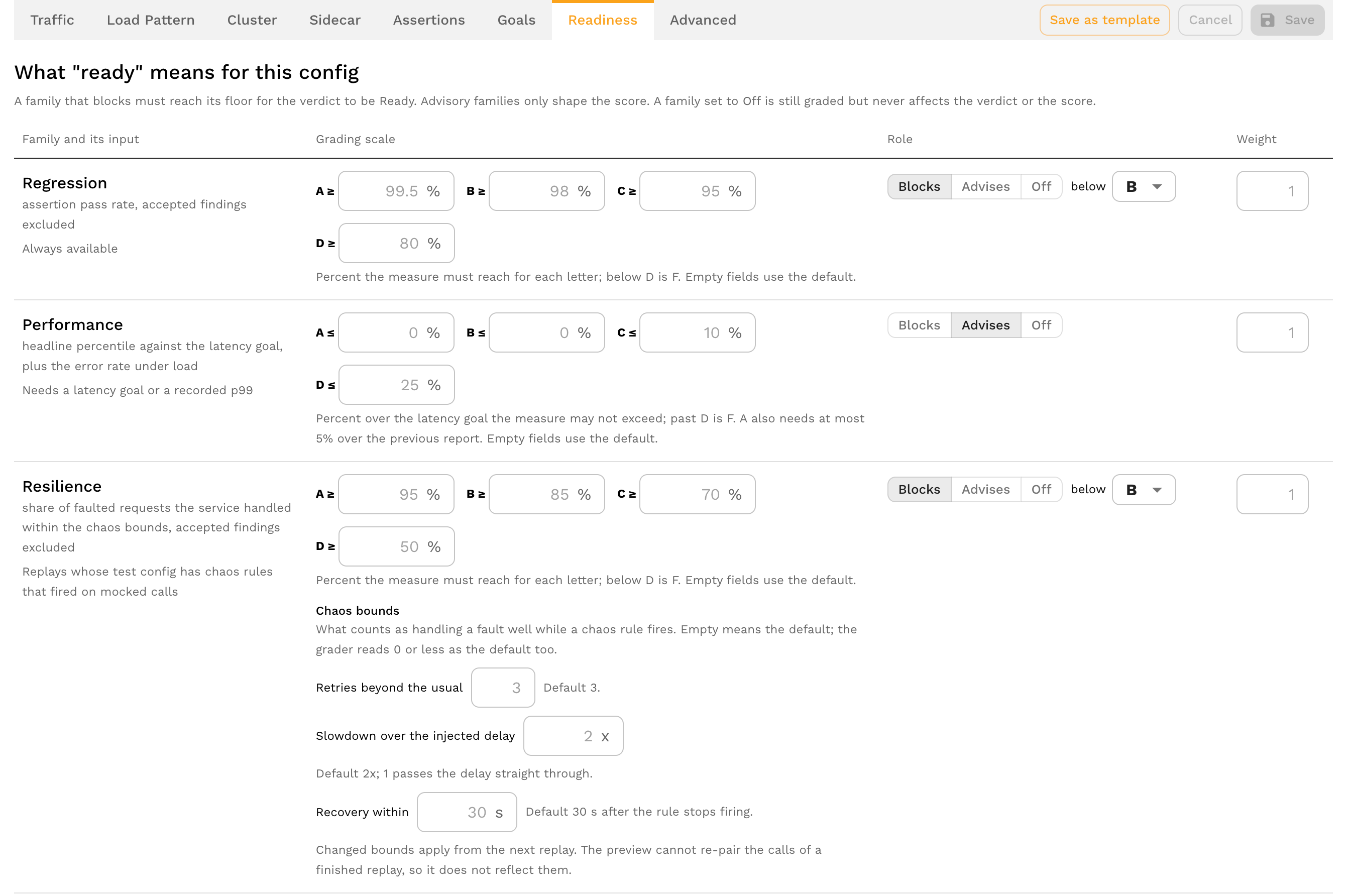
| Column | What it holds |
|---|---|
| Family and its input | The family's name, what it grades from and when it is available, for example "Needs an OpenAPI document attached to the service". |
| Grading scale | The A, B, C and D rungs. Rate families take a percent the measure must reach; Performance takes the percent over the latency goal it may not exceed. Runtime health, Trend and Security show their fixed scale. Empty fields use the default. |
| Role | Blocks below a floor letter, Advises, or Off. |
| Weight | The family's weight in the score. Empty means the default of 1; a negative value is an error. |
Rung overrides have to stay in order (A at or above B, B at or above C, and so on) and cannot be negative.
Save is held with "Fix the readiness thresholds before saving." while any field is wrong, and the JSON view reports the same errors.
A summary line under the table counts how many families block, advise and are off and sums the weights.
Windows
- Trend window. On the Trend row, in days: how far back the Trend family looks for the previous graded report of the same service and build. Default 14 days; at least 1.
- Production window. On the Coverage row, in days: how far back the Coverage family reads the service's recorded traffic, ending at the replay's start. Default 14 days; 1 to 90. A new window applies to the next replay, so the preview does not reflect it.
Security auth probe
Under the Security row.
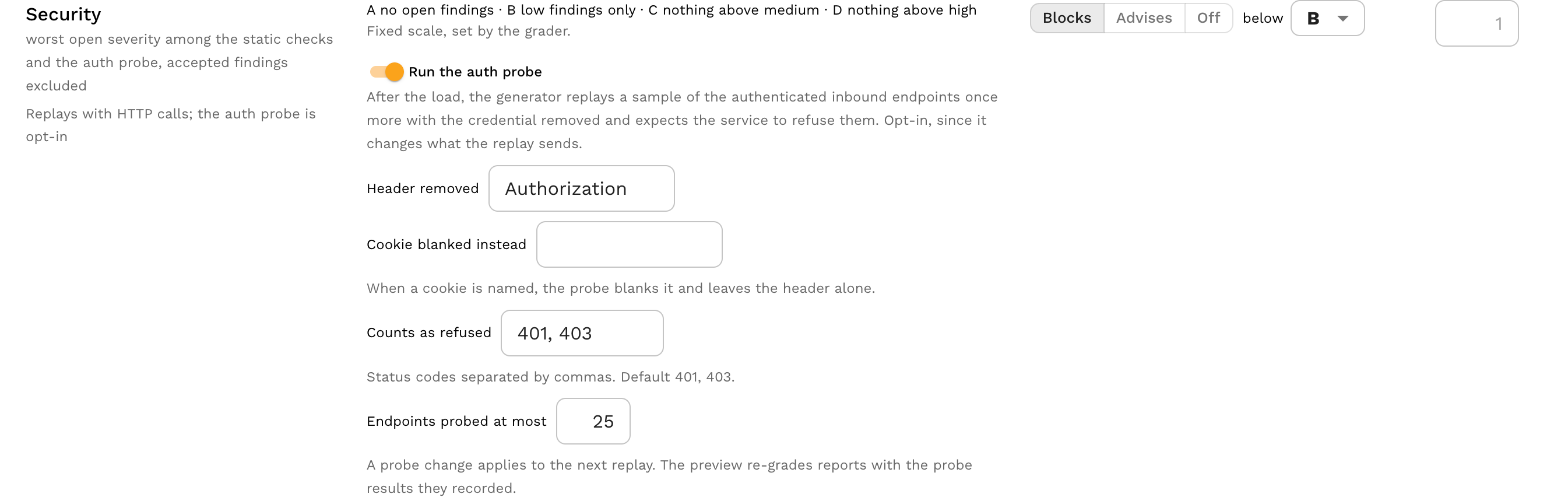
The probe replays authenticated endpoints once more with the credential removed and expects the service to refuse them; see Security.
| Field | Default | Meaning |
|---|---|---|
| Enabled | Off | The opt-in switch. The static checks run either way. |
| Header | Authorization | The request header the probe removes. |
| Cookie | Empty | When set, the probe blanks this cookie's value instead of removing the header. |
| Expected statuses | 401, 403 | Status codes that count as the service refusing the stripped request, as a comma-separated list. Any 2xx is a finding; other statuses are neither. |
| Max endpoints | 25 | How many distinct endpoints the probe sends, so it stays a sample. 0 means the default. |
A probe switched off keeps its other settings so switching it back on finds them.
Changes apply to the next replay.
Resilience chaos bounds
Under the Resilience row.
What counts as handling a fault well while a chaos rule fires; see Resilience.
| Field | Default | Meaning |
|---|---|---|
| Retries beyond the usual | 3 | Attempts beyond the usual ones a request may make on the faulted dependency. A whole number. |
| Slowdown over the injected delay | 2x | How many times the injected delay a request may slow down by; 1 passes the delay straight through. |
| Recovery within | 30 s | How long after the rule stops firing an affected endpoint has to answer without a 5xx. Whole seconds. |
Empty means the default, and the grader reads 0 or less as the default too.
Changed bounds apply from the next replay; the preview cannot re-pair the calls of a finished replay.
Preview against recent reports
The right-hand panel re-grades the last five reports that ran with this config using the draft on the left and shows the saved grade beside the draft's: the verdict, the score and every letter that changes.
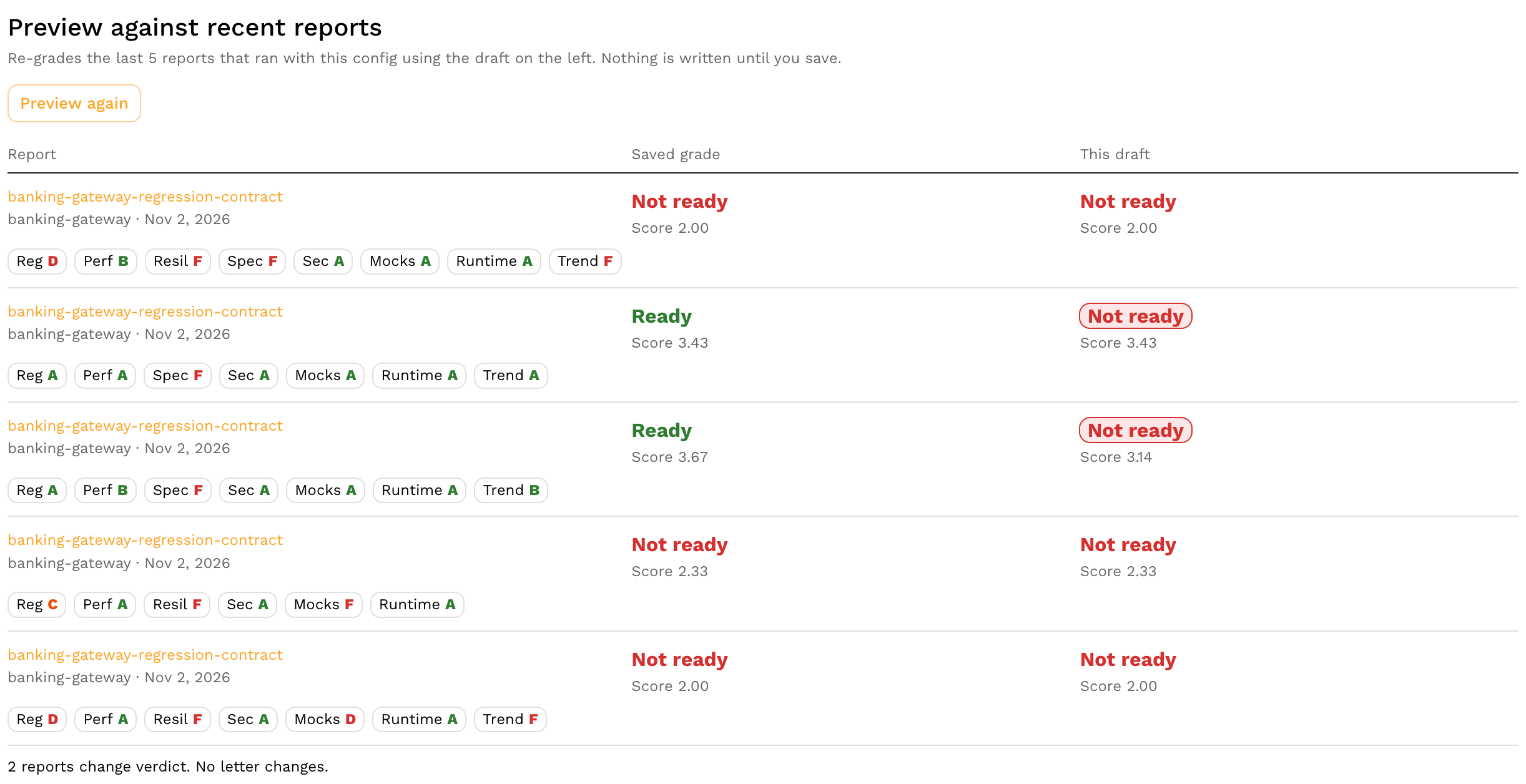
Nothing is written until you save.
The preview cannot reflect a changed coverage window, probe setting or chaos bound, since those change what the next replay records.
Accepting findings
The Accepting findings block is the acceptance policy: what an acceptance may do under this config.
| Setting | Default | Meaning |
|---|---|---|
| Who can accept a finding | Anyone who can see the report | Or admins only. |
| Longest acceptance | 90 days | The most an acceptance may run from its creation. No acceptance is open-ended. |
| A field across endpoints, or a whole check on one endpoint | Admins, logged | The wildcard kinds. Can be set to not allowed. |
| Baselining a whole service | Admins, logged | Can be set to not allowed. |
Grades lifted by an acceptance are always marked on the report, and accepted findings are always shown there.
Acceptances in effect
The Acceptances in effect ledger lists every acceptance recorded for a service, at any build, with the ones that expired or were reopened.
Pick a service to see its acceptances with their kind, scope, owner, reason, end date, the report they came from and the letter before and after.
An admin can baseline the service from here.
See Acceptances.
The JSON
The readiness section of a test config uses these fields.
Durations are written as seconds with an s suffix (1209600s is 14 days) and enums by name.
{
  "readiness": {
    "families": [
      {
        "family": "READINESS_FAMILY_REGRESSION",
        "role": "READINESS_ROLE_BLOCKS_BELOW",
        "floor": "READINESS_LETTER_B",
        "weight": 2,
        "boundaries": { "a": 99.5, "b": 98, "c": 95, "d": 80 }
      },
      {
        "family": "READINESS_FAMILY_SECURITY",
        "role": "READINESS_ROLE_BLOCKS_BELOW",
        "floor": "READINESS_LETTER_C"
      },
      {
        "family": "READINESS_FAMILY_COVERAGE",
        "role": "READINESS_ROLE_ADVISES"
      }
    ],
    "trendWindow": "1209600s",
    "coverageWindow": "604800s",
    "securityProbe": {
      "enabled": true,
      "authHeader": "Authorization",
      "expectedStatuses": [401, 403],
      "maxEndpoints": 25
    },
    "resilience": {
      "maxRetries": 3,
      "maxLatencyAmplification": 2,
      "recoveryWindow": "30s"
    },
    "acceptancePolicy": {
      "maxDuration": "2592000s",
      "onlyAdminsAccept": true,
      "noWildcards": false,
      "noBaselines": false
    }
  }
}
| Field | Meaning |
|---|---|
families[].family | One of READINESS_FAMILY_REGRESSION, READINESS_FAMILY_PERFORMANCE, READINESS_FAMILY_RESILIENCE, READINESS_FAMILY_SPEC_ADHERENCE, READINESS_FAMILY_SECURITY, READINESS_FAMILY_MOCK_FIDELITY, READINESS_FAMILY_COVERAGE, READINESS_FAMILY_RUNTIME_HEALTH, READINESS_FAMILY_DATA_LAYER, READINESS_FAMILY_TREND. A family not listed takes its defaults. |
families[].role | READINESS_ROLE_BLOCKS_BELOW, READINESS_ROLE_ADVISES or READINESS_ROLE_OFF. |
families[].floor | READINESS_LETTER_A to READINESS_LETTER_F. The lowest letter that still passes when the role blocks. Default B. |
families[].weight | Weight in the score. 0 or absent means 1. |
families[].boundaries | a, b, c, d: the rungs for a rate family, or the percent over the goal for Performance. A rung left at 0 keeps its default. Ignored by Runtime health, Trend and Security. |
trendWindow | How far back Trend looks for the previous graded report. Default 1209600s (14 days). |
coverageWindow | How far back Coverage reads recorded traffic, ending at the replay's start. Default 1209600s (14 days). |
securityProbe | enabled, authHeader (default Authorization), authCookie, expectedStatuses (default 401 and 403), maxEndpoints (default 25). Absent or disabled means the Security family grades from its static checks alone. |
resilience | maxRetries (default 3), maxLatencyAmplification (default 2), recoveryWindow (default 30s). A value at or below zero takes the default. |
acceptancePolicy | maxDuration (default 7776000s, 90 days), onlyAdminsAccept, noWildcards, noBaselines. The switches are spelled as restrictions because an absent field is the default. |
Push an edited config with the CLI, or edit proxymock/testconfigs/<name>.json in a proxymock workspace:
speedctl put testconfig my_config.json
The scorecard is graded by the Speedscale cloud analyzer when the report completes; local and cloud-free replays are not graded, so the readiness section has no effect on them.