Acceptances
An acceptance records that a team knows about a finding and has decided to ship with it.
The accepted finding leaves its family's measure, the letter is re-computed without it, and the finding stays visible on every report under Accepted with the owner, the reason and the end date.
Nothing is silenced for good: every acceptance has an end date, and the grade without acceptances is shown beside the lifted one.
Acceptances are per finding and per service.
Performance and Trend produce no findings, so nothing can be accepted on them.
Accepting a finding
Open the family's detail on the Readiness tab of a report and find the finding under its group.
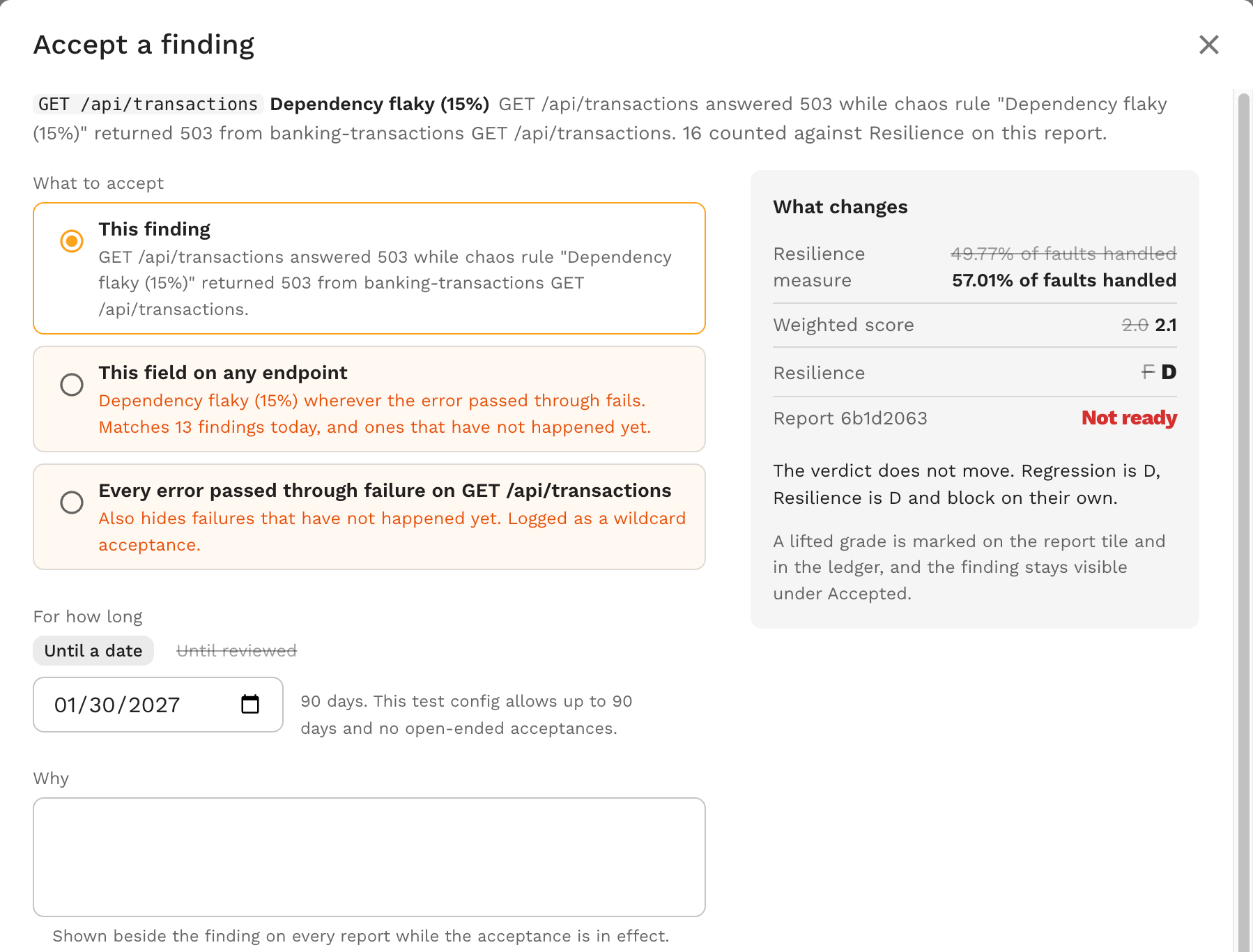
Accept opens the dialog for that one finding; Accept findings... switches the list to a selection mode where you pick findings one at a time, or by path or by check, and accept them together.
The dialog asks for:
- What to accept. This finding, or one of the wider scopes below when the policy and your role allow them.
- For how long. An end date. The dialog proposes the latest date the policy allows and says "This test config allows up to N days and no open-ended acceptances." Until reviewed is not offered.
- Why. Required. The reason is shown beside the finding on every report while the acceptance is in effect.
- Owner. Who answers for the acceptance; pre-filled with you.
- Where it applies. "Future replays of
<service>at any build" makes the acceptance service-wide. When the report carries a SUT image tag the box is checked by default, because an acceptance keyed on the tag stops applying on the next build.
While you fill it in, the dialog re-grades the report with the proposed acceptance and shows what changes: the family's measure, the weighted score and the letter, for example "Regression goes from C to B on this report", and whether the family still blocks.
Confirming records the acceptance and re-grades the report now.
The grade before the acceptance stays in its history, and the report tile and the ledger carry a lifted mark.
What accepting does to the measure
An accepted finding's count moves to the passing side of its family's measure; the denominator stays.
A failed assertion counts as passed, an unmatched mock call as matched, a differing statement as matching, a restart as not having happened, a non-conforming call as conforming, an unexercised endpoint leaves the production total, a security finding leaves the open findings, and a faulted request counts as handled.
The family's detail ends with "N accepted findings (M counted) left out of the measure; 97% pass and C without them."
Keys, builds and services
An acceptance is keyed on the service and the SUT image tag of the report it was made from.
A report graded at that tag applies it; a report at another tag does not.
A service-wide acceptance has no tag and applies to every build.
A report with no image tag applies only the service-wide acceptances, never another build's.
Finding keys are hashed from the family, the check id, the endpoint pattern and the field path, so the same failure on the next replay carries the same key and stays accepted until the end date.
Wildcard rules
Three kinds cover findings by their parts rather than by key, so they also hide failures that have not happened yet.
They are admin-only and logged to the activity feed, and the test config's policy can forbid them.
| Kind | Covers |
|---|---|
| This field on any endpoint | The same check and field path wherever it fails. The dialog says how many findings it matches today. |
Every <check> failure on <endpoint> | The whole check on one endpoint. |
| Future findings on the same paths | Every finding of the family, present or future, on the selected endpoint patterns. Offered when accepting several findings. The pattern is a glob where * matches one path segment and ** the rest. |
Baselines
A baseline accepts every current finding of a service, across all families, so that only what is new from then on is graded.
It is admin-only, logged, and the policy can forbid it.
Every report shows a baseline mark and the grade without it until the baseline expires.
From a report's findings list, Baseline this service instead baselines from that report and re-grades it.
From the ledger on the test config's Readiness tab, Baseline this service baselines from the service's latest graded report without re-grading it.
Both record one acceptance per family that has findings.
Reopening
Reopen on an accepted finding, or on a row of the ledger, revokes the acceptance.
The creator or an admin may reopen a plain acceptance; wildcard rules and baselines need an admin.
A reopened finding counts again from the next replay.
The report it was accepted on keeps the grade it was given, so the lifted letter and the Accepted row stay there until then.
The verdict never moves on its own
Re-grading a report because of an acceptance moves the letters but keeps the verdict the report had, and the report says so: "The verdict does not move: an acceptance never changes a graded report's verdict, so it stays Not ready until the next replay grades with the acceptance in effect."
When the accepted finding was not the only blocker the note names the rest, for example "The verdict does not move. Security is D and blocks on its own."
The next replay grades afresh with the acceptance in effect.
The policy
The test config's acceptance policy sets the longest acceptance (default 90 days), whether only admins may accept a finding, and whether wildcard rules and baselines are allowed.
The dialog shows a scope as "Admins only" or "Not allowed by this test config" when you cannot use it.
The ledger
The Acceptances in effect ledger on the Readiness tab of the test config editor lists every acceptance recorded for a service, at any build, including the ones that expired or were reopened.
Each row shows the kind, what it covers, the build or "every build", the owner and reason, the end date or who reopened it and when, the report it was created from and the family's letter before and after on that report.
A link from an acceptance mark on the service trend opens the ledger at that acceptance.
The Readiness tab of a report also lists the acceptances in effect when it was graded under "What fed these grades".