Configure a Replay with Test Configs
A test config controls how a replay runs, separately from the traffic being replayed. It holds the load shape (stages and virtual users), the responder's behaviour and scale (replicas, CPU and memory), chaos, generator settings, and the goals and assertions a report is judged by. It is the same TestConfig document Speedscale cloud stores and the dashboard edits, so a config written in proxymock also works in Speedscale cloud.
In proxymock a test config is a file in your workspace. It travels with the repo it tests, gets reviewed in a merge request, and applies the same way on each of the three replay paths.
Where test configs live
Each test config is one file:
proxymock/
└── testconfigs/
    ├── big-responder.json
    └── checkout-soak.json
- One complete config per file. A file holds exactly one
TestConfigas JSON, the same shape Speedscale cloud stores. There is no include or merge mechanism. - The id is the file name.
big-responder.jsonis the configbig-responder. If the document has an"id"field, it must match the file name. Ids use letters, digits,.,_and-. - Parsing is strict. An unknown field is an error that names the field, so a typo fails loudly instead of being ignored.
- The workspace is the only location.
--incan point at the repo root, at theproxymock/directory or at a recording inside it. All three find the sameproxymock/testconfigs/directory, the same way blueprints are found. proxymock never reads test configs from~/.speedscale.
See the workspace layout reference for the rest of the workspace.
The built-in regression config
If you do not choose a config, every replay uses the built-in regression config. It is the same default Speedscale cloud uses: one virtual user, the standard assertions on status code, Content-Type header and response schema, and a responder in passthrough mode.
regression is maintained by Speedscale and is read-only. You can view it and copy it, but not edit it. To change a setting, make a copy under your own name and edit the copy. The names of all Speedscale default configs (regression, standard and the others) are reserved, and workspace configs cannot use them. Names are case-sensitive.
Edit test configs in proxymock web
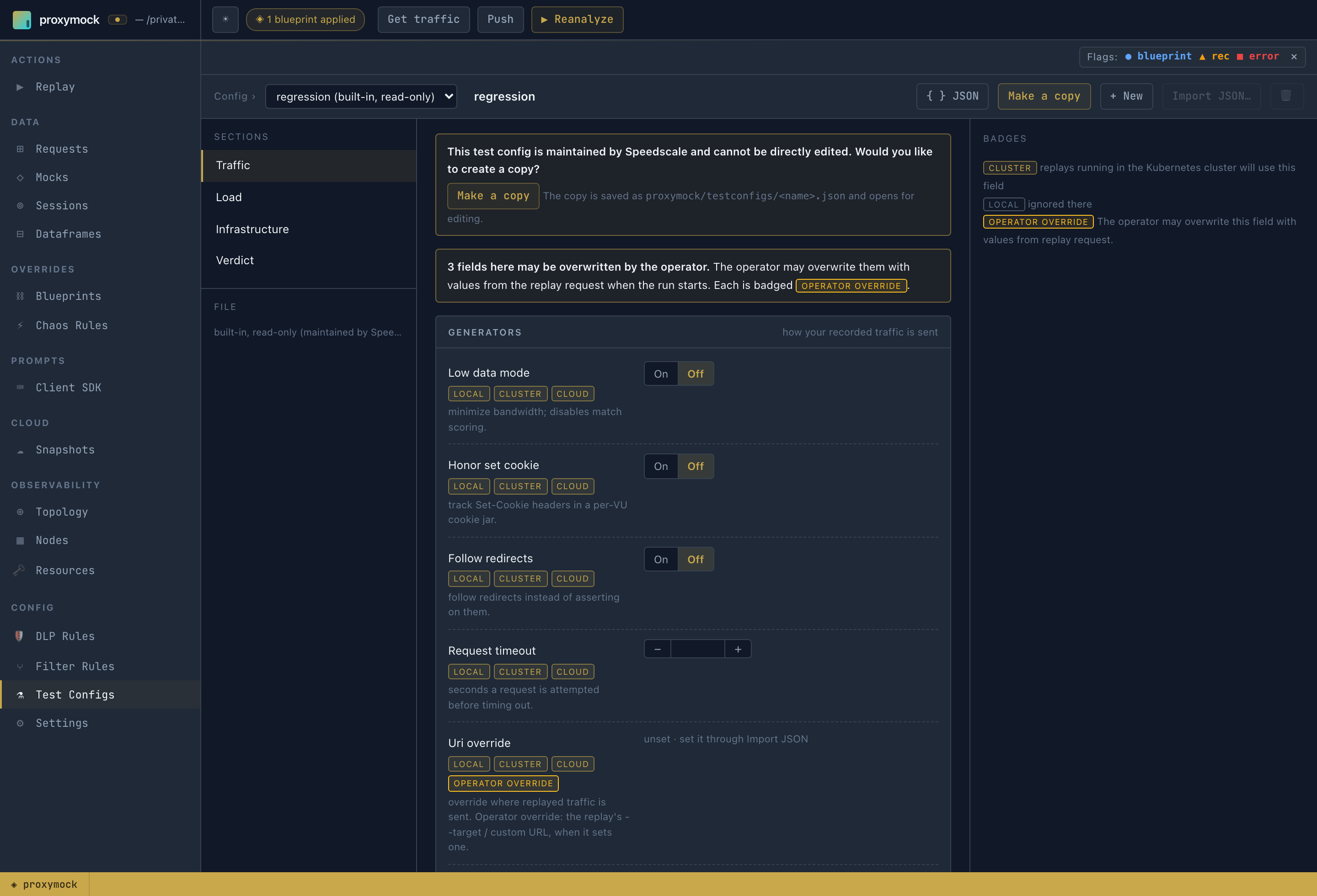
Open Config → Test Configs in proxymock web. You do not need a Speedscale login or a cluster to author a config.
- Config selects the config to edit.
regression (built-in, read-only)is always listed first, followed by the workspace configs. The file being edited is shown under File. - Make a copy, shown on the read-only
regression, saves a copy asproxymock/testconfigs/<name>.jsonand opens it for editing. + New starts a new config. Import JSON… loads a document you already have. - Sections group the fields: Traffic (generator and responder behaviour, chaos), Load (stages, virtual users, target TPS), Infrastructure (responder and generator replicas, resources, image tags and other cluster settings) and Verdict (goals and assertions).
- Save config writes the file. Discard drops unsaved edits.
Badges: which replay path uses a field
Each field has three badges, local, cluster and cloud. A highlighted badge means replays on that path use the field. A dimmed badge means that path ignores it. For example, responder replicas are highlighted for cluster and cloud but not for local: a local replay runs its mock server in-process, so there are no responder pods to scale.
Some fields also carry an operator override badge, and the section shows a note counting them. The legend explains: "The operator may overwrite this field with values from replay request." On cluster and cloud replays the Speedscale operator sets these fields from the replay request, not from the config:
| Field | What the operator uses instead |
|---|---|
cluster.workloadName, cluster.namespace | the workload and namespace the replay targets |
snapshotId | the snapshot being replayed |
responder.numReplicas | raised to 1 when it is unset or below 1 |
cluster.cleanup, cluster.replayMode, cluster.buildTag | the replay's own setting, when it sets one |
cluster.logLevel | the operator's own log level, when the field is unset |
cluster.sidecarTls* | the replay's sidecar TLS settings, when it sets them |
generator.uriOverride | the replay's target or custom URL, when it sets one |
generator.dlpConfigId, responder.dlpConfigId | the operator's DLP config, when DLP is on and the field is unset |
A config can still set these fields, but on a cluster or cloud replay the request takes priority.
Pick values from a cluster
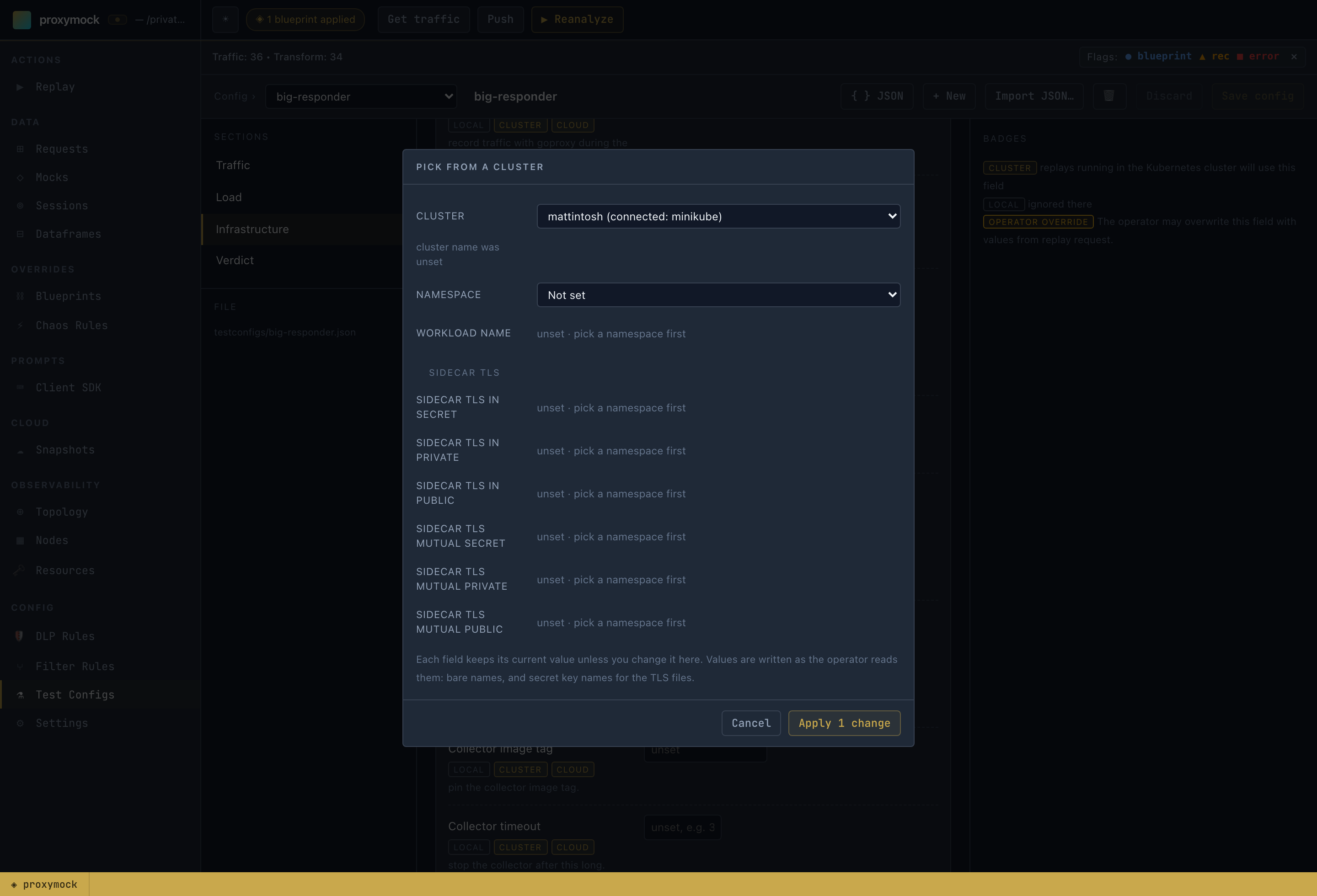
Fields that name something in a cluster, such as the cluster name, namespace, workload and sidecar TLS secrets, are plain text boxes, so you can type any value. Next to each one, Pick… opens a dialog for browsing a cluster: either the one proxymock web is connected to through your kubeconfig, or a cluster registered with Speedscale cloud. Choose the cluster, then the namespace, workload and secrets together. Apply writes only the fields you changed.
See the JSON
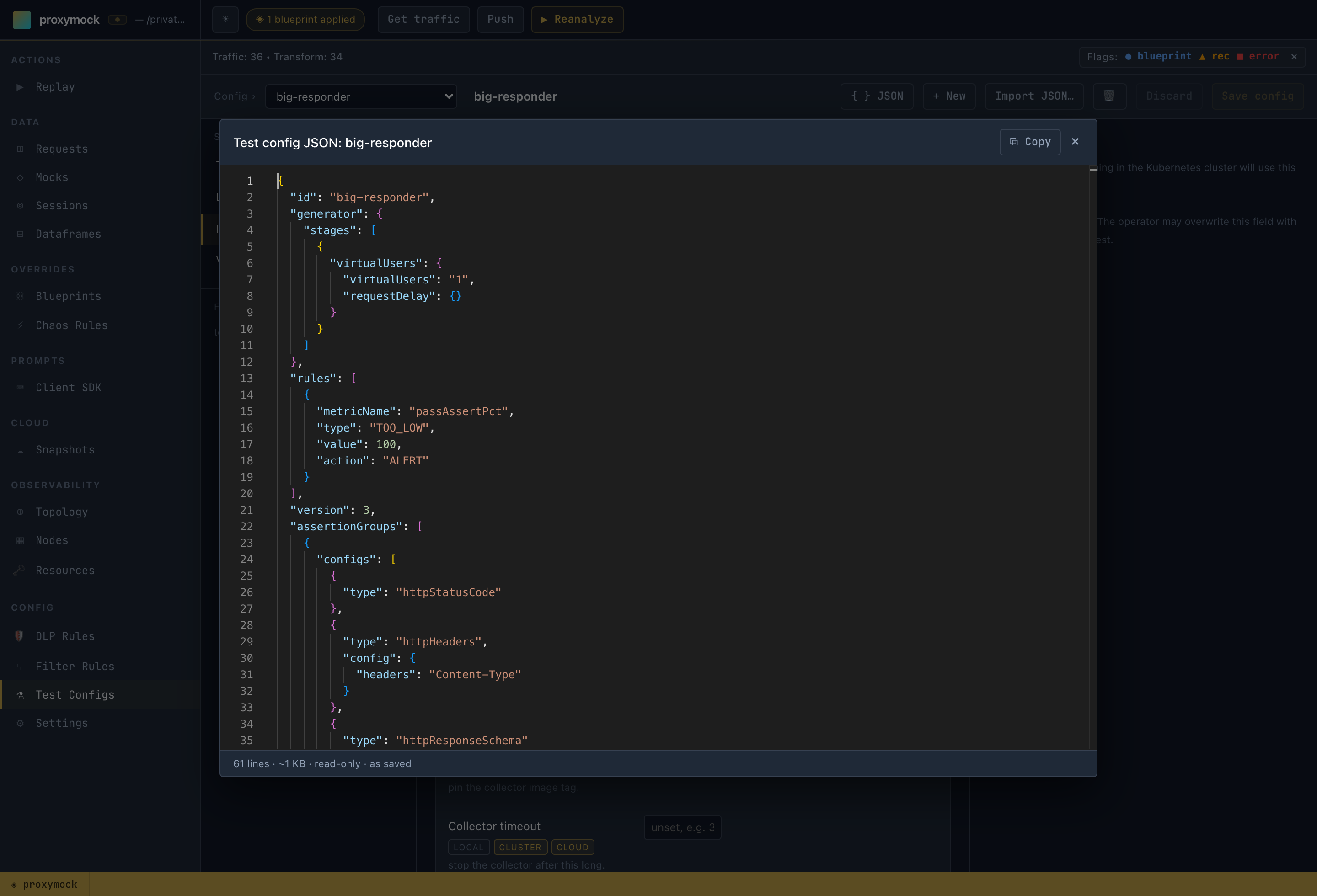
JSON shows the config exactly as it is saved or sent, including fields the editor does not display, such as deprecated settings. The document is read-only here. Use Copy to take it elsewhere, or edit the file directly.
Worked example: more responder replicas and resources
A common request is to run more mock-server (responder) pods, and larger ones, for a cluster replay under heavy load. The regression default runs one responder with the operator's default resources.
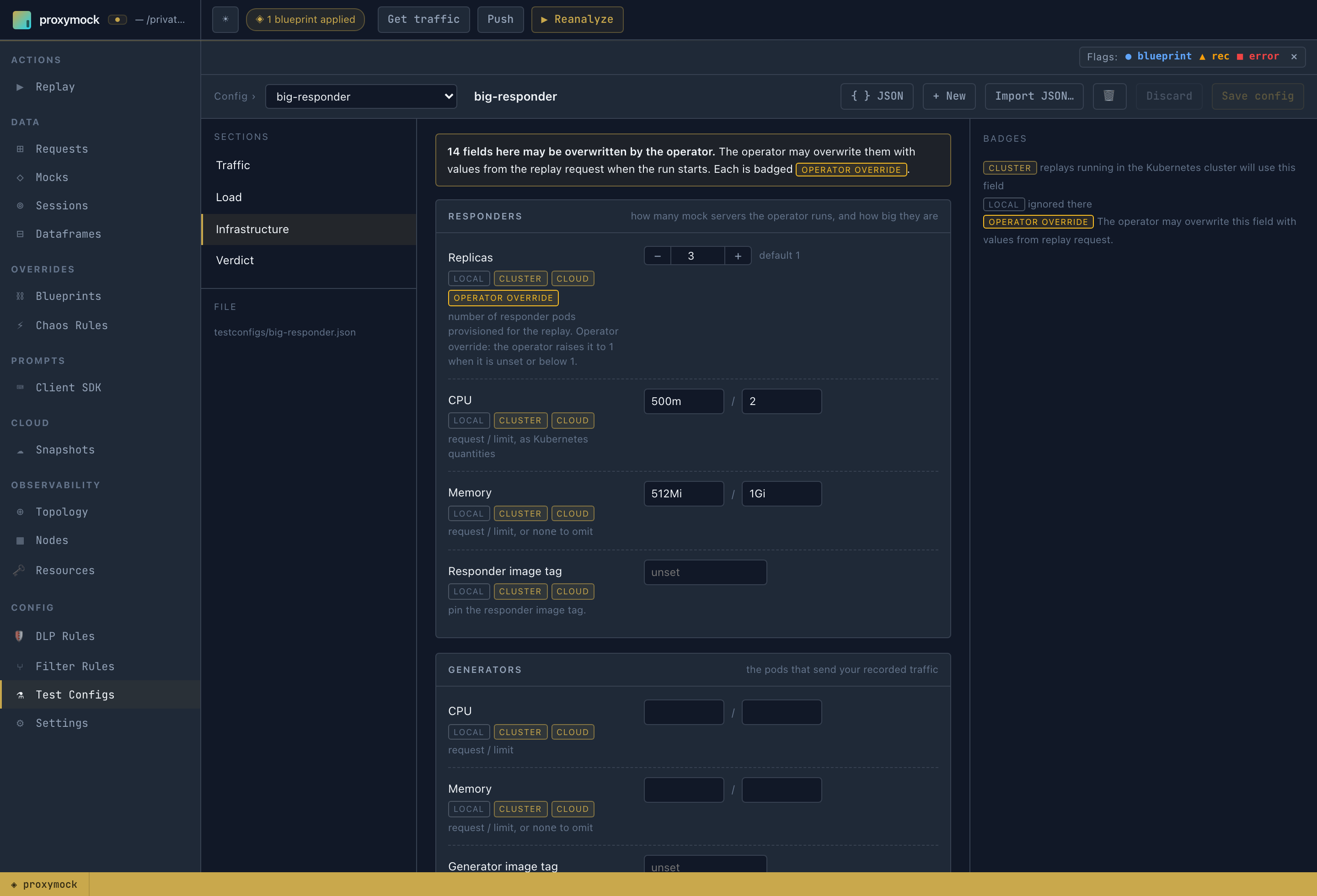
- In Config → Test Configs, select
regression (built-in, read-only)and press Make a copy. Name the copybig-responder. - Open Infrastructure. Under Responders, set Replicas to
3, CPU to500m/2(request / limit) and Memory to512Mi/1Gi. Values are Kubernetes quantities, and one Kubernetes would reject is refused with the field named. - Press Save config. The file is now
proxymock/testconfigs/big-responder.json.
The relevant part of the saved file (the other fields are copied unchanged from regression):
{
  "id": "big-responder",
  "responder": {
    "numReplicas": 3,
    "passthroughMode": true
  },
  "cluster": {
    "responderResources": {
      "requests": { "cpu": "500m", "memory": "512Mi" },
      "limits": { "cpu": "2", "memory": "1Gi" }
    }
  }
}
Replicas and responder resources are cluster and cloud fields, so run the config on one of those paths:
proxymock cluster replay start --in ./proxymock -n my-namespace --workload my-service \
  --test-config big-responder --wait
See the responder sizing guide to choose values.
Use a test config on each replay path
All three replay paths take the same config name and resolve it the same way. --test-config accepts a workspace config name, a path to a config JSON file, or regression (the default).
| Path | CLI | What happens to the config |
|---|---|---|
| On this machine | proxymock replay --test-config NAME | Used as the base for the in-process run. Flags on the command override it. |
| In your cluster | proxymock cluster replay start --test-config NAME | Staged in the in-cluster forwarder next to the snapshot. The operator reads it from there, so no cloud login is needed. |
| Via Speedscale cloud | proxymock cloud replay --test-config NAME | A workspace config is pushed to Speedscale cloud under its id, then the replay runs with it. regression is not pushed because the cloud already has it. |
# on this machine
proxymock replay --in ./proxymock --test-against localhost:3000 --test-config big-responder

# in your cluster
proxymock cluster replay start --in ./proxymock -n my-namespace --workload my-service --test-config big-responder --wait

# via Speedscale cloud
proxymock cloud replay --in ./proxymock --cluster my-cluster -n my-namespace --workload my-service --test-config big-responder --wait
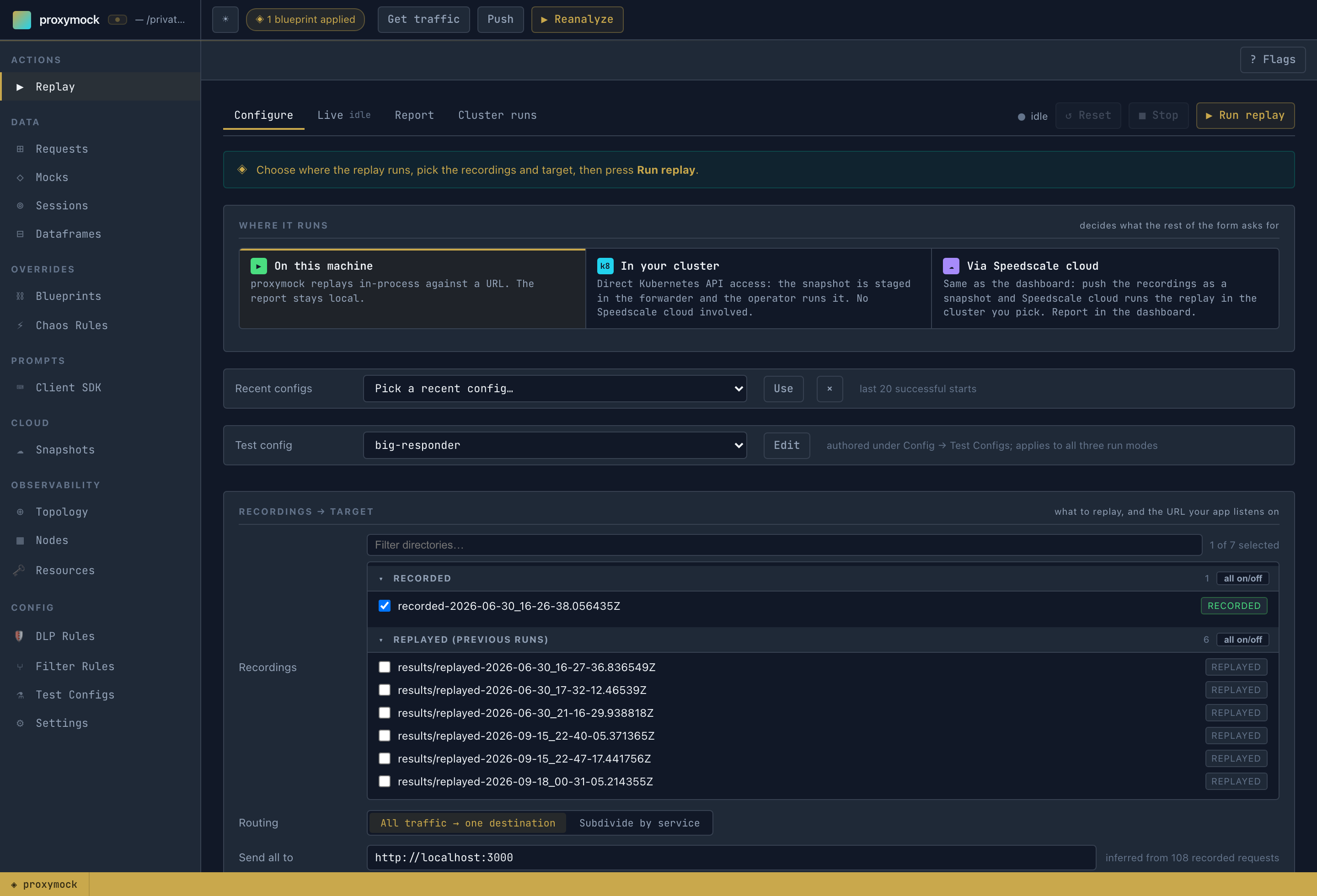
In proxymock web, the Test config picker in the Replay tab is the only test config choice, and it applies to all three run modes. It defaults to regression (built-in, read-only). Edit opens the selected config in the editor, or offers to make a copy of regression.
Each run names the config it used and where it came from, then lists any fields the chosen path ignores, instead of dropping them silently:
Loaded test config "big-responder" from /path/to/repo/proxymock/testconfigs/big-responder.json
‼ a local replay does not honour these fields, so they are ignored: cluster.cleanup, ...
Precedence
From highest to lowest:
- Flags on the command, or the load controls in the Replay tab.
- The named test config.
- The built-in
regressionconfig.
For example, --vus, --for, --times or --stage on proxymock replay replace the config's load schedule. The run then prints a warning that the config's stages will not run. A run with no load flags uses the config's schedule. On cluster and cloud replays, the operator overrides described above take priority over the config.
Which fields each path uses
| Fields | Local | Cluster | Cloud |
|---|---|---|---|
| Chaos, most generator traffic settings, load stages and virtual users, responder low data mode and response delay | yes | yes | yes |
Responder replicas and resources, generator resources, image tags, cluster.*, responder passthrough mode, DLP config, mock mapping | no | yes | yes |
Goals (rules) and assertions (assertionGroups) | yes, for metrics available locally | no | yes |
Local replay evaluates goals and assertion groups it can measure and writes the results to its replay verdict. Metrics that require Cloud are marked as not evaluated. Recording coverage goals use the OpenAPI contract in the workspace or replay --spec; a positive threshold fails when the contract is missing. A cloud-free in-cluster replay does not produce a verdict yet. See replay verdicts for local exit codes.
Report-level assertions judge the whole run and are listed under Report-level assertions in the verdict. A local replay evaluates httpOutput only when --mocks-out names the directory proxymock mock wrote while it served the replay. kafkaOutput, sqlOutput and chaosFired are evaluated in Speedscale cloud and are marked as not evaluated locally.
Running a test config's load stages on a local replay requires a proxymock release newer than v2.5.1017. On v2.5.1017 and earlier, set local load with --stage, --vus or --for.
The editor badges are built from the same table, which you can also print from the CLI: proxymock test-config meta.
Test configs from the CLI
proxymock test-config reads the workspace given by --in (default: the current directory):
# the configs in this workspace, plus the built-in regression
proxymock test-config list -o pretty

# one config, where it came from, its warnings and validation problems
proxymock test-config show big-responder

# validate a config and print it exactly as the local runner, operator or cloud receives it
proxymock test-config compile big-responder

# which run paths honour each field, and which fields the operator overrides
proxymock test-config meta
compile exits with an error listing every problem when a config is not valid: an unknown field, an id that does not match the file name, a Kubernetes quantity that would be rejected, or a stage whose arithmetic does not work. Run it in CI to catch a broken config before a replay does.
To create or change a config from the CLI, edit the JSON file directly. compile checks it.
Test configs and Speedscale cloud
Test configs move with your snapshots, the same way blueprints do:
- Snapshot push uploads every workspace test config along with the traffic. A config that does not parse is skipped and reported rather than dropped silently.
- Snapshot pull restores those configs into
proxymock/testconfigs/. If a pulled config would replace a local config with different contents, proxymock asks before overwriting it.
To pull a single config by id:
proxymock cloud pull test-config checkout-soak --in ./proxymock
This writes <workspace>/proxymock/testconfigs/checkout-soak.json. If that file exists and differs from the cloud copy, proxymock warns, naming the file and the local values that would be lost, and asks for confirmation (default no). Without a terminal, such as in CI or a pipe, the pull refuses and names the file. --force overwrites without asking. A local copy that already matches is not rewritten.
Protected Speedscale configs such as standard are never written under their own name. Pull an editable copy instead:
proxymock cloud pull test-config standard --as standard-tuned
proxymock cloud replay --test-config pushes the config it runs with, so you do not need to push it separately.
From an AI agent
Every replay tool on the MCP server takes a test_config parameter with the same meaning as --test-config. cluster (action replay-start) and cloud_replay (action start) accept it today.
The test_config MCP tool, and test_config on replay_traffic, are merged but not yet released. They ship in the first proxymock release after v2.5.1017.
The test_config tool lets an agent author workspace configs with the same rules as the web editor. Files it writes open unchanged in the editor. It works offline with no Speedscale account and never reads or writes ~/.speedscale.
| Action | Does |
|---|---|
list | Workspace configs plus the read-only built-in regression |
show | One config as JSON, with warnings and validation problems |
meta | Field paths, types, defaults, which run paths honour each field, and operator overrides. Filter by section or path_prefix |
create | A new config under id, copied from regression by default, from another config with from, or from a full config document. Refuses an existing id unless force is true |
set | Change fields by path, for example {"responder.numReplicas": 3}. Unknown and deprecated paths are refused; null removes a field |
validate | Check a saved config by id, or an unsaved config document, without writing |
delete | Remove a workspace config. Requires confirm: true |
A typical agent workflow for "run this replay with 3 responder replicas":
test_configmetawithpath_prefix: "responder."to find the field.test_configcreatewithid: "big-responder", which copiesregression.test_configsetwithfields: {"responder.numReplicas": 3}.clusterreplay-startwithtest_config: "big-responder".
Reserved names cannot be created, changed or deleted, and protected can never be set. create and set refuse to write a config that fails validation and name each problem.
Related
- Choose Where a Replay Runs compares the three replay paths.
- Test configs in Speedscale and the test config reference describe the fields from the dashboard's side.
- Workspace layout covers everything else stored in the workspace.