Regression Test a Model Swap
Before you move an application to another model, a new checkpoint, or a new quantization, replay the prompts production already sent and check that the answers are still right. proxymock sends each recorded LLM request to the candidate model, compares its answer with the recorded one, and reports three rates that a CI job can gate on.
Answers are read from four API formats:
| Format | Requests scored | Served by |
|---|---|---|
| OpenAI-compatible | Chat completions and text completions | OpenAI, Azure OpenAI, vLLM, NIM, TGI, and the /v1 endpoints of Ollama and other servers |
| Anthropic Messages | /v1/messages | The Anthropic API and servers compatible with it |
| Ollama native | /api/chat and /api/generate | Ollama |
| Amazon Bedrock | Converse and ConverseStream for any model, InvokeModel and InvokeModelWithResponseStream for Anthropic models | Amazon Bedrock |
Streamed and non-streamed responses are both scored in every format, and a streamed replay of a non-streamed recording compares correctly. The candidate must serve the same API format that was recorded. proxymock does not translate a request from one format to another.
By default, scoring runs in process and makes no network call. Two optional settings send response text to an endpoint you choose: an external embedding backend, and a judge for divergent pairs. Compare Response Meaning explains both.
Replay the recorded prompts at the candidate
Start from a recording of your application's LLM traffic, made with proxymock record or the Speedscale sidecar. The same replay also reports how fast the candidate answers: see LLM Streaming Metrics.
In a recording of an application that calls a model, the LLM requests are outbound traffic. A replay sends inbound traffic by default and serves outbound calls as mocks, so select the LLM calls as tests with --tests-filter:
export CANDIDATE_API_KEY=your-candidate-key

proxymock replay \
  --in ./proxymock/recorded-example \
  --tests-filter '(networkaddr IS "api.openai.com:443")' \
  --test-against http://localhost:8000 \
  --llm-model checkpoint-b \
  --llm-api-key-env CANDIDATE_API_KEY \
  --fail-if 'llm.tool-call-match-pct < 100' \
  --fail-if 'llm.failure-pct > 5'
Use the address of the model API your application called. (direction IS OUT) selects every outbound call instead, which is enough when the model is the only dependency in the recording. Without a filter, a recording that holds only outbound calls has nothing to replay and the replay stops with an error. Choose What a Replay Tests has the filter syntax.
Leave out --tests-filter when you recorded in front of the model server itself, where the LLM requests are inbound.
| Flag | Effect |
|---|---|
--tests-filter | Which recorded requests are sent to the candidate |
--test-against | Address of the candidate model server |
--llm-model | Model name sent in each recorded LLM request, in place of the recorded one |
--llm-api-key-env | Name of the environment variable holding the candidate's API key, sent in place of the recorded credential |
Both overrides apply to POST requests in the OpenAI-compatible, Anthropic Messages and Ollama native formats, which name the model in the request body. An Anthropic Messages request is recognized by its anthropic-version header. Everything else in each request is sent as recorded, including the sampling settings and the conversation history.
The key replaces the credential the recorded request carried. On an Anthropic Messages request that has an x-api-key header, the key goes there. On every other request it is sent as a Bearer token in the Authorization header.
A Bedrock request names its model in the URL and is signed, so neither flag changes it. Bedrock answers are still scored. To send recorded Bedrock requests to another model, change the model id in the URL with a transform and sign the request again with aws_auth.
Pass the name of the variable to --llm-api-key-env, never the key. proxymock stores the variable name in the run's snapshot and reads the key when it sends a request. The replay output records each request as it was sent, as a recording does.
Leave out --llm-api-key-env to send the recorded credential. Leave out --llm-model to send the recorded model name, for example when the candidate is a different server that serves the same model name.
What is compared
Each recorded response and its replay are reduced to the answer itself: the text, the tool calls and the reason the model stopped. Response ids, timestamps and tool-call ids are ignored.
Tool calls are compared structurally and decide the pair first. The candidate must call the same functions the same number of times. Arguments are compared as parsed JSON:
- Keys, numbers, booleans and short strings must be equal.
- A string of four or more words is treated as prose and compared for meaning, so a reworded search query still matches.
- The order of calls within one response is ignored, and the number of reordered pairs is reported.
A tool-call mismatch fails the pair whatever its text says. That includes a tool call on one side and prose on the other, and arguments that are not valid JSON.
Answer text is compared for meaning, using the same scorer and thresholds as semantic comparison. Reasoning text is not scored. When a response offers several choices, only the first is scored.
Some self-hosted servers leave a model's thinking in the answer text, wrapped in tags such as <think>. Thinking differs between runs of a model that reaches the same answer, so a thinking block at the start of an answer is treated as reasoning and not scored. This covers <think>, <thinking>, <reasoning> and [THINK] blocks, and an answer that starts inside a block the chat template opened. You can also have the server separate the thinking itself, with vLLM's --reasoning-parser option or the think field of an Ollama request, which keeps it out of your application as well.
| Situation | How it is counted |
|---|---|
| The candidate returns an error or no completion | A failure |
| The candidate refuses a request production answered | A failure |
| The candidate's answer is cut short | Scored on what arrived, and counted as truncated |
| The recorded answer is an error, a refusal or cut off | Left out of every rate |
Gate on the three rates
--fail-if name | Meaning |
|---|---|
llm.tool-call-match-pct | Of the pairs where either side called a tool, the percentage whose calls matched |
llm.divergence-pct | Percentage of scored pairs that did not match, failures included |
llm.failure-pct | Percentage of scored pairs that failed |
No gate on these rates applies by default. Scoring LLM responses does not fail a replay by itself: with no condition on these rates the replay prints scored but not gated, and its exit code comes from whatever other gates are in force, such as the goals of a test config.
A condition on a rate that has nothing to measure is an error, not a pass. For example, llm.tool-call-match-pct is not reported when no scored pair called a tool.
The rates are not reported with --no-out, --load-test or --ignore-body-changes, because those options do not keep or score response bodies.
Use --fail-if for these rates in a local replay. A test config goal on one of them is evaluated on a cloud or cluster report and is not evaluated in a local replay.
Read the result
The replay prints each failed pair with its reason, then the rollup:
LLM FAIL: POST /v1/chat/completions get_order: order_id 42 -> 43
LLM quality: 4 scored · tool calls 1/3 matched (33.3%) · divergence 75.0% · failures 50.0%
replay-verdict.json holds the detail:
summary.llmhas the counts behind each rate, the rates, how the run was scored (scorer version, thresholds, text scorer and judge), and the run's LLM speed metrics underspeed.- Each LLM pair has an
llmobject with its band (match,divergentorfail), the reason, and the tool-call comparison. - Each LLM pair has an
llmPrompt: up to 120 characters of the last user message, so you can tell one request from another.
A warning is printed when fewer than 30 pairs were scored, because each pair then moves a rate by several points.
Compare two checkpoints
Replay the same recording at each model into its own directory, then score the candidate's run against the baseline's:
proxymock replay \
  --in ./proxymock/recorded-example \
  --test-against http://localhost:8000 \
  --llm-model checkpoint-a \
  --out ./proxymock/results/checkpoint-a

proxymock replay \
  --in ./proxymock/recorded-example \
  --test-against http://localhost:8001 \
  --llm-model checkpoint-b \
  --out ./proxymock/results/checkpoint-b

proxymock replay score ./proxymock/results/checkpoint-b \
  --baseline ./proxymock/results/checkpoint-a \
  --html llm-comparison.html
Use the same --tests-filter on both replays when the LLM calls were recorded as outbound.
Both runs are scored against the recorded answers, and every change is the candidate minus the baseline:
LLM quality: 4 scored · tool calls 1/3 matched (33.3%) [-66.7 pts] · divergence 75.0% [+75.0 pts] · failures 50.0% [+50.0 pts]
             vs baseline: 4 request(s) compared, 3 got worse, 0 got better
             match -> fail  get_order: order_id 42 -> 43  ("Where is order 42?")
             match -> divergent  answer text similarity 0.92  ("Has my package shipped yet?")
             llm.ttft-p95 212.00 -> 240.00 (+13.2%)
- The three rates show their change in percentage points.
- The requests whose verdict got worse are listed worst first, each with the reason and the start of its prompt.
- The headline speed metrics show their change. LLM Streaming Metrics defines them.
-o json puts the full comparison under deltas.llm, including regressed, improved and every speed metric. --html writes the same comparison as one self-contained HTML page with no scripts and no external requests, so it opens from disk on a machine with no network.
proxymock refuses to compare two runs that were scored differently, and names the setting that differs, for example a different --semantic-pass threshold, text scorer or judge. A run scored by an older proxymock release can differ in scorer version alone, so score both runs with the same release. It also refuses two runs that share no recorded request. A difference between such runs would describe the scoring or the recordings, not the models. Rerun one replay with the other's settings.
Measure the noise first
Requests are replayed with their recorded sampling settings, so a model can answer the same prompt differently on two runs. Before you judge a candidate, measure how much the current model disagrees with itself. Replay the recording twice at the model that produced it, then score the second run against the first:
proxymock replay \
  --in ./proxymock/recorded-example \
  --test-against http://localhost:8000 \
  --out ./proxymock/results/noise-1

proxymock replay \
  --in ./proxymock/recorded-example \
  --test-against http://localhost:8000 \
  --out ./proxymock/results/noise-2

proxymock replay score ./proxymock/results/noise-2 \
  --baseline ./proxymock/results/noise-1
Use the same --tests-filter on both replays when the LLM calls were recorded as outbound, as in the first replay. Without it, neither replay sends the LLM requests.
The three rates of either run are the noise floor: what the gate reports when nothing changed. The comparison lists the requests whose verdict differs between the two runs. Those prompts are unstable for this model, so a change on one of them says little about a candidate.
The tool-call match rate is the most stable of the three, because it does not depend on wording.
Choose starting conditions
No condition applies by default, so a replay gates on answers only when you add one. Start from the noise floor and tighten as you learn how the rates move:
| Condition | Starting point | Reason |
|---|---|---|
llm.tool-call-match-pct | Fail below the noise floor's rate, which is 100 when the noise runs matched every tool call | A changed tool call is a changed action, and this rate does not move with wording |
llm.failure-pct | Fail above the noise floor's rate plus the weight of two requests | A failure is a wrong tool call, an error, a refusal or an answer that means something else |
llm.divergence-pct | Fail above the noise floor's rate plus 10 points, or leave it out at first | It counts reworded answers too, which a new model produces even when it is right |
The weight of one request is 100 divided by the number of scored pairs. With 50 scored pairs each request moves a rate by 2 points, so the failure condition above starts 4 points over the noise floor. A margin smaller than one request cannot hold.
For a model that matched every tool call and failed nothing in the noise runs, that gives:
--fail-if 'llm.tool-call-match-pct < 100' \
--fail-if 'llm.failure-pct > 4' \
--fail-if 'llm.divergence-pct > 10'
Gate on the rates across many prompts, not on any single prompt. Before you trust the divergence condition, read the divergent requests of a few runs, or let a judge rule on them.
Use it with semantic comparison
The three rates are computed whether or not --semantic is set. Without --semantic, they are reported and every other verdict stays as it was.
With --semantic, an LLM pair's body verdict is its LLM result. A changed tool call fails the pair, a reworded answer is reported as divergent, and the optional judge can rule on the divergent pairs.
Let a judge rule on reworded answers
A reworded answer lands in the divergent band, where the score alone cannot say whether the meaning changed. With --semantic, a judge model can rule on those pairs:
proxymock replay \
  --in ./proxymock/recorded-example \
  --test-against http://localhost:8000 \
  --llm-model checkpoint-b \
  --semantic \
  --semantic-judge openai \
  --semantic-judge-endpoint http://localhost:11434/v1 \
  --semantic-judge-model judge-model
The judge is shown the recorded answer and the candidate's answer as plain text: the answer followed by any tool calls and their arguments. It is not shown the raw response body, so a streamed response is judged on what it says.
A judge that rates the two the same clears the pair, and one that finds a material difference fails it. The three rates count each pair in the band the judge left it in. A tool-call mismatch is already a failure and is never sent to the judge.
Use a judge that is not the model you are evaluating. proxymock warns when the judge is served from the address under test with the same model name, because a model grading its own answers is lenient.
The judge receives the recorded answer and the candidate's answer of every pair it rules on, so choose the backend by where that text may go:
--semantic-judge | Where the answers are sent |
|---|---|
openai with --semantic-judge-endpoint | The server at that address, such as a model you host in your own network |
openai with no endpoint | The OpenAI API |
anthropic | The Anthropic API |
managed | The model Speedscale provides, outside your network |
Only the first keeps the answers inside your network. With no judge and the built-in scorer, scoring sends the answers nowhere.
A judged run and an unjudged run are scored differently, so comparing them is refused. Judge both runs or neither. Compare Response Meaning covers the judge backends, the call cap and where the text is sent.
Keep the scoring settings in the test config
The thresholds, the embedding backend and the judge can live in the test config, so everyone who replays with it scores answers the same way. Add an llmEval section to a workspace test config such as proxymock/testconfigs/model-swap.json:
{
  "llmEval": {
    "passThreshold": 0.92,
    "failThreshold": 0.7,
    "judge": {
      "backend": "openai",
      "endpoint": "http://judge.internal:8000/v1",
      "model": "judge-model",
      "maxCalls": 25
    }
  }
}
| Setting | Meaning |
|---|---|
passThreshold, failThreshold | Answer text similarity at or above which a pair matches, and below which it fails. Leave out for the defaults of the embedding backend. |
embedder | backend is builtin (the default, in process), local (an Ollama-compatible server) or openai, with endpoint, model and apiKeyEnv. |
judge | backend is managed, openai or anthropic, with endpoint, model, apiKeyEnv and maxCalls. Leave out for no judge. |
apiKeyEnv names the environment variable that holds a key. The key itself never goes in a test config.
Pass the test config with --test-config model-swap. With --semantic, the --semantic-* flags override these settings, and the settings override your preferences. Without --semantic, only LLM answers are scored, with these settings, and a judge named here still rules on the reworded ones.
Score a cloud or cluster replay
A replay that Speedscale runs in a cluster scores LLM answers the same way when its report is analyzed. It runs the same scoring code as proxymock replay and reads the same llmEval settings from the test config, so a report and a local run of the same recording and settings carry the same results.
The three rates are report metrics, and a goal in the test config can fail the report on them:
| Report metric | --fail-if name |
|---|---|
llmToolCallMatchPct | llm.tool-call-match-pct |
llmDivergencePct | llm.divergence-pct |
llmFailurePct | llm.failure-pct |
For example, a goal of llmToolCallMatchPct too low at 100 marks the report as missed goals when any tool call changed. A rate with nothing to measure is not reported, and a goal on a metric the report does not have is not evaluated.
Each replayed LLM request is tagged with how it scored: llmBand is match, divergent, fail or unscorable, and llmToolCalls is match or mismatch when either side called a tool. The tags hold the score before any judge ruled. The report also stores every scored request's result, with the judge's rating when one ruled, in its llm-eval.json artifact.
On a report in Speedscale cloud, scoring uses the builtin scorer and, when the test config asks for one, the managed judge. That judge is the model Speedscale provides, and the redacted answer text is sent to it, outside your network.
A judge or embedding backend on a server the test config names is not called from Speedscale cloud, and apiKeyEnv is never read there. The report drops that setting, scores without it and shows a warning. Where Speedscale's analyzer runs in your own network, its operator can allow these servers with the llm_eval_allow_endpoints setting.
A judge that cannot be reached, or settings that cannot be applied, do not fail the report. The answers keep the verdict their score gave them and the report shows a warning.
Reports made before this feature gain these results when they are reanalyzed. A replay in generator low data mode is not scored, because it keeps no response bodies. A cluster replay that does not report to Speedscale cloud does not score LLM answers.
Read a report in the dashboard
A report whose replay sent LLM requests has an LLM tab. Its Answer quality section shows the three rates with the counts behind them, and says whether a goal on each rate was met.
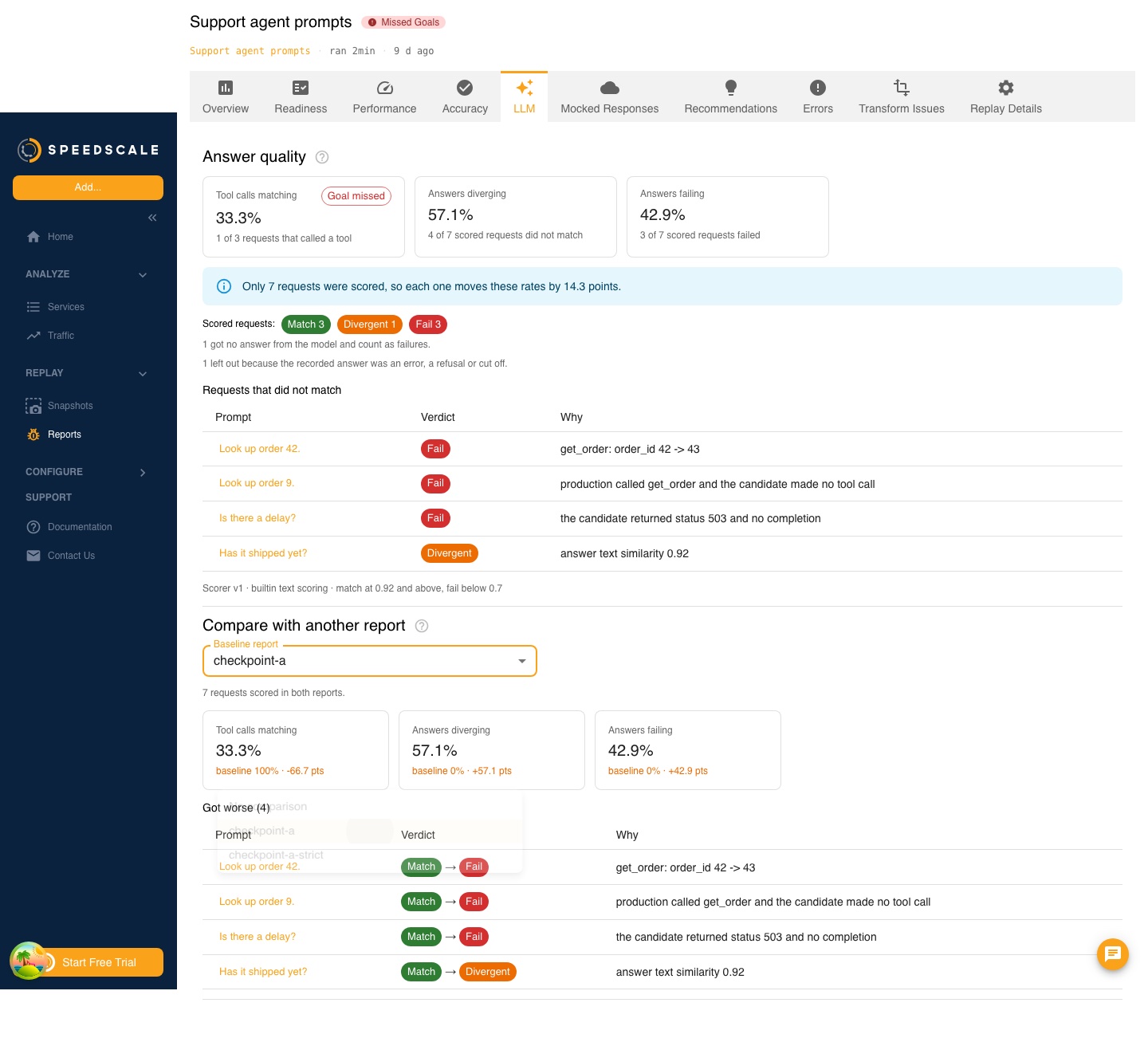
Below the rates:
- How many scored requests matched, diverged and failed, and how many were left out and why.
- A note when fewer than 30 requests were scored.
- What a judge did, when the test config named one: how many answers it ruled on and how many it could not.
- The requests that did not match, worst first, each with its verdict and the reason.
Select a request's prompt to read the recorded answer beside the replayed one. Both are shown as the answer itself, with any tool calls and their arguments, so a streamed response and a whole one read the same. The difference that decided the verdict is called out above them.
Compare two reports
Under Compare with another report, choose another report of the same snapshot, such as the report from the previous checkpoint. The section then shows:
- The change in each of the three rates, in percentage points, with a change for the worse highlighted.
- The change in the LLM speed metrics, with a change of 10% or more for the worse highlighted.
- The requests whose verdict got worse, worst first, and the ones that got better.
Select a request in either list to read the recorded answer beside what each report's model answered.
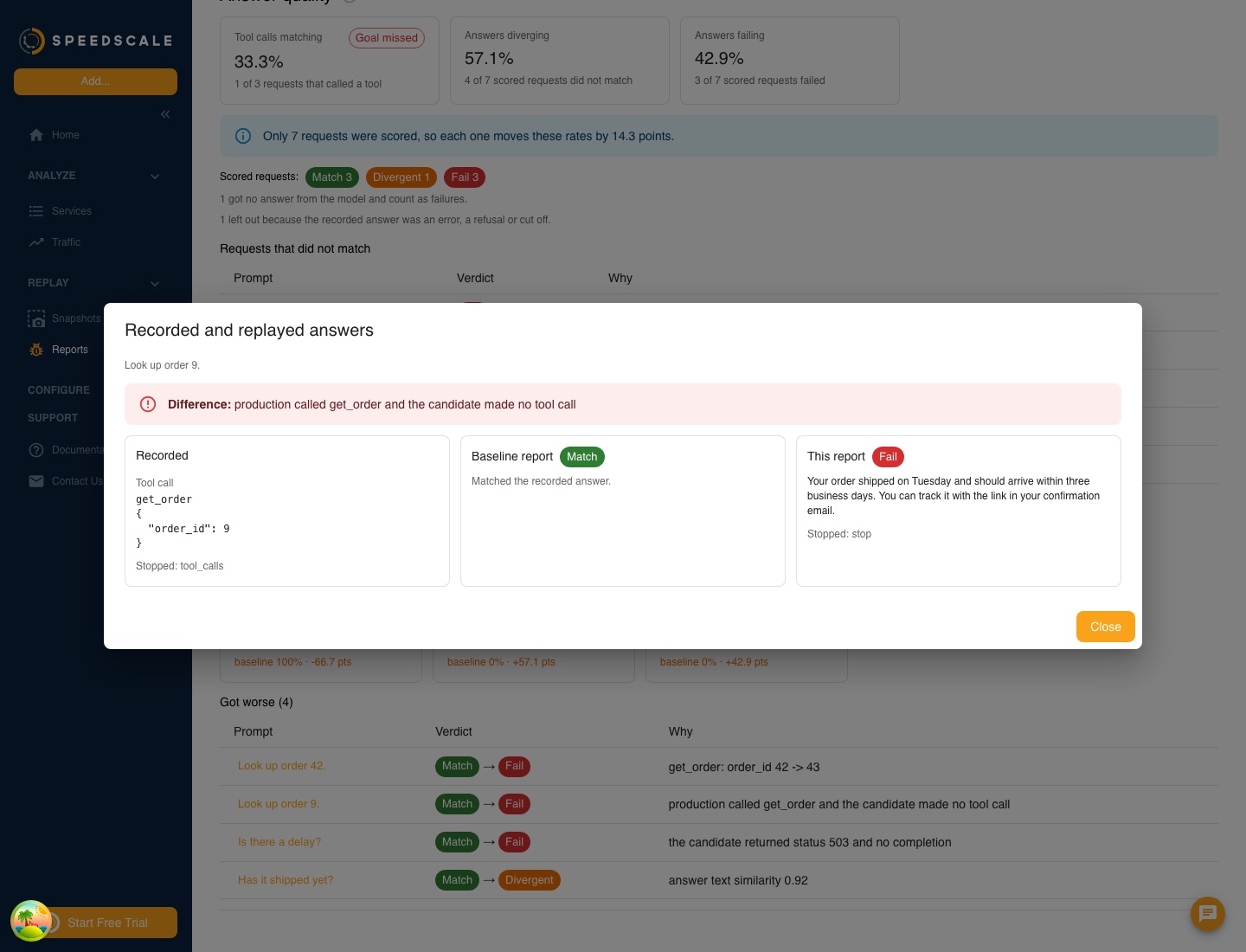
This is the same comparison as proxymock replay score --baseline. When the two reports were scored with different settings, the section says which setting differs and shows no change, because the difference would describe the scoring and not the models.
A report analyzed before answers were scored shows a prompt to reanalyze it. The lists hold up to 200 requests, and a report keeps both answers for up to 1,000 requests that did not match.
Try it in a lab
The LLM streaming lab in the mock-lab repository runs this guide end to end with no model API key and no model to host. Its make eval-gate target replays a recorded assistant at a model that answers as recorded and at one that regressed. The gate passes the first and fails the second on a changed tool-call argument, and the comparison lists the two requests that got worse.