Replay GraphQL operations
proxymock replay sends the operations your server received while you recorded it to a new build of the server, and compares each response with the recorded one. Every operation your clients really sent becomes a test, with no test code to write.
Run the replay
Start the build you want to test, then replay the recording at it:
proxymock replay --in proxymock/recorded-<timestamp> --test-against http://localhost:8080
The report groups results by operation, using the labels described in Operations in mock and replay:
│ ENDPOINT             │ METHOD      │ COUNT │ ... │ FAILED │ STATUS CODE MISMATCH │
│ CreateUser           │ mutation    │     1 │ ... │      0 │                   0% │
│ Dashboard,UserFields │ query       │     1 │ ... │      0 │                   0% │
│ Find                 │ query       │     1 │ ... │      0 │                   0% │
│ GetPlans,GetUser     │ query,query │     2 │ ... │      0 │                   0% │
│ Session              │ query       │     1 │ ... │      0 │                   0% │
│ Track                │ mutation    │     1 │ ... │      0 │                   0% │
The replay also writes replay-verdict.json to its output directory, with one entry per request: the recorded and observed status, and whether the status and the body matched. See Replay verdicts and gates to fail a CI job on it.
GraphQL errors
A GraphQL server reports most failures inside a successful HTTP response: status 200, with an errors array and null where the data would be. A replay therefore catches them as a body mismatch, not a status mismatch.
The graphql-demo server shows it. Its Session query verifies a signed JWT passed in variables.token, and the driver's tokens expire five minutes after they are signed. Replay a recording older than that, and Session answers:
{
  "data": { "session": null },
  "errors": [
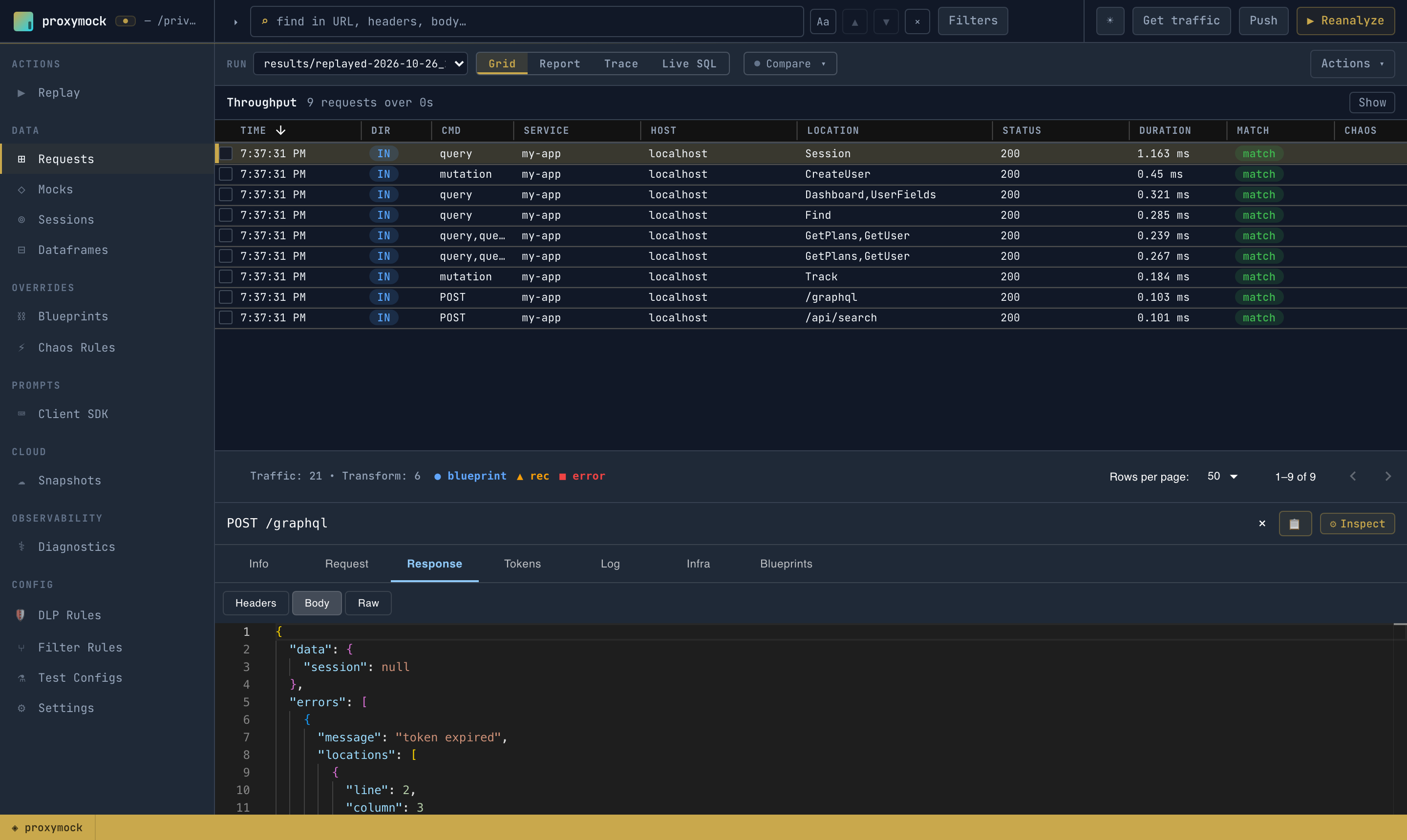
    { "message": "token expired", "locations": [{ "line": 2, "column": 3 }], "path": ["session"] }
  ]
}
The replay verdict is mismatch: one request whose status matched, 200 and 200, and whose body did not.
Open the replay's run in proxymock web to see it. The Requests list labels each call with its operation, and nothing in the list sets Session apart: status 200, like the rest. Its response body holds the error:
Fix values that expire
A recorded token, timestamp or one-time id is usually wrong by the time you replay it. Fix it with a transform that rewrites the request before it is sent. For a GraphQL request, the graphql transform reaches a value by its semantic path, such as variables.token or createUser.args.input.plan, so the rest of the chain sees a plain value.
The quickest way is from proxymock web: open the request, select Request → Body, and use the button on the value's row. Its chooser replaces a value, stores it for a later request, or smart-replaces it, and saves the transform in the Field Transforms blueprint, scoped to the GraphQL endpoint, so it applies to every operation on it. See Read the recording. A fix the chooser does not offer, such as re-signing a JWT, goes in a blueprint you write yourself.
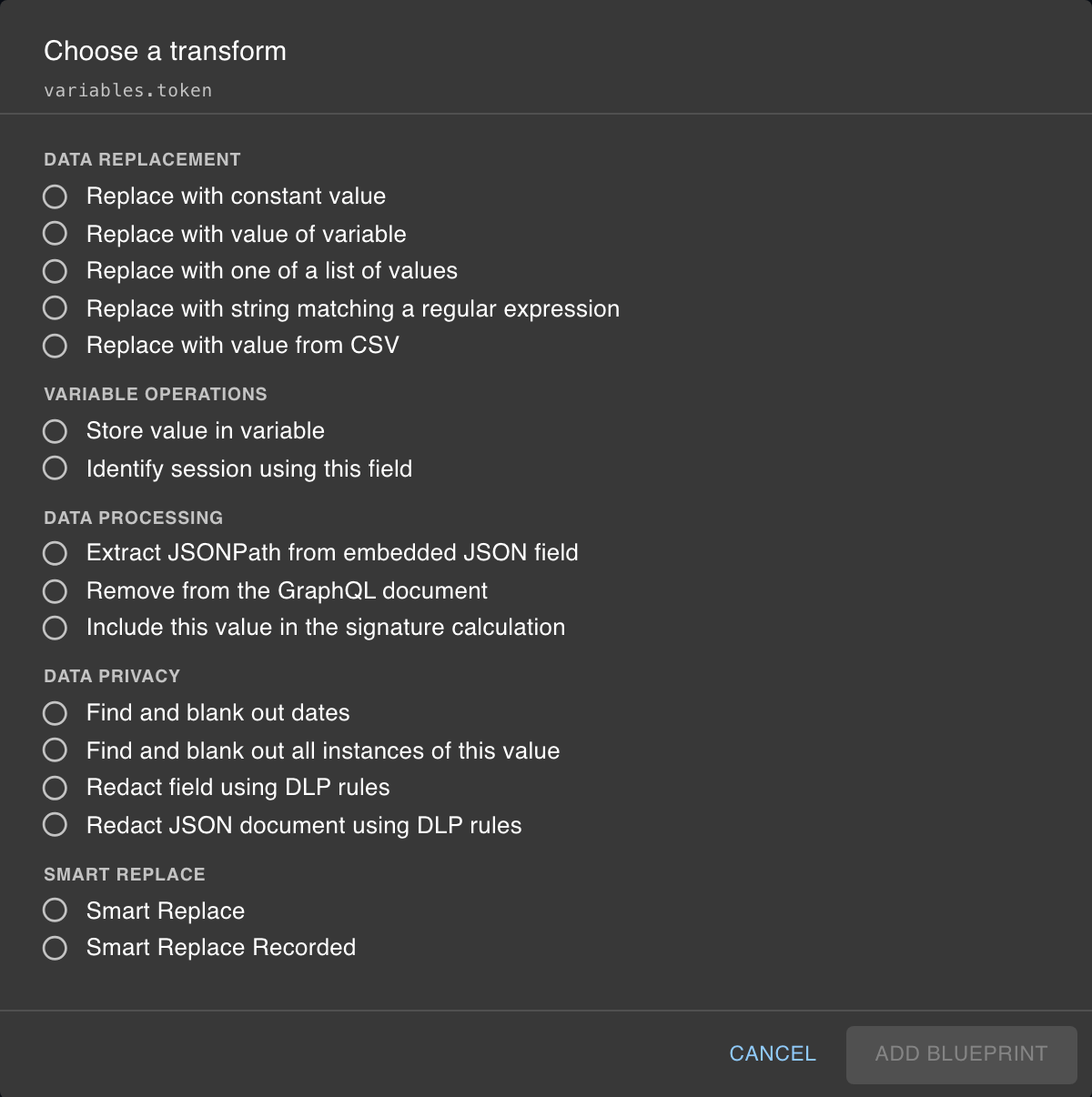
You can also write the blueprint yourself. This one re-signs the demo's session token with the demo's published HS256 key:
{
  "id": "11111111-2222-3333-4444-555555555555",
  "name": "Resign session token",
  "active": true,
  "tokenizeConfig": {
    "name": "Resign session token",
    "id": "11111111-2222-3333-4444-555555555555",
    "generator": [
      {
        "filters": { "filters": [ { "include": true, "optUrl": "/graphql" } ] },
        "extractor": { "type": "req_body" },
        "transforms": [
          { "type": "graphql", "config": { "path": "variables.token" } },
          { "type": "jwt_resign", "config": { "key": "speedscale-demo-secret" } }
        ]
      }
    ]
  }
}
The chain is in generator, so it changes what is sent to your server. Its filter scopes it by URL path, because during a replay a GraphQL request's location and command are its operation, not /graphql and POST. jwt_resign keeps the token's claims and algorithm and moves its expiry forward. In real use, pass the key with secretPath rather than inline.
Replay again, and require the blueprint to have run:
proxymock replay --in proxymock/recorded-<timestamp> --test-against http://localhost:8080 \
  --require-blueprint 'Resign session token'
proxymock reports Blueprint "Resign session token": 1 transform chain(s) ran., the server accepts the token, and the verdict is pass.
GraphQL recipes has more chains: replacing a variable, editing JSON embedded in an argument, and removing a selection. Create and Verify Blueprints covers where blueprints live and how to preview them.
Persisted queries
A persisted query carries a hash instead of query text, so it is replayed byte for byte. Its variables. paths can still be transformed. If your server has not seen the hash, it answers with its persisted-query error, and the client in production would then have sent the full query. Replay that second request too, by recording a client that sends it.
Replay generated operations
Operations generated from a schema replay the same way. Generated requests carry synthesized values, so they drive a first recording rather than serve as a baseline: rewrite their placeholders, replay them at your server through proxymock record, and use that recording as the test.