Mock a GraphQL API
proxymock mock answers your app's GraphQL requests from a recording, so the app runs with no API behind it: no account, no rate limit, no test data to keep alive, and the same answers every time. That makes an app that depends on a GraphQL API testable on a laptop, in CI and by an AI coding assistant.
Run the mock
Record the API once, then start the mock the same way and run the app under it:
proxymock mock --in proxymock/recorded-<timestamp> -- ./your-app
If you recorded through a mapped port, map it again so the app reaches the mock on the same address:
proxymock mock --in proxymock/recorded-<timestamp> --map 18081=http://localhost:18080 -- ./your-app
The mock writes what it served to proxymock/results/mocked-<timestamp>, one file per request, tagged HIT when a recording answered it and MISS when none did. A miss is passed through to the real API, or, with --no-passthrough, answered with a 404, which is the setting to use when you want misses to be visible.
What a GraphQL mock matches on
A request matches a recording when its method, host, path and query parameters match and its body means the same thing. For GraphQL, the body is compared as a parsed document, so:
| Does not change the match | Changes the match |
|---|---|
| Whitespace, line breaks and comments in the query | The operation and its name |
| The order arguments are written in | Which fields are selected, and in what order |
| The order of an input object's fields | A variable's value |
The order of keys inside variables | An argument literal written into the query |
Selection order counts because it is the order of the fields in the response, so two requests that differ in it are owed different answers.
When a request does not match
The usual cause is a variable that changes on every run: a signed token, a request id, a generated email address. Two runs of the same client send the same document with different variables, so the second run misses every recording of the first.
The graphql-demo driver shows it. It sends seven operations, and its Session query carries a freshly signed JWT and a random request id on every run. Run it against a mock of its own recording, with misses visible:
proxymock mock --in proxymock/recorded-<timestamp> --map 18081=http://localhost:18080 \
  --no-passthrough -- ./graphql-demo -drive -target http://localhost:18081
The first request, Session, misses, and the driver stops.
Open the workspace with proxymock web and select Mocks. Select a field to open the request that missed:
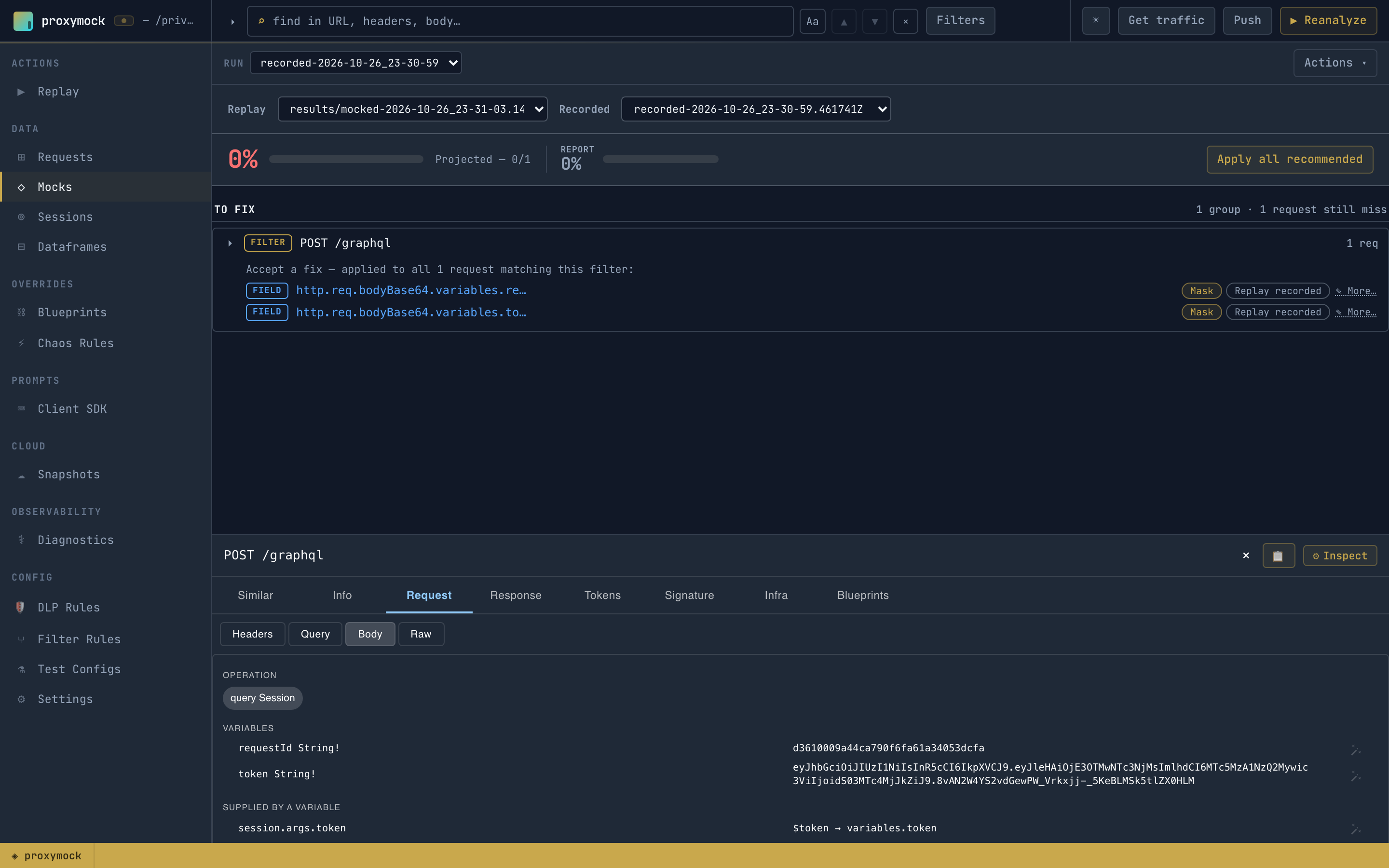
The Mocks view finds the fields that drifted between the request and its nearest recording and recommends a fix for each. For Session it recommends masking variables.token and variables.requestId. It never recommends masking the query or operationName, because those say which operation the request is, and masking them would let any operation match any other. An accepted fix is a responder chain in the workspace's tuning blueprint, scoped to the GraphQL endpoint:
{
  "filters": { "filters": [ { "include": true, "operator": "REGEX", "optUrl": "^/graphql$" } ] },
  "extractor": { "type": "req_body" },
  "transforms": [
    { "type": "json_path", "config": { "path": "variables.token" } },
    { "type": "constant", "config": { "new": "*" } }
  ]
}
The chain runs on both sides of the match, the recordings and each incoming request, so the token no longer decides it. With those two fixes the driver gets past Session and stops at CreateUser, whose variables.email is generated per run. One more accepted fix, and a third run completes the driver's whole pass with every request a HIT, no API running.
Accept recommendations wherever is convenient:
- In proxymock web, on the Mocks view, choose Mask or Replay recorded for each field, or Apply all recommended.
- From an AI coding assistant, with the
mockstool of the proxymock MCP server, or let the assistant run the whole loop: Improve Mock Match Rate with AI.
Clients that add __typename
Apollo and other clients add __typename to selection sets. It changes the document without changing what the request asks for, so a recording made with one client can miss requests from another. Strip it from both sides with a responder chain:
req_body() → graphql_delete(field="__typename")
See GraphQL recipes for this and other chains, and Create and Verify Blueprints for where they live in a workspace.
Generated mocks
A mock generated from a schema matches the generated operation exactly: its selection and its variables. A client that selects different fields of the same root field gets no match, because it is owed a different response. Record the client instead, or edit the generated request to the document the client sends.