Inferred database schema
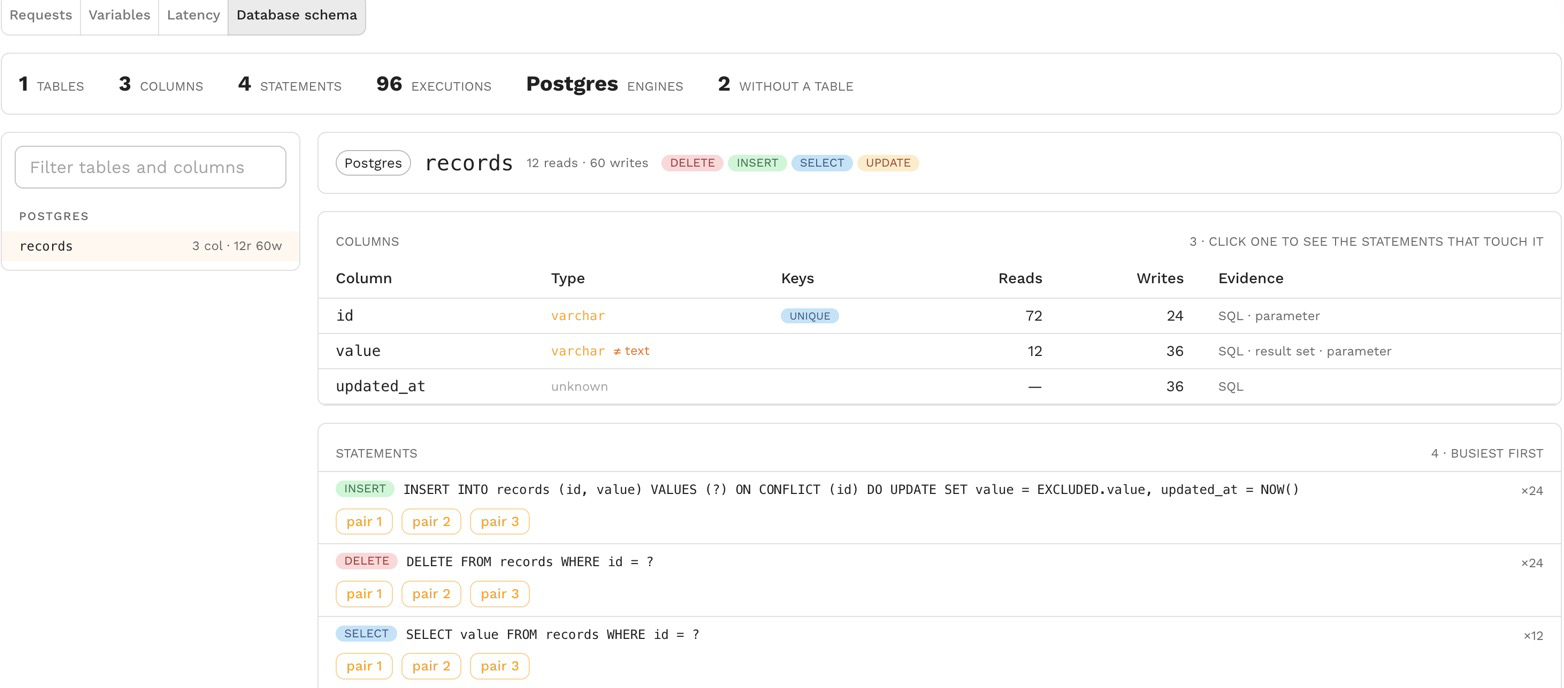
A snapshot with database traffic shows the tables and columns its statements read and write, worked out from the traffic itself. You see the part of the schema a service actually depends on, with column types, keys and how often each column is read and written, without a connection to the database, a schema dump or a migration history.
Use it to learn an unfamiliar service, to check which columns a migration would affect, to see which service writes a table, and to know what a test database needs before you mock or replay against one.
Open it
Open a snapshot, then choose Database schema in its traffic panel, next to Requests, Variables and Latency.
The summary counts the tables and columns found, the statements and executions they came from, and the database engines. Without a table counts statements such as BEGIN, SET or SELECT 1 that name no table.
Tables and columns
The table list shows each table with its column count and how often it was read and written, and Filter tables and columns finds one by name. Select a table to see its columns:
| Column | What it shows |
|---|---|
| Column | The column name |
| Type | The type the evidence points to, or unknown; when evidence disagrees the column says which types it saw |
| Keys | PK, UNIQUE, NOT NULL and AUTO (auto-increment), when the traffic showed them |
| Reads, Writes | How often statements read and wrote the column |
| Evidence | Where the column was seen: SQL (a statement names it), result set (a query returned it), parameter (a bound value was written to it), DDL or error |
Constraints the traffic revealed, in a CREATE TABLE or in an error such as a unique violation, are listed under the table.
Below the columns, the statements that touch the table are listed busiest first with how often each ran. Select a column to narrow the list to the statements that touch that column, and open one of a statement's example requests to see the call itself.
How it is inferred
Speedscale reads each recorded Postgres and MySQL statement and its response when the snapshot is analyzed:
- the tables and columns each statement names, and whether it reads or writes them;
- the column names and types of the result sets queries returned;
- the types of the values bound to prepared statements;
- DDL statements such as
CREATE TABLE, when the traffic holds any; - errors that name a constraint or column, such as a unique or not-null violation.
It only knows what the traffic touched. A column no recorded statement used does not appear, and a type stays unknown when nothing in the traffic said what it is.
A snapshot analyzed before this existed says so; reanalyze it to see its schema.