Understanding DLP Recommendations
When Speedscale analyzes a snapshot, it proposes transform chains for the sensitive data it finds. These DLP recommendations appear in the snapshot's Prepare tab next to other suggestions. Each one names the location it found, the kind of data, and the chain that would mask or replace it.
Two Kinds of Recommendation
| Kind | Appears when | Proposes |
|---|---|---|
| Redaction | The snapshot holds real sensitive values, usually from a test environment. | A chain that replaces the value with a REDACTED- token. Added to a DLP rule, it masks the field in captured traffic. |
| Test data | The snapshot holds REDACTED- tokens, usually from production after masking. | A chain that replaces each token with a realistic generated value of the same kind, so replays send plausible data. See Generating Test Data. |
Viewing Recommendations
Open the snapshot's Prepare tab and select a DLP suggestion under To review. The middle pane shows its proposed transform chain and the value each step produces on a recorded request. The right pane lists matching requests; select several to check the scope of the change.
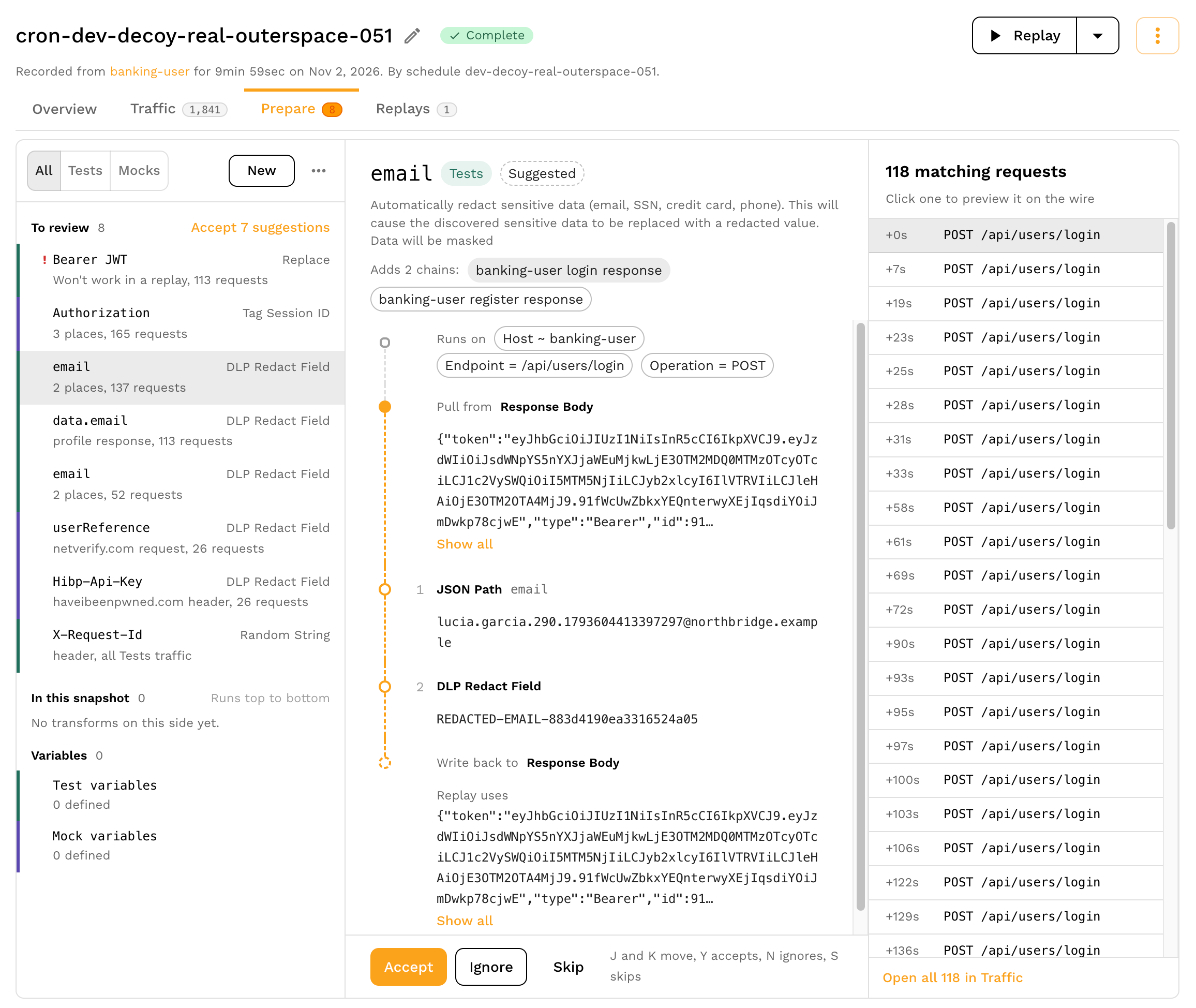
Use Open all in Traffic to inspect every matching request. The recommendation review guide explains the shared queue, previews and keyboard shortcuts.
What a Suggested Chain Contains
A suggested chain has the same parts as any transform chain:
- Filters that limit which RRPairs it runs on, such as one host or endpoint.
- An extractor that selects where the value lives, such as a request header, a query parameter, or the request or response body.
- Transforms that narrow to the field, for example a JSON Path step inside a body, and then replace the value.
Check the filters before you accept: a chain scoped too widely can change traffic you meant to keep, and one scoped too narrowly misses the same field on other endpoints. When the same field name appears on many endpoints, consider masking it by name instead of accepting one chain per location.
Managing DLP Recommendations
Accept stages a suggestion's chains under In this snapshot. Ignore moves it to Ignored, and Skip leaves it undecided. Select Save and reanalyze to save staged edits, or Discard to drop them. Review the chain's filters and several matching requests before saving.
Accepting a suggestion changes the snapshot's transforms. To reuse a chain for capture redaction, open the saved transform's menu and select Add to DLP rule. Follow Creating DLP Rules to select or create a rule, then apply the rule to forwarders. Accepting a snapshot suggestion does not deploy a capture rule.
To revisit a dismissed item, open Ignored in Prepare. For the complete review workflow, see Working through recommendations.
Next Steps
- Creating DLP Rules: combine accepted chains and field names into a rule.
- Applying Rules to Production: point a forwarder at the rule.