CI/CD
Integrate Speedscale into your CI/CD workflow to enable high-velocity deployment with confidence.
Run Speedscale after your build and unit tests, but before deploying to production.
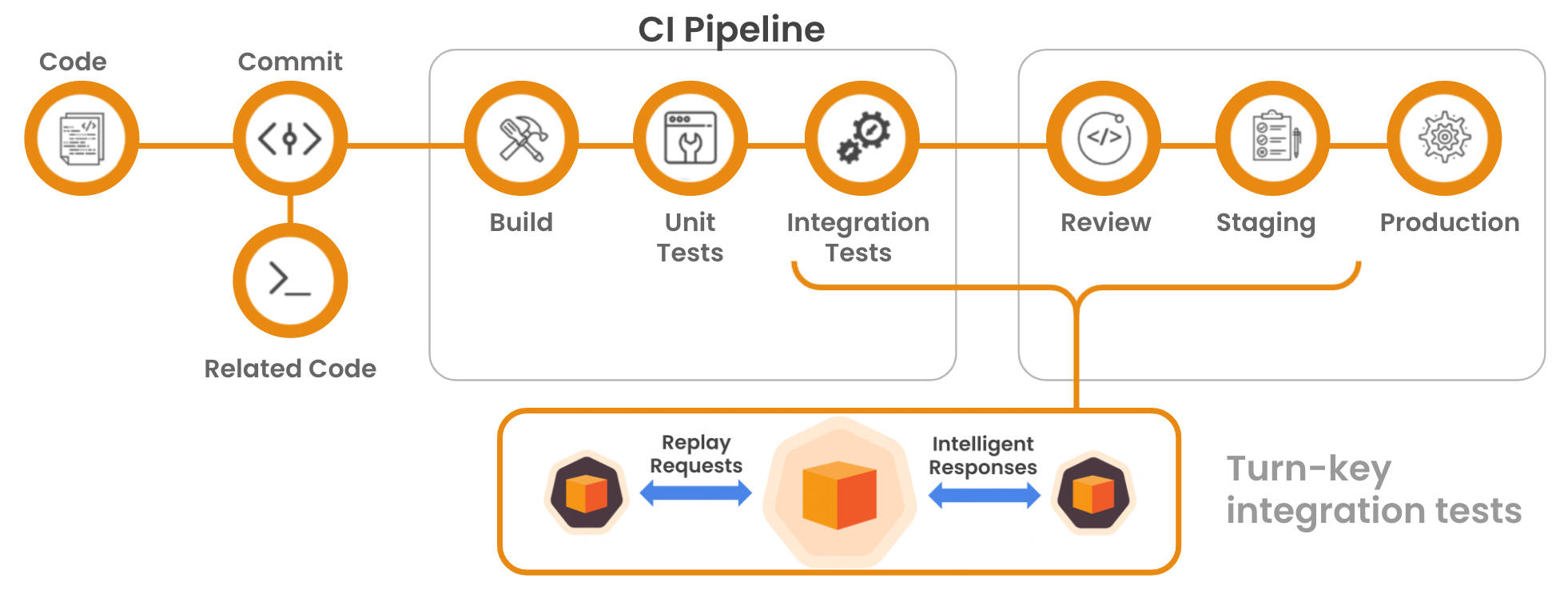
Adding anything to your CI/CD pipeline generally involves the same 3 steps:
- adding a step to your pipeline
- setting the right environment variables
- executing the right script to perform a desired action
Let's walk through these steps for Speedscale.
Prerequisites
In order to integrate Speedscale into your CI/CD you will need:
- A Kubernetes cluster running the Speedscale Operator
- At least one registered service, visible at https://app.speedscale.com
Direct access to your Kubernetes cluster is optional.
Speedscale can also be run in Docker
The Pipeline
Every CI system has a different way of setting the PATH for actions, make sure ~/.speedscale is in the path after running the installer script.
The speedscale.sh script can be implemented a few ways. Choose the one that makes the most sense for your environment.
- CircleCI
- GitHub
- GitLab
- Jenkins
- Azure DevOps
- Google Cloud Deploy with Skaffold
version: "2.1"
orbs:
  kubernetes: circleci/kubernetes@1.3.1 # <--- if using kubectl - see below
jobs:
  speedscale:
    docker:
      - image: "cimg/python:3.10"
    environment:
      SERVICE: my-service # <--- Speedscale environment variables - see below
    steps:
      - kubernetes/install-kubectl: # <--- if using kubectl - see below
          kubectl-version: << parameters.kubectl-version >>
      - run:
          command: |
            export PATH=${PATH}:${HOME}/.speedscale
            ./speedscale.sh # <--- Speedscale script - see below
See a full config.yml for more context.
name: CI with Speedscale
on:
  push:
    branches:
      - main
  pull_request:
    branches:
      - main

env:
  SERVICE: my-service # <--- Speedscale environment variables - see below

jobs:
  build:
    runs-on: ubuntu-latest
    steps:
      - name: Checkout
        uses: actions/checkout@v4

      # You'll probably want to build, unit test, push image, etc. here
      - name: Build
        run: docker build -t gcr.io/myimage:latest .  && docker push gcr.io/myimage:latest
  test:
    name: Replay
    needs: build
    runs-on: ubuntu-latest
    steps:
      - name: Checkout
        uses: actions/checkout@v4

      - name: Speedscale replay
        run: |
          export PATH=${PATH}:${HOME}/.speedscale
          echo "~/.speedscale" >> ${GITHUB_PATH}
          ./speedscale.sh # <--- Speedscale script - see below
stages:
  - test
  - build
  - speedscale

# test code before image build
test-code:
  stage: test
  image: ubuntu
  script:
    - ./test.sh
  only:
    - branches
  except:
    - master

# build and push image
build:
  stage: build
  image: ubuntu
  script:
    - docker build -t gcr.io/myimage:latest .
    - docker push gcr.io/myimage:latest

# test build with speedscale
speedscale-replay:
  stage: speedscale
  image: ubuntu
  environment:
    SERVICE: my-service # <--- Speedscale environment variables - see below
  script:
    - export PATH=${PATH}:${HOME}/.speedscale
    - ./speedscale.sh # <--- Speedscale script - see below
#!groovy

pipeline {
  agent any

  environment {
      SERVICE = 'my-service' // <--- Speedscale environment variables - see below
      PATH = "${env.PATH}:${HOME}/.speedscale"
  }
  stages {
    stage('speedscale') {
      steps {
        sh 'sh speedscale.sh' // <--- Speedscale script - see below
      }
    }
  }
  post{
    success{
      echo "======== pipeline executed successfully ========"
    }
    failure{
      echo "======== pipeline execution failed ========"
    }
  }
}
trigger:
  - main

variables:
  - name: SERVICE # <--- Speedscale environment variables - see below
    value: my-service

pool:
  vmImage: "ubuntu-latest"

steps:
  # get kubectl
  - task: KubectlInstaller@0 # <--- if using kubectl - see below
    displayName: "kubectl installed"
    inputs:
      kubectlVersion: "latest"
  # run replay
  - bash |
    echo "##vso[task.prependpath]~/.speedscale"
    export PATH=${PATH}:${HOME}/.speedscale
    ./speedscale.sh # <--- Speedscale script - see below
Add the verify block to your existing Skaffold deploy.
apiVersion: skaffold/v4beta7
kind: Config
manifests:
  rawYaml:
    - k8s-deploy.yaml
deploy:
  kubectl: {}
verify:
  - name: speedscale
    container:
      name: speedscale
      image: ubuntu
      command: ["/bin/sh"]
      args: ["-c", "export PATH=${PATH}:${HOME}/.speedscale && ./speedscale.sh"] # <--- Speedscale script - see below
The Environment
Set these environment variables to configure the replay, either in the script or through the CI/CD platform:
| Variable | Example Value | Description |
|---|---|---|
| CLUSTER | my-cluster | Name of the cluster running the Speedscale Operator. |
| SERVICE | my-service | Service name as displayed at https://app.speedscale.com. |
| NAMESPACE | my-ns | Kubernetes namespace where your service is running. |
| TEST_CONFIG | standard | Test configuration defined at https://app.speedscale.com/config. |
| SNAPSHOT_ID | latest | Use the latest snapshot for this service. |
| TIMEOUT | 10m | Maximum amount of time to wait for replay to complete. |
| BUILD_TAG | v1.2.3 | Identifies the version of your service being tested. |
If NAMESPACE is omitted (or --namespace is not passed), speedctl infra replay will infer the namespace automatically when the snapshot was captured from a single namespace. If the snapshot spans multiple namespaces the variable is required.
The Script
Let's fill in the speedscale.sh script shown above. Choose the implementation that makes the most sense for your environment.
- Without Cluster Access
- With Cluster Access
If you do not have cluster access the replay can be started and validated with speedctl.
In addition to the other environment variables, your speedscale API key should be set (securely) for authentication:
| Variable | Example Value | Description |
|---|---|---|
| SPEEDSCALE_API_KEY | 2ca17dbe5b3b7a4f15f926b83d1ed567a98d38a3e47be | Service account API key created from https://app.speedscale.com/tenant |
#!/usr/bin/env sh

if [ -z "$SPEEDSCALE_API_KEY" ];then
  echo "SPEEDSCALE_API_KEY is required"
  exit 1
fi

echo "installing speedctl"
sh -c "$(curl -Lfs https://downloads.speedscale.com/speedctl/install)"

echo "creating replay for service $SERVICE in cluster $CLUSTER in namespace $NAMESPACE"
REPORT_ID=$(speedctl infra replay "$SERVICE" \
  --cluster "$CLUSTER" \
  --namespace "$NAMESPACE" \
  --test-config-id "$TEST_CONFIG" \
  --snapshot-id "$SNAPSHOT_ID" \
  --id-only \
  --build-tag "$BUILD_TAG")

echo "waiting for replay with report ID $REPORT_ID to complete"
speedctl wait report "$REPORT_ID" \
  --timeout "$TIMEOUT"

# exit script with the code from wait report command
exit $?
If you have cluster access from your pipeline the replay can be started and validated with kubectl.
#!/usr/bin/env sh

# generate a unique replay name
RANDOM=$$
REPLAY_NAME="${SERVICE}-replay-${RANDOM}"

cat << EOF > replay.yaml
apiVersion: speedscale.com/v1
kind: TrafficReplay
metadata:
  name: "$REPLAY_NAME"
spec:
  snapshotID: "$SNAPSHOT_ID"
  testConfigID: "$TEST_CONFIG"
  workloadRef:
    kind: Deployment
    name: "$SERVICE"
  buildTag: "$BUILD_TAG"
EOF

echo "created traffic replay CR yaml"
cat replay.yaml

echo "applying traffic replay CR to the cluster"
kubectl apply \
  --namespace "$NAMESPACE" \
  --filename replay.yaml

echo "waiting for replay to complete"
if kubectl wait "replay/${REPLAY_NAME}" \
  --namespace "$NAMESPACE" \
  --for condition=Ready \
  --timeout "$TIMEOUT"; then
  status=$(kubectl get replay/${REPLAY_NAME} -n "$NAMESPACE" -o json | jq '.status.conditions[-1].message' -r)
else
  echo "timed out waiting for traffic replay"
  exit 1
fi

echo "Report Status: $status"

case "${status}" in
  "Failed: Missed Goals")
    exit 1
    ;;
  *)
    exit 0
    ;;
esac
Customising Mock Behaviour in CI
The speedctl infra replay command supports several flags to control which outbound dependencies are mocked during a pipeline run. These can be passed directly in your speedscale.sh script or added as additional environment variables.
Disable all mocks
Pass --no-mocks to send real outbound traffic instead of using recorded responses:
REPORT_ID=$(speedctl infra replay "$SERVICE" \
  --cluster "$CLUSTER" \
  --namespace "$NAMESPACE" \
  --test-config-id "$TEST_CONFIG" \
  --snapshot-id "$SNAPSHOT_ID" \
  --id-only \
  --build-tag "$BUILD_TAG" \
  --no-mocks)
Mock only specific dependencies
Use --mock-only (repeatable) to mock a subset of outbound services and call everything else live. Selectors accept svc:<substring>, host:<hostname>, glob:<pattern>, or an exact service key.
REPORT_ID=$(speedctl infra replay "$SERVICE" \
  --cluster "$CLUSTER" \
  --namespace "$NAMESPACE" \
  --test-config-id "$TEST_CONFIG" \
  --snapshot-id "$SNAPSHOT_ID" \
  --id-only \
  --build-tag "$BUILD_TAG" \
  --mock-only 'svc:payments' \
  --mock-only 'host:api.stripe.com')
Exclude specific dependencies from mocking
Use --mock-except to mock everything except the listed services:
REPORT_ID=$(speedctl infra replay "$SERVICE" \
  --cluster "$CLUSTER" \
  --namespace "$NAMESPACE" \
  --test-config-id "$TEST_CONFIG" \
  --snapshot-id "$SNAPSHOT_ID" \
  --id-only \
  --build-tag "$BUILD_TAG" \
  --mock-except 'svc:db')
Exclude inbound services from replay
Use --exclude-in (repeatable) to skip specific inbound services so they are not replayed:
REPORT_ID=$(speedctl infra replay "$SERVICE" \
  --cluster "$CLUSTER" \
  --namespace "$NAMESPACE" \
  --test-config-id "$TEST_CONFIG" \
  --snapshot-id "$SNAPSHOT_ID" \
  --id-only \
  --build-tag "$BUILD_TAG" \
  --exclude-in 'svc:frontend')
Preview the mock plan without running a replay
During pipeline development you can validate your selector configuration with --dry-run-mocks. This prints the resolved mock plan and exits without triggering a replay:
speedctl infra replay "$SERVICE" \
  --cluster "$CLUSTER" \
  --snapshot-id "$SNAPSHOT_ID" \
  --mock-only 'svc:payments' \
  --dry-run-mocks -o pretty
See the full replay reference for a complete list of flags and selector syntax.
Need Help?
Let us know on the community Slack if instructions for your deploy system are not included here.