---
title: "Modifying Tests/Mocks | Speedscale Docs"
description: "Modify tests and mock responses in proxymock recordings effortlessly with this guide, ensuring updates reflect in future test runs."
canonical: "https://docs.speedscale.com/proxymock/guides/modify-rrpairs/"
---
[Documentation index](https://docs.speedscale.com/proxymock/llms.txt) | [Markdown](https://docs.speedscale.com/proxymock/guides/modify-rrpairs/index.md) | [Canonical page](https://docs.speedscale.com/proxymock/guides/modify-rrpairs/)
# Modifying Tests/Mocks
Use this guide to modify your tests or mock responses in an existing proxymock recording. Any modifications made will automatically show up the next time you run proxymock.
## Before you begin
Make sure you have:
* proxymock [installed](https://docs.speedscale.com/proxymock/getting-started/quickstart/quickstart-cli/)
* existing proxymock recording (like this [one](https://github.com/speedscale/mock-lab/tree/main/lab/proxymock))
## Editing raw files
RRPairs are plain markdown files, so you can edit them in any editor. Each recording is stored in its own directory under the `proxymock` parent directory. Modify the RRPair and save the file; the next time you run proxymock as a mock or test server the new data will be used.
For more information about the RRPair file format, check this [link](https://docs.speedscale.com/proxymock/how-it-works/rrpair-format/). For more information about how mock signatures are built from the raw traffic recording see this [link](https://docs.speedscale.com/proxymock/how-it-works/signature/).
## Applying transforms in proxymock web
Raw-file edits change the recorded data in place. When you instead want to _overlay_ a change at run time, such as swapping an expired token or masking a field, apply a **transform** from the request detail in `proxymock web`. Transforms are saved as [blueprints](https://docs.speedscale.com/proxymock/guides/blueprints/) and applied every time you run proxymock as a mock or test server; the recording itself is untouched.
Start the web UI from the parent of `proxymock/`:
```shell
proxymock web
```
Open a request in the **Requests** grid to see its RRPair detail, then add a transform to the field you want to change:
* **Header or query field** — in the **Request** or **Response** tab, hover the row and click the transform (wand) icon next to the value.
* **Body field** — open the **Body** tab and right-click the line you want, then choose **Add transform…**.
Either opens a short menu of transforms — _Replace with constant_, _Smart replace_, _Store in variable_, and the rest of the [transform library](https://docs.speedscale.com/guides/transformation/transforms/). Pick one, fill in any value it needs, and proxymock writes a rule into a blueprint named **Field Transforms**, scoped to that request's endpoint and method. The rule is active immediately and applies on your next run.
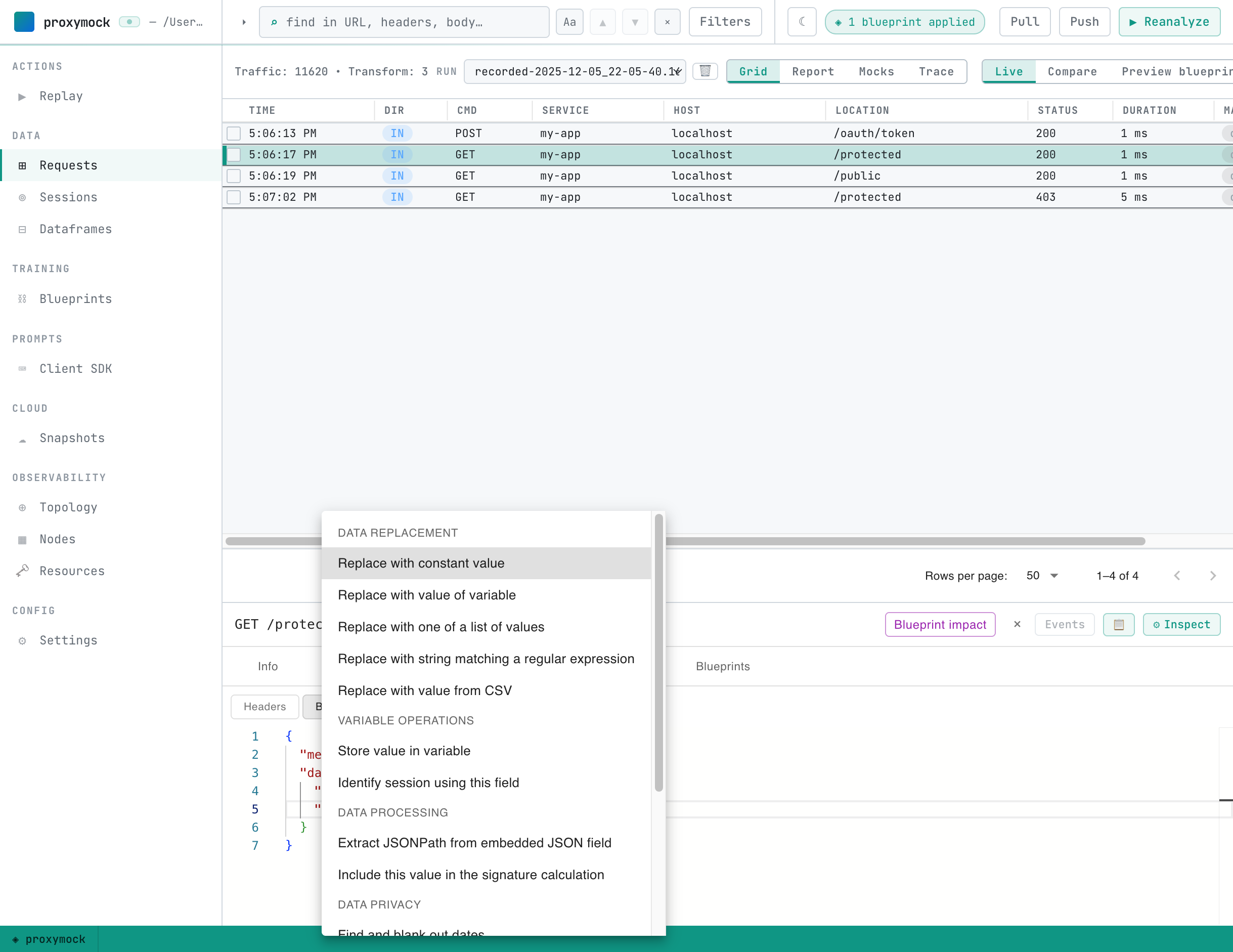
You can review and edit every rule in the **Blueprints** tab — the same place the [recommendations workflow](https://docs.speedscale.com/proxymock/guides/recommendations/) lands its rules.
## Previewing blueprint impact
Before you replay, you can see exactly what the active blueprints will change. In the **Requests** grid, switch the lens to **Preview blueprints**. proxymock applies the blueprints to the current run's traffic in memory and shows a before/after diff of every request they touch — no replay required.
The card above the grid steps through each change one at a time. Use **‹** / **›** to walk them: each step opens the affected request, names the field and the rule that changes it, and highlights the change in the before/after view.
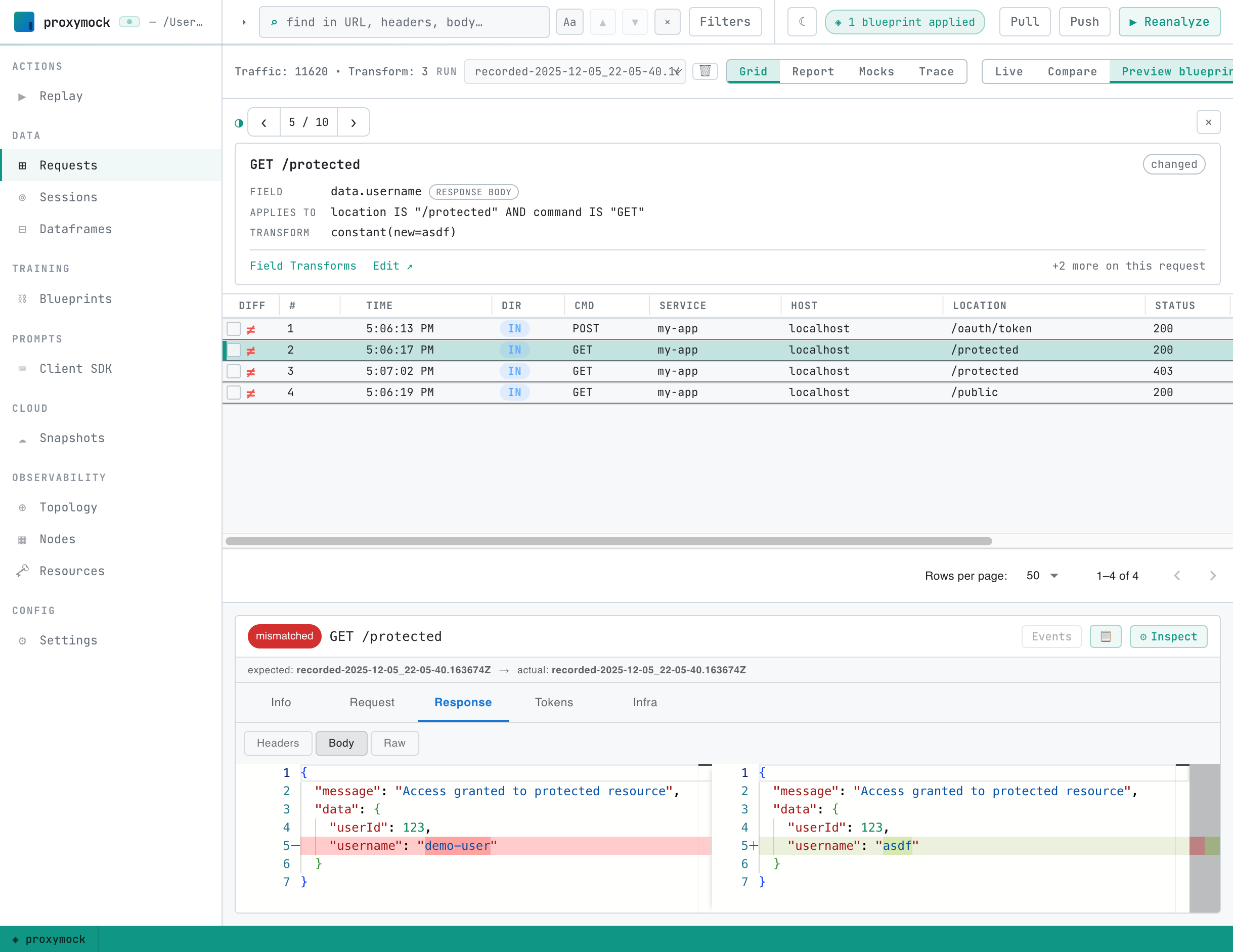
This is the quickest way to confirm a new rule does what you expect — and only what you expect — before committing to a full replay.