---
title: "Choose What a Replay Tests | Speedscale Docs"
description: "Use a tests filter to choose which recorded traffic a replay sends as tests and which it serves as mocks, so traffic your app sent to a database or API can drive load or regression tests against that dependency."
canonical: "https://docs.speedscale.com/proxymock/guides/choose-replay-tests/"
---
[Documentation index](https://docs.speedscale.com/proxymock/llms.txt) | [Markdown](https://docs.speedscale.com/proxymock/guides/choose-replay-tests/index.md) | [Canonical page](https://docs.speedscale.com/proxymock/guides/choose-replay-tests/)
# Choose What a Replay Tests
Every replay splits recorded traffic into two roles. **Tests** are sent by the replay to the system under test. **Mocks** are served back to that system when it makes its own calls.
By default the split follows the direction each RRPair was recorded in. Inbound traffic, the requests your app received, becomes tests. Outbound traffic, the calls your app made to databases and APIs, becomes mocks. That is what you want for testing your app.
Sometimes the dependency is what you want to test. You might want to load test the database your app uses, check a new version of an internal API against the calls your app really makes, or regression test a migration. A **tests filter** does this: it chooses which recorded traffic is replayed as tests, and everything it does not match is mocked.
## How each RRPair's role is decided
proxymock and Speedscale apply the same three rules, in this order:
1. **A `replayRole` tag on the RRPair wins.** `replayRole=test` always makes it a test and `replayRole=mock` always makes it a mock.
2. **Otherwise the tests filter decides, when there is one.** RRPairs that match are tests and everything else is a mock, including inbound traffic the filter does not match.
3. **Otherwise the recorded direction decides.** Inbound is a test and outbound is a mock.
The recorded direction itself never changes. A database query recorded as outbound stays outbound in every file, report and view; the filter only decides what the replay does with it.
Technology is detected automatically, so a filter such as `(tech IS Postgres)`, `(tech IS MySQL)`, `(tech IS "SQL Server")` or `(tech IS Oracle)` works on a fresh `proxymock record` recording as well as on a snapshot.
## Write a tests filter
A tests filter uses the same query language as other Speedscale filters. See [the filter query string reference](https://docs.speedscale.com/guides/creating-filters/#edit-the-filter-query-string) for every field and operator.
Two rules trip people up:
* Each parenthesised group holds one kind of filter. Write `(direction IS OUT) AND (tech IS Postgres)`, not `(direction IS OUT AND tech IS Postgres)`.
* `AND` and `OR` between groups apply to the whole expression.
| Goal | Tests filter |
| --- | --- |
| Replay a database your app called | `(direction IS OUT) AND (tech IS Postgres)` |
| Replay a MySQL database your app called | `(direction IS OUT) AND (tech IS MySQL)` |
| Replay a SQL Server database your app called | `(direction IS OUT) AND (tech IS "SQL Server")` |
| Replay an Oracle database your app called | `(direction IS OUT) AND (tech IS Oracle)` |
| Replay every call your app made | `(direction IS OUT)` |
| Replay one dependency | `(networkaddr IS "rates.internal:443")` |
| Keep your app's inbound tests as well | `(direction IS IN) OR (tech IS Postgres)` |
## Set the tests filter
| Where you replay | How to set it |
| --- | --- |
| proxymock CLI | `proxymock replay --tests-filter ''` |
| AI assistant (proxymock MCP) | Ask for it, or pass the `tests-filter` parameter of the `replay_traffic` tool |
| proxymock web | The **Tests filter** field on the Replay tab |
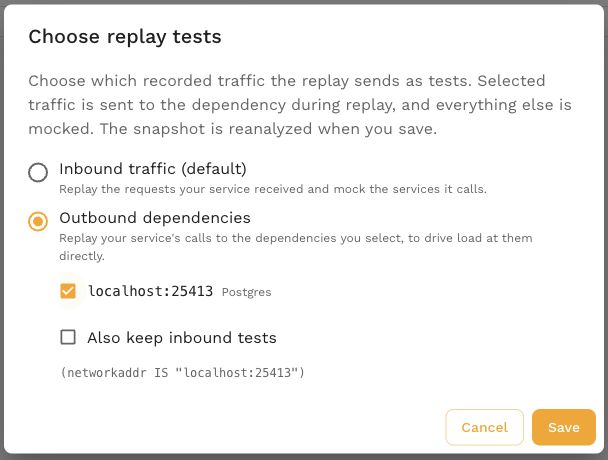
| Speedscale dashboard | **Choose replay tests** on the snapshot's **Traffic** tab. Pick the dependencies under **Outbound dependencies**, optionally check **Also keep inbound tests**, and save. The snapshot is reanalyzed and the page shows the active selection as **Replay tests:** followed by the filter. |
The following example selects the recorded Postgres dependency. The filter preview uses the dependency address from the recording.
[Open screenshot full size](https://docs.speedscale.com/assets/images/outbound-postgres-5eb6354f1ad4654f48a102dbac399bfe.jpg)
Point the replay at the dependency with `--test-against`, the same way you point an ordinary replay at your app. For a database, use a `postgres://host:port/database`, `mysql://host:port/database`, `sqlserver://host:port?database=name` or `oracle://host:port/SERVICE` address; see [Connect to the database](https://docs.speedscale.com/proxymock/databases/load-and-regression-testing/#credentials) for credentials.
### Save the filter with a workspace
To make a workspace always replay the same tests without passing the flag, add a `replaySelection` to the workspace's `.metadata/snapshot.json`. The `--tests-filter` flag, when given, replaces the saved filter for that run.
```json
{
"replaySelection": {
"tests": {
"conditions": [
{ "filters": [{ "include": true, "direction": "OUT" }] },
{ "filters": [{ "include": true, "tech": "Postgres" }] }
],
"filterQuery": "(direction IS OUT) AND (tech IS Postgres)"
}
}
}
```
If the workspace already has a `.metadata/snapshot.json`, for example from a snapshot pulled from Speedscale, add `replaySelection` next to the fields already there. If a metadata file cannot be parsed, proxymock names it in a warning and ignores its settings.
### Promote a single RRPair
To change the role of one recorded file without a filter, add a `replayRole` tag. In a markdown RRPair it goes on the `tags` line of the metadata section:
```text
direction: OUT
tags: replayRole=test, service=orders
```
In a JSON RRPair it goes in the `tags` object. The `direction` stays as recorded.
## Example: replay outbound API calls against a staging dependency
Your app calls a rates API, and you want to check a new build of that API against the calls your app really makes. Replay only the outbound traffic and send it to the staging instance:
```bash
proxymock replay \
--tests-filter '(direction IS OUT)' \
--test-against http://rates-staging.internal:8080
```
The replay sends each recorded call to the staging API, compares the responses with the recording, and writes the results under `proxymock/results/`. Any inbound traffic in the recording is mocked, because the filter does not match it.
## Where replay output goes
Replay and mock output is written under `proxymock/results/` unless you choose another `--out`. Output directories are marked with a `.proxymock-output` file, and later runs never read them back as recordings, wherever they are in the workspace. Replaying earlier output as new traffic used to make every run slower than the last. To replay an earlier run on purpose, pass its directory directly with `--in`.
While a replay reads a large workspace it prints `reading recorded traffic`, a progress line every few seconds, and `read recorded traffic` with the count when it is done. The same lines appear in the process logs of an MCP replay.
## Snapshots that used reverse services
Earlier versions of Speedscale had a **reverse services** snapshot setting that flipped every recorded RRPair from inbound to outbound and back, rewriting the recorded direction. It has been removed.
Use a tests filter instead. `(direction IS OUT)` replaces reverse services for most snapshots, and unlike reverse services a filter can promote just one dependency, keep inbound tests at the same time, and leaves the recording as it was captured. A snapshot that had reverse services turned on returns to its recorded orientation the next time it is reanalyzed.
## Related
* [Load and Regression Test a Database](https://docs.speedscale.com/proxymock/databases/load-and-regression-testing/)
* [RRPair markdown format](https://docs.speedscale.com/proxymock/how-it-works/rrpair-format/)
* [proxymock CLI reference](https://docs.speedscale.com/reference/proxymock-cli-reference/)