---
title: "Mock a GraphQL API | Speedscale Docs"
description: "Run your app against a mock of the GraphQL API it calls, built from a proxymock recording: what a GraphQL mock matches on, why rotating variables miss, and how the Mocks view masks exactly those variables."
canonical: "https://docs.speedscale.com/proxymock/graphql/mock-graphql/"
---
[Documentation index](https://docs.speedscale.com/proxymock/llms.txt) | [Markdown](https://docs.speedscale.com/proxymock/graphql/mock-graphql/index.md) | [Canonical page](https://docs.speedscale.com/proxymock/graphql/mock-graphql/)
# Mock a GraphQL API
`proxymock mock` answers your app's GraphQL requests from a recording, so the app runs with no API behind it: no account, no rate limit, no test data to keep alive, and the same answers every time. That makes an app that depends on a GraphQL API testable on a laptop, in CI and by an AI coding assistant.
## Run the mock
[Record the API](https://docs.speedscale.com/proxymock/graphql/record/#record-the-graphql-api-your-app-calls) once, then start the mock the same way and run the app under it:
```bash
proxymock mock --in proxymock/recorded- -- ./your-app
```
If you recorded through a mapped port, map it again so the app reaches the mock on the same address:
```bash
proxymock mock --in proxymock/recorded- --map 18081=http://localhost:18080 -- ./your-app
```
The mock writes what it served to `proxymock/results/mocked-`, one file per request, tagged `HIT` when a recording answered it and `MISS` when none did. A miss is passed through to the real API, or, with `--no-passthrough`, answered with a 404, which is the setting to use when you want misses to be visible.
## What a GraphQL mock matches on
A request matches a recording when its method, host, path and query parameters match and its body means the same thing. For GraphQL, the body is compared as a parsed document, so:
| Does not change the match | Changes the match |
| --- | --- |
| Whitespace, line breaks and comments in the query | The operation and its name |
| The order arguments are written in | Which fields are selected, and in what order |
| The order of an input object's fields | A variable's value |
| The order of keys inside `variables` | An argument literal written into the query |
Selection order counts because it is the order of the fields in the response, so two requests that differ in it are owed different answers.
## When a request does not match
The usual cause is a variable that changes on every run: a signed token, a request id, a generated email address. Two runs of the same client send the same document with different variables, so the second run misses every recording of the first.
The [graphql-demo](https://github.com/speedscale/demo/tree/master/graphql-demo) driver shows it. It sends seven operations, and its `Session` query carries a freshly signed JWT and a random request id on every run. Run it against a mock of its own recording, with misses visible:
```bash
proxymock mock --in proxymock/recorded- --map 18081=http://localhost:18080 \
--no-passthrough -- ./graphql-demo -drive -target http://localhost:18081
```
The first request, `Session`, misses, and the driver stops.
Open the workspace with `proxymock web` and select **Mocks**. Select a field to open the request that missed:
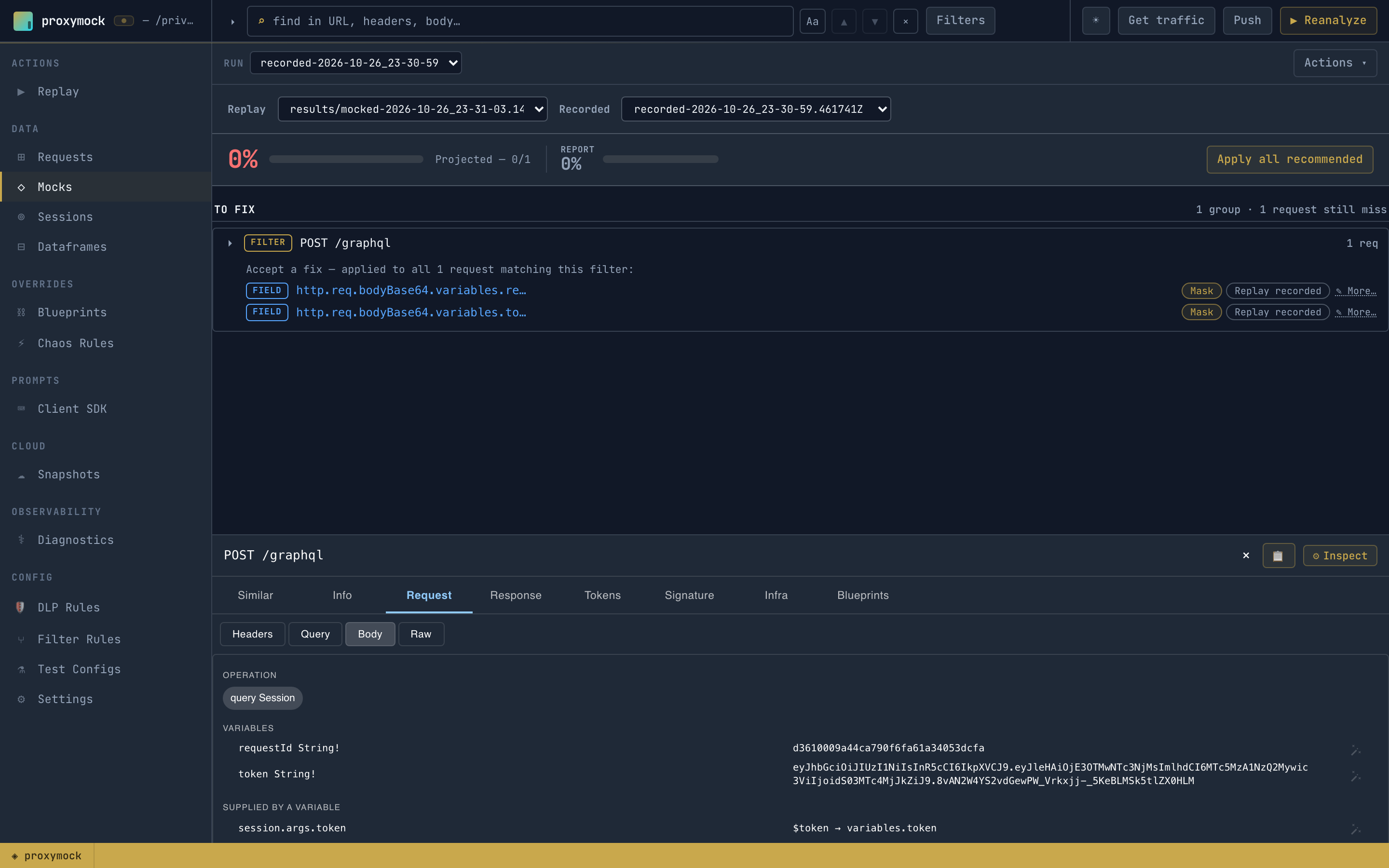
The Mocks view finds the fields that drifted between the request and its nearest recording and recommends a fix for each. For `Session` it recommends masking `variables.token` and `variables.requestId`. It never recommends masking the query or `operationName`, because those say which operation the request is, and masking them would let any operation match any other. An accepted fix is a responder chain in the workspace's tuning blueprint, scoped to the GraphQL endpoint:
```json
{
"filters": { "filters": [ { "include": true, "operator": "REGEX", "optUrl": "^/graphql$" } ] },
"extractor": { "type": "req_body" },
"transforms": [
{ "type": "json_path", "config": { "path": "variables.token" } },
{ "type": "constant", "config": { "new": "*" } }
]
}
```
The chain runs on both sides of the match, the recordings and each incoming request, so the token no longer decides it. With those two fixes the driver gets past `Session` and stops at `CreateUser`, whose `variables.email` is generated per run. One more accepted fix, and a third run completes the driver's whole pass with every request a `HIT`, no API running.
Accept recommendations wherever is convenient:
* In proxymock web, on the **Mocks** view, choose **Mask** or **Replay recorded** for each field, or **Apply all recommended**.
* From an AI coding assistant, with the `mocks` tool of the [proxymock MCP server](https://docs.speedscale.com/proxymock/how-it-works/mcp-tools/), or let the assistant run the whole loop: [Improve Mock Match Rate with AI](https://docs.speedscale.com/proxymock/guides/mock-match-rate/).
## Clients that add `__typename`
Apollo and other clients add `__typename` to selection sets. It changes the document without changing what the request asks for, so a recording made with one client can miss requests from another. Strip it from both sides with a responder chain:
```text
req_body() → graphql_delete(field="__typename")
```
See [GraphQL recipes](https://docs.speedscale.com/guides/graphql/recipes/#strip-__typename-for-a-better-mock-match-rate) for this and other chains, and [Create and Verify Blueprints](https://docs.speedscale.com/proxymock/guides/blueprints/) for where they live in a workspace.
## Generated mocks
A mock [generated from a schema](https://docs.speedscale.com/proxymock/graphql/generate/) matches the generated operation exactly: its selection and its variables. A client that selects different fields of the same root field gets no match, because it is owed a different response. Record the client instead, or edit the generated request to the document the client sends.