---
title: "scrub_date | Speedscale Docs"
description: "Replace any date or datetime value inside a JSON body with \"*\" using the scrub_date transform in Speedscale, removing dynamic timestamps that would otherwise prevent responder signature matches."
canonical: "https://docs.speedscale.com/guides/transformation/transforms/scrub_date/"
---
[Documentation index](https://docs.speedscale.com/guides/llms.txt) | [Markdown](https://docs.speedscale.com/guides/transformation/transforms/scrub_date/index.md) | [Canonical page](https://docs.speedscale.com/guides/transformation/transforms/scrub_date/)
# scrub\_date
The `scrub_date` transform walks a JSON body and replaces every value that looks like a date or datetime with `*`. It is the date-aware sibling of [`scrub`](https://docs.speedscale.com/guides/transformation/transforms/scrub/) — instead of scrubbing a specific extracted value, it scrubs **every** date-shaped field in the body. This neutralizes the dynamic-timestamp problem that otherwise breaks responder signature matching for requests that carry `now()`\-style fields.
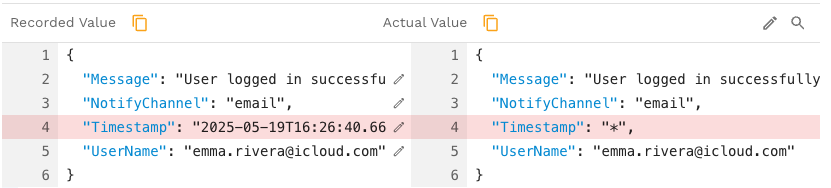
* **Transform type name (config/API):** `scrub_date`
* **Shorthand format:** `scrub_date(ignore=...)`
## Quick Start
```json
"type": "scrub_date",
"config": {}
```
```text
req_body() → scrub_date()
```
Every date-shaped string in the JSON request body becomes `*`. No further configuration is needed for the common case.
## How It Works
`scrub_date` runs entirely in the first phase. The second phase is a no-op.
1. **First phase** — the token entering the transform is assumed to be JSON. The DLP engine walks every key/value in the JSON, including nested objects and arrays. For each string value, the engine asks two questions:
* Does the value match the `datetime` DLP pattern (a recognized date or timestamp shape)?
* Does the value parse as a valid datetime by Speedscale's lenient date parser?
If either is true and the field's leaf key is not in `ignorePaths`, the value is replaced with `*`. The walk continues into nested structures.
2. **Second phase** — no-op. The scrubbed JSON returned by the first phase is what subsequent transforms in the chain see.
### What Counts as a Date
The transform recognises a broad spectrum of formats — ISO 8601 (`2023-10-01T12:00:00Z`), RFC 1123 (`Mon, 02 Jan 2006 15:04:05 MST`), date-only (`2023-10-01`), and many others. The recognition is the same one that powers `layout=auto` in the [`date`](https://docs.speedscale.com/guides/transformation/transforms/date/) transform.
**Numeric values are not scrubbed.** A Unix epoch number like `1696156800` is left alone because the walk is restricted to JSON string scalars. If you need to neutralize epoch timestamps, use the [`date`](https://docs.speedscale.com/guides/transformation/transforms/date/) transform on that field with `layout=epoch`, or convert the field to a string before scrubbing.
### Scope
`scrub_date` operates on whatever the chain hands it. The token is expected to be a JSON document or fragment.
* `req_body() → scrub_date()` scrubs the entire request body.
* `res_body() → scrub_date()` scrubs the entire response body.
* `res_body() → json_path(path="event") → scrub_date()` scrubs only the JSON subtree rooted at `event`.
If the token isn't valid JSON, the walk produces no changes and the value passes through.
## Configuration
```json
"type": "scrub_date",
"config": {
"ignorePaths": ""
}
```
| Parameter | Required | Default | Description |
| --- | --- | --- | --- |
| `ignorePaths` | No | empty | Comma-separated list of JSON key names to leave alone. Matched against the **last key** in the path only — `"createdAt"` skips every field named `createdAt` at any depth. |
### `ignorePaths` Matching
Just like [`scrub`](https://docs.speedscale.com/guides/transformation/transforms/scrub/), only the leaf key name is compared. You cannot pass a dotted path. Given `{"user": {"profile": {"birthDate": "..."}}}`, `ignorePaths=birthDate` skips the field; `ignorePaths=profile.birthDate` matches nothing.
## Examples
### Example 1 — Scrub all dates in a request body
```json
{
"type": "scrub_date",
"config": {}
}
```
```text
req_body() → scrub_date()
```
Before:
```json
{
"orderId": "12345",
"timestamp": "2021-04-19T10:30:00Z",
"user": {
"createdAt": "2021-01-15T08:00:00Z",
"lastLogin": "2021-04-19T09:15:30Z"
}
}
```
After:
```json
{
"orderId": "12345",
"timestamp": "*",
"user": {
"createdAt": "*",
"lastLogin": "*"
}
}
```
### Example 2 — Preserve a known-stable field
```json
{
"type": "scrub_date",
"config": {
"ignorePaths": "version,createdBy"
}
}
```
```text
res_body() → scrub_date(ignorePaths="version,createdBy")
```
Useful when one of the date-shaped fields is a deliberate, stable value (e.g. an API spec version date or a created-by audit field) that should remain untouched.
### Example 3 — Scrub a nested subtree only
```text
res_body() → json_path(path="audit") → scrub_date()
```
Only the JSON subtree under `audit` is walked; everything else in the response body is unaffected.
### Example 4 — Epoch numbers are not scrubbed
Before: `{"event": {"date": 1696156800}}` After: `{"event": {"date": 1696156800}}`
Numeric fields pass through. If you need to neutralize this, switch to [`date`](https://docs.speedscale.com/guides/transformation/transforms/date/) with `layout=epoch` on that field, or convert the field to a string upstream.
## Common Misconceptions
1. **"It modifies dates in headers or the URL."** No. The walk is JSON-only. Headers, URL path, and query strings are not touched.
2. **"Epoch timestamps in numeric fields get scrubbed."** No. Only JSON string scalars are inspected. Numbers are skipped.
3. **"`ignorePaths` takes a JSONPath."** No. Only the last key name is compared. Use leaf names like `createdAt`, not paths like `user.createdAt`.
4. **"It shifts dates relative to replay time."** No — that's the [`date`](https://docs.speedscale.com/guides/transformation/transforms/date/) transform. `scrub_date` only neutralizes dates to `*`. Use `date` when you need replay-relative timestamps; use `scrub_date` when you want the field gone from signature matching entirely.
5. **"It only scrubs fields whose key looks date-shaped."** No. The decision is made on the **value's** shape, not the key's name. A field called `note` whose value happens to be `"2023-10-01"` will be scrubbed.
## Troubleshooting
| Symptom | Likely cause | Fix |
| --- | --- | --- |
| Body unchanged after the transform | Body is not valid JSON, or no string values match a known date format | Confirm the body is JSON; inspect the values that should have been scrubbed |
| A numeric epoch wasn't scrubbed | Walk only inspects strings | Switch to [`date`](https://docs.speedscale.com/guides/transformation/transforms/date/) with `layout=epoch`, or stringify the field upstream |
| A field that wasn't a date got scrubbed | The value happened to match a date format (e.g. `"2023-01-01"` as a version string) | Add the field's key to `ignorePaths` |
| `ignorePaths` not respected | Used a dotted path | Use the leaf key name only |
| Only part of the response body was scrubbed | Chain extracted a subtree via `json_path` | Remove the `json_path` step to scrub the whole body |
## Related Transforms
* [`scrub`](https://docs.speedscale.com/guides/transformation/transforms/scrub/) — substring-scrub of a specific extracted value across the body. Use when you have one rotating value to blank out; use `scrub_date` when you want to blank out **all** date-shaped values.
* [`date`](https://docs.speedscale.com/guides/transformation/transforms/date/) — shifts dates relative to replay time instead of erasing them. Use when the SUT needs to see plausible timestamps.
* [`dlp_json`](https://docs.speedscale.com/guides/transformation/transforms/dlp_json/) — walks the JSON the same way but applies DLP redaction (PII categories) instead of date neutralization.
## Advanced Notes
* The walk uses the same JSON traversal as `dlp_json`, including correct handling of root-array bodies and nested arrays. A body whose root is `[{"createdAt": "..."}]` is scrubbed correctly.
* Date detection combines DLP pattern recognition with Speedscale's lenient date parser, so values that don't trip the pattern but still parse cleanly as a datetime are also caught.
* The transform does not require the recorded response to be present in the action file.
* Errors during the JSON walk are non-fatal; the transform returns the input unchanged if the body cannot be parsed.