---
title: "Locking a Snapshot | Speedscale Docs"
description: "Lock a snapshot so it cannot be renamed, edited, reanalyzed, or deleted until the locking user or an admin unlocks it. Protect snapshots your CI pipelines and demos depend on."
canonical: "https://docs.speedscale.com/guides/locking-a-snapshot/"
---
[Documentation index](https://docs.speedscale.com/guides/llms.txt) | [Markdown](https://docs.speedscale.com/guides/locking-a-snapshot/index.md) | [Canonical page](https://docs.speedscale.com/guides/locking-a-snapshot/)
# Locking a Snapshot
A locked snapshot is read-only. Nobody can rename it, edit its traffic or transforms, reanalyze it, append other snapshots to it, or delete it until it is unlocked. Use a lock to protect a snapshot that a CI pipeline, a shared demo, or a regression suite depends on.
Any user can lock a snapshot. Only the user who locked it or an [Admin](https://docs.speedscale.com/security/access-model/) can unlock it.
## Lock a snapshot from the dashboard
1. Open the snapshot from the [snapshots page](https://app.speedscale.com/snapshots).
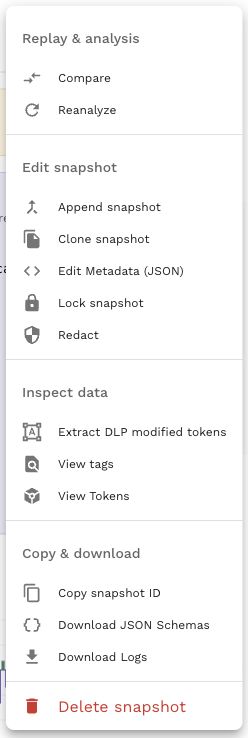
2. Click the **⋮** (more actions) menu in the top right corner.
3. Choose **Lock snapshot**.
[Open screenshot full size](https://docs.speedscale.com/assets/images/snapshot-actions-ff4ba352622aed5bd4d27fc93bf7336f.jpg)
The snapshot header now shows a **Locked** badge next to the status, and a banner names who locked it and when. On the snapshots list a lock icon appears next to the snapshot name.
While the snapshot is locked, the actions that would change it are disabled in the menu. The menu also shows who holds the lock so you know who to ask.
## Unlock a snapshot
1. Open the locked snapshot.
2. Click the **⋮** menu and choose **Unlock snapshot**.
If you are not the user who locked the snapshot and you are not an Admin, the **Unlock snapshot** entry is disabled and shows who can unlock it.
## Lock and unlock with speedctl
The same operations are available from the CLI:
```bash
speedctl lock snapshot
speedctl unlock snapshot
```
Both commands print the updated snapshot definition. Unlock follows the same rule as the dashboard: only the user who locked the snapshot or an Admin can unlock it.
## What a lock prevents
The lock is enforced by the Speedscale API, not just the dashboard. Any write to a locked snapshot is rejected with a `FAILED_PRECONDITION` error, whether it comes from the dashboard, `speedctl`, or a direct API call. That includes:
| Blocked while locked | Still allowed |
| --- | --- |
| Rename | View the snapshot, its traffic, and its reports |
| Reanalyze | Replay the snapshot |
| Tune (apply recommendations) | Clone the snapshot |
| Apply new transform | Compare against another snapshot |
| Append another snapshot | Download logs and JSON schemas |
| Edit metadata (JSON) | Copy the snapshot ID |
| Edit or patch RRPairs | View and extract tokens |
| Reverse snapshot direction | Redact into a new snapshot |
| AI-assisted tuning and generated transforms | `speedctl pull snapshot` |
| `speedctl push snapshot` | |
| Delete | |
Cloning a locked snapshot produces an unlocked copy, so if you need to experiment with transforms on a protected snapshot, clone it first and work on the copy.
## Notes
* A snapshot cannot be locked while analysis is in progress. Wait for the status to reach **Complete** and try again.
* A snapshot that is already locked cannot be locked again by another user. The lock holder is shown in the error message and in the snapshot banner.
* Locking does not hide the snapshot. Everyone in the tenant can still see it and replay it.
* Locks survive `speedctl pull` and `speedctl push` round trips and metadata edits made by the system, such as replay reports being attached. Only **Lock snapshot** and **Unlock snapshot** change the lock.