---
title: "Inferred database schema | Speedscale Docs"
description: "See the PostgreSQL, MySQL, SQL Server and Oracle tables and columns a service actually uses, with types, keys and how often each is read and written, inferred from a snapshot's recorded traffic with no access to the database."
canonical: "https://docs.speedscale.com/guides/databases/inferred-schema/"
---
[Documentation index](https://docs.speedscale.com/guides/llms.txt) | [Markdown](https://docs.speedscale.com/guides/databases/inferred-schema/index.md) | [Canonical page](https://docs.speedscale.com/guides/databases/inferred-schema/)
# Inferred database schema
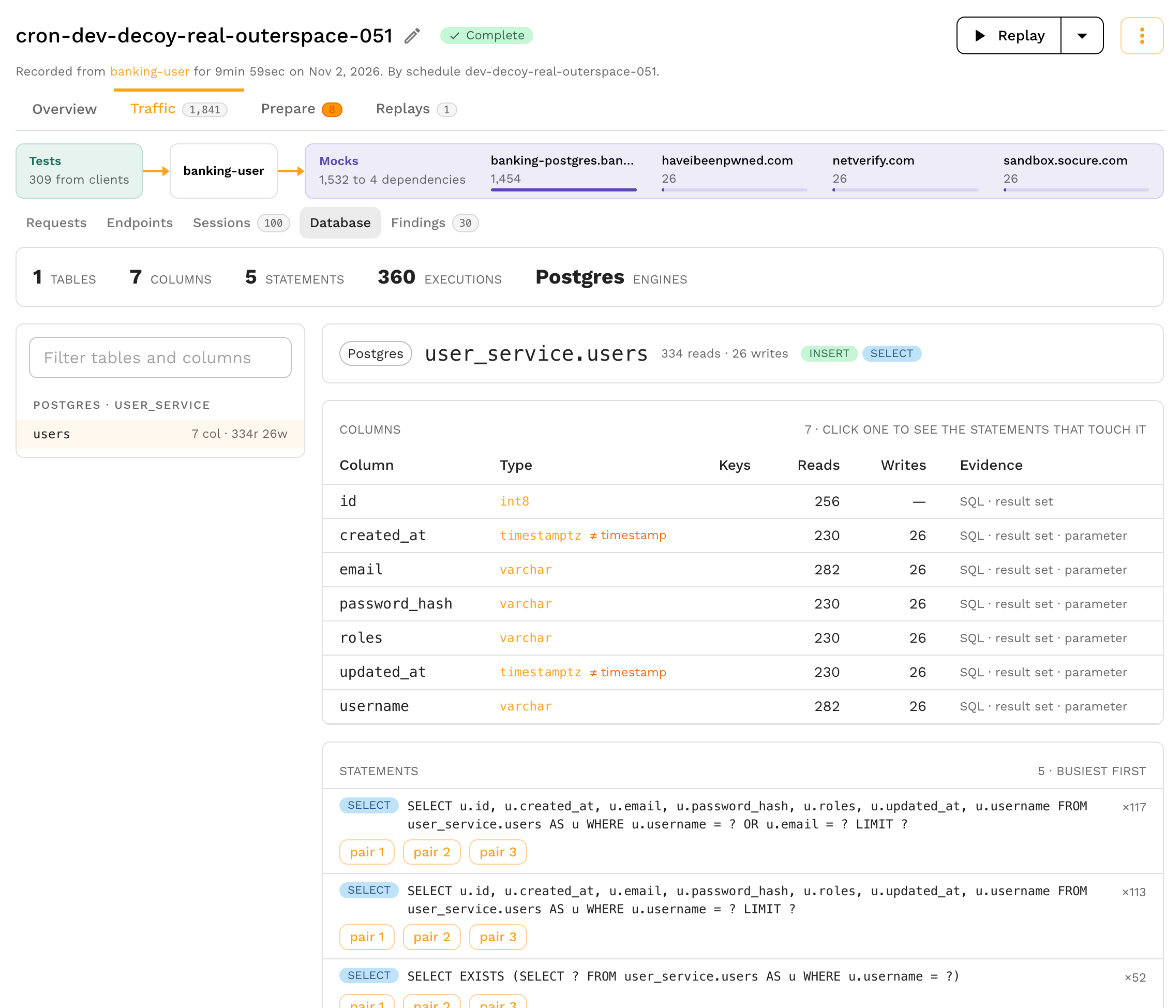
A snapshot with database traffic shows the tables and columns its statements read and write, worked out from the traffic itself. You see the part of the schema a service actually depends on, with column types, keys and how often each column is read and written, without a connection to the database, a schema dump or a migration history.
Use it to learn an unfamiliar service, to check which columns a migration would affect, to see which service writes a table, and to know what a test database needs before you mock or replay against one (mocking and replay cover Postgres, MySQL and SQL Server).
## Open it
Open a snapshot's **Traffic** tab, then choose **Database**, next to **Requests**, **Endpoints** and **Sessions**.
The summary counts the tables and columns found, the statements and executions they came from, and the database engines. **Without a table** counts statements such as `BEGIN`, `SET` or `SELECT 1` that name no table.
## Tables and columns
The table list shows each table with its column count and how often it was read and written, and **Filter tables and columns** finds one by name. Select a table to see its columns:
| Column | What it shows |
| --- | --- |
| Column | The column name |
| Type | The type the evidence points to, or **unknown**; when evidence disagrees the column says which types it saw |
| Keys | **PK**, **UNIQUE**, **NOT NULL** and **AUTO** (auto-increment), when the traffic showed them |
| Reads, Writes | How often statements read and wrote the column |
| Evidence | Where the column was seen: **SQL** (a statement names it), **result set** (a query returned it), **parameter** (a bound value was written to it), **DDL** or **error** |
Constraints the traffic revealed, in a `CREATE TABLE` or in an error such as a unique violation, are listed under the table.
Below the columns, the statements that touch the table are listed busiest first with how often each ran. Select a column to narrow the list to the statements that touch that column, and open one of a statement's example requests to see the call itself.
## How it is inferred
Speedscale reads each recorded Postgres, MySQL, SQL Server and Oracle statement and its response when the snapshot is analyzed:
* the tables and columns each statement names, and whether it reads or writes them;
* the column names and types of the result sets queries returned;
* the types of the values bound to prepared statements and RPC parameters;
* DDL statements such as `CREATE TABLE`, when the traffic holds any;
* errors that name a constraint or column, such as a unique or not-null violation.
A SQL Server table that a statement names without a schema is listed under the default schema, `dbo`.
It only knows what the traffic touched. A column no recorded statement used does not appear, and a type stays **unknown** when nothing in the traffic said what it is.
A snapshot analyzed before this existed says so; reanalyze it to see its schema.
## Related
* [Inspect a statement](https://docs.speedscale.com/guides/databases/inspect-a-statement/)
* [Mock a database](https://docs.speedscale.com/guides/databases/mock-a-database/)
* [Database traffic](https://docs.speedscale.com/concepts/database-traffic/)