---
title: "Run journeys in a cluster | Speedscale Docs"
description: "Run Playwright journeys as a Kubernetes replay against a deployed frontend: start it with proxymock cluster replay start --browser, with or without Speedscale cloud, or from the dashboard's replay launcher on a snapshot that carries journeys."
canonical: "https://docs.speedscale.com/guides/browser-journeys/run-in-cluster/"
---
[Documentation index](https://docs.speedscale.com/guides/llms.txt) | [Markdown](https://docs.speedscale.com/guides/browser-journeys/run-in-cluster/index.md) | [Canonical page](https://docs.speedscale.com/guides/browser-journeys/run-in-cluster/)
# Run journeys in a cluster
In a cluster, the Speedscale operator runs your journeys in a generator pod against a frontend deployed in Kubernetes, or any frontend the cluster can reach. A responder runs beside the browser in the same pod and answers the frontend's API calls from the recording, so the frontend's API tier does not have to be deployed.
## Before you start
* The [Speedscale operator](https://docs.speedscale.com/getting-started/installation/install/) installed in the cluster, on a release that includes browser journeys.
* The frontend's URL as the cluster sees it, such as `http://shop-frontend.web:80`.
* Journeys that follow [what a replay expects](https://docs.speedscale.com/guides/browser-journeys/write-journeys/#what-a-replay-expects).
The generator pod for a journey replay uses the `generator-browser` image, which adds Node.js, Playwright and Chromium to the generator. It is larger than the usual generator image, and the pod gets a 1 GiB memory-backed `/dev/shm`, which Chromium needs.
## From the command line
`proxymock cluster replay start --browser` packs a folder of journeys with the recording and runs them in the cluster:
```bash
proxymock cluster replay start --in --browser ./journeys \
--target http://shop-frontend.web:80 --wait
```
`--target` is the frontend's URL. What happens by default:
* **The snapshot stays in the cluster.** The recording and journeys are staged in the cluster's forwarder, with no Speedscale cloud round trip. Add `--snapshot-source cloud` to push them to Speedscale cloud with the snapshot and read the run as a report there.
* **The frontend's API calls are mocked.** The responder beside the browser answers calls to the hosts the recording knows from the recording, and reaches every other host directly. Add `--no-mocks` to send every call to the real APIs instead; see [Mocks and real APIs](https://docs.speedscale.com/guides/browser-journeys/mocks-and-real-apis/).
* **Only the generator runs.** The replay defaults to `generator-only` mode, because the responder it needs runs inside the generator pod.
* **The test config is the built-in one with journeys turned on.** Pass `--test-config` to use your own; its other [browser settings](https://docs.speedscale.com/reference/configuration/browser/) and goals apply.
With `--wait`, the command follows the replay to the end. A cloud-free run then prints its result, exits nonzero if it missed its goals, and downloads each failed journey's screenshot, trace and error context:
```text
screenshots and traces of failed journeys, saved to browser-artifacts/:
shopper sees a checkout button (checkout.spec.ts:3) screenshot: browser-artifacts//shopper-sees-a-checkout-button/test-failed-1.png
shopper sees a checkout button (checkout.spec.ts:3) trace: browser-artifacts//shopper-sees-a-checkout-button/trace.zip
open a trace with: npx playwright show-trace browser-artifacts//shopper-sees-a-checkout-button/trace.zip
```
A run with `--snapshot-source cloud` keeps the same files with its report instead.
[Run a replay in your cluster](https://docs.speedscale.com/proxymock/guides/cluster/) covers the rest of `proxymock cluster replay`: choosing a cluster and namespace, `status`, and `stop`.
## From the dashboard
The dashboard starts a journey replay from a snapshot that carries journeys. Store journeys with a snapshot when you push it:
```bash
proxymock cloud push snapshot --in --browser ./journeys
```
A `proxymock cluster replay start --browser --snapshot-source cloud` run stores them the same way.
Then open the replay launcher for that snapshot at `/replay-launcher?snapshotId=`:
1. Under **Start from**, pick **Browser journeys**. The row appears only when the snapshot carries journeys, and names its specs.
2. Under **System under test**, enter the **Frontend URL**, the frontend's URL as the cluster sees it.
3. Pick the cluster under **Where it runs**.
4. Leave **Answer the frontend's API calls from the recording** on to mock the frontend's APIs, or turn it off to send every call to the real APIs and compare the answers with the recording.
5. Check the goals under **Test settings**. The template starts with **Browser journeys passing ≥ 100%**.
6. Select **Start**. When the replay finishes, open its report's **Journeys** tab; see [Read the results](https://docs.speedscale.com/guides/browser-journeys/read-results/).
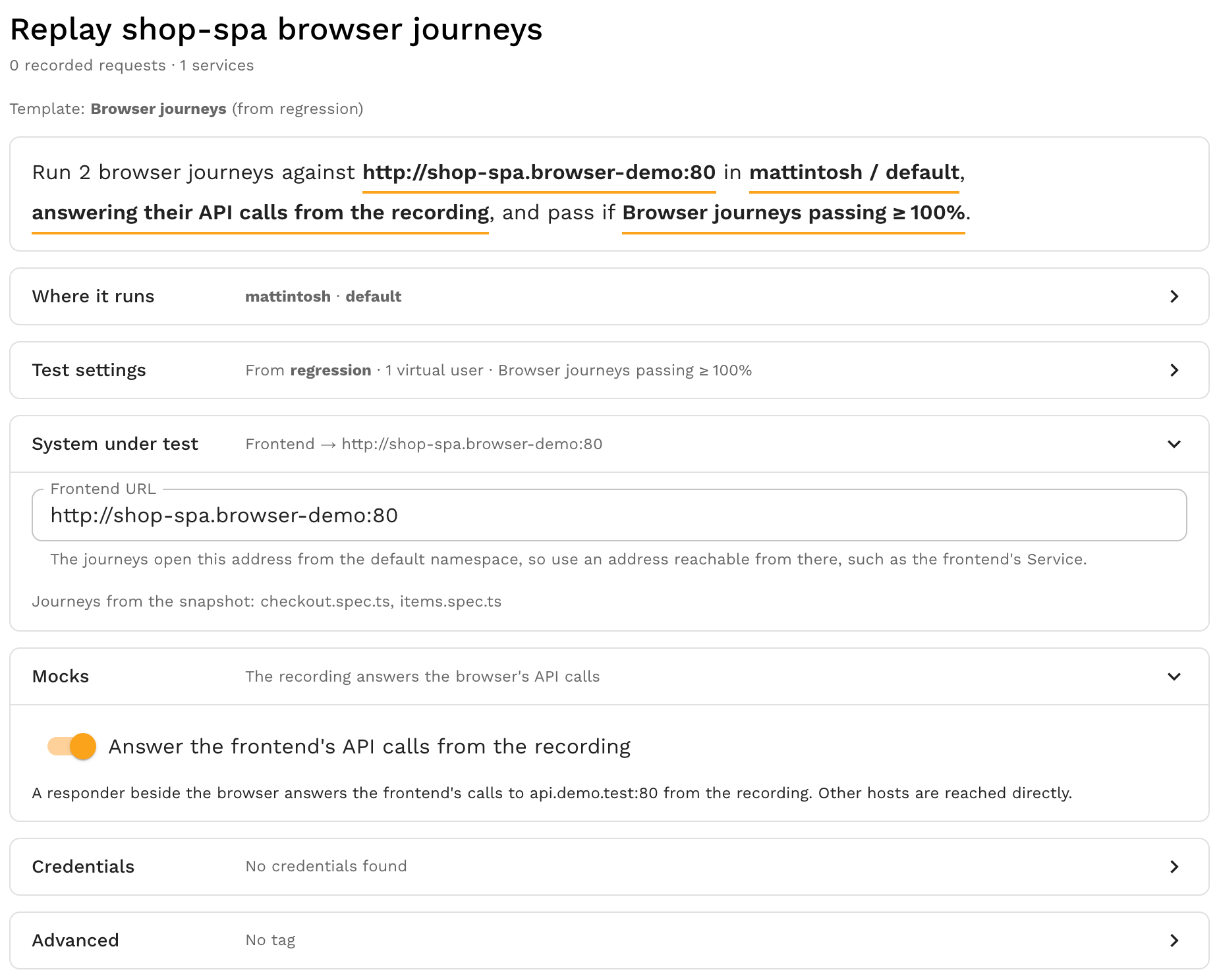
The run panel beside the launcher shows the `proxymock cluster replay start --browser` command for the same run, for a replay from your machine's copy of the journeys and recording.
## In a test config
Any replay runs journeys when its test config turns them on. The command line and the launcher set this for you. To run journeys from a CI pipeline or your own config, set `generator.browser`:
```json
{
"generator": {
"browser": {
"enabled": true,
"responderProxy": true,
"workers": 2,
"journeyTimeout": "60s",
"blockPatterns": ["**/www.googletagmanager.com/**"]
}
},
"cluster": {
"replayMode": "generator-only"
},
"rules": [
{ "metricName": "browserJourneyPassPct", "type": "TOO_LOW", "value": 100, "action": "ALERT" },
{ "metricName": "browserLcpP95", "type": "TOO_HIGH", "value": 2500, "action": "ALERT" }
]
}
```
The journeys come from the snapshot. To carry them in the config itself, put them in `journeyFiles`. Every setting is in the [browser test config reference](https://docs.speedscale.com/reference/configuration/browser/).