---
title: "Mocks and real APIs | Speedscale Docs"
description: "How a browser journey replay answers the frontend's API calls: from the recording through a responder or proxymock mock, or from the real APIs with each answer compared with the recording. Covers the hit, miss, passthrough and observed verdicts, how each call is scored, and the response headers that carry the verdict."
canonical: "https://docs.speedscale.com/guides/browser-journeys/mocks-and-real-apis/"
---
[Documentation index](https://docs.speedscale.com/guides/llms.txt) | [Markdown](https://docs.speedscale.com/guides/browser-journeys/mocks-and-real-apis/index.md) | [Canonical page](https://docs.speedscale.com/guides/browser-journeys/mocks-and-real-apis/)
# Mocks and real APIs
A journey's browser sends its traffic through a proxy that decides how each of the frontend's API calls is answered. In a cluster that proxy is a responder in the generator pod. On your machine it is `proxymock mock`, named with `--browser-proxy`.
In a cluster, the responder handles the calls to hosts the recording has traffic for. Calls to any other host, such as a CDN or a third-party script, go straight to that host and are not scored. `proxymock mock` handles every call, so on your machine a call to a host the recording does not have is a passthrough.
## Mocks on
With mocks on, the default, the proxy looks each call up in the recording the same way [service mocking](https://docs.speedscale.com/guides/mocking/mocks/) does, and answers it one of three ways:
| Verdict | When | What the browser gets |
| --- | --- | --- |
| Hit | The recording has a matching call. | The recorded response. |
| Miss | The recording has the host but no matching call. | A 404. |
| Passthrough | No matching call, and the proxy passes unmatched calls through. | The real host's response. |
`proxymock mock` passes unmatched calls through unless you start it with `--no-passthrough`. A responder in a cluster answers them with a 404 unless the test config turns on the responder's passthrough mode.
The report names each miss and passthrough under the step that made it, as a call the recording could not answer. Record those calls, or find out why the frontend made a call the recording does not have.
Mocking a browser's calls needs a few things a service's calls do not, and the proxy handles them:
* **CORS preflights.** A browser sends an `OPTIONS` preflight before many cross-origin calls, and recordings rarely have one. The proxy answers a preflight to a mocked host itself, so the call that follows is not blocked.
* **The page's origin.** A recorded `Access-Control-Allow-Origin` names the origin the recording was made from. When the replay's frontend runs on another origin, the proxy answers with the requesting origin instead, so a journey recorded on a laptop replays against a cluster.
* **Conditional requests.** A call with `If-None-Match` or `If-Modified-Since` that matches the recorded `ETag` or `Last-Modified` gets a `304 Not Modified`, as the real server would send.
* **Error responses.** A miss or a failed passthrough still carries CORS headers, so the browser reports the status instead of an opaque network error.
## Compare the real APIs with the recording
With mocks off, the proxy sends every call to the real API and also looks it up in the recording. When the recording has a matching call, the call is **observed**: the browser gets the real response, and the report compares it with the recorded one.
Turn mocks off with:
* `--no-mocks` on `proxymock cluster replay start --browser`.
* The **Answer the frontend's API calls from the recording** switch, turned off, in the dashboard's replay launcher.
* `--observe-real-apis` on `proxymock mock` when you run journeys on your machine.
* `"responderProxy": true` and `"observeRealApis": true` in the [test config](https://docs.speedscale.com/reference/configuration/browser/).
The proxy compares the status code and the response body, the same checks as the [status code](https://docs.speedscale.com/reference/configuration/assertions/httpstatuscode/) and [response body](https://docs.speedscale.com/reference/configuration/assertions/httpresponsebody/) assertions. Calls that differ are named on the step that made them, with what differed, such as `GET https://api.example.com/items (Body JSON)`. Fields that change on every call, such as timestamps and request IDs, show up as differences.
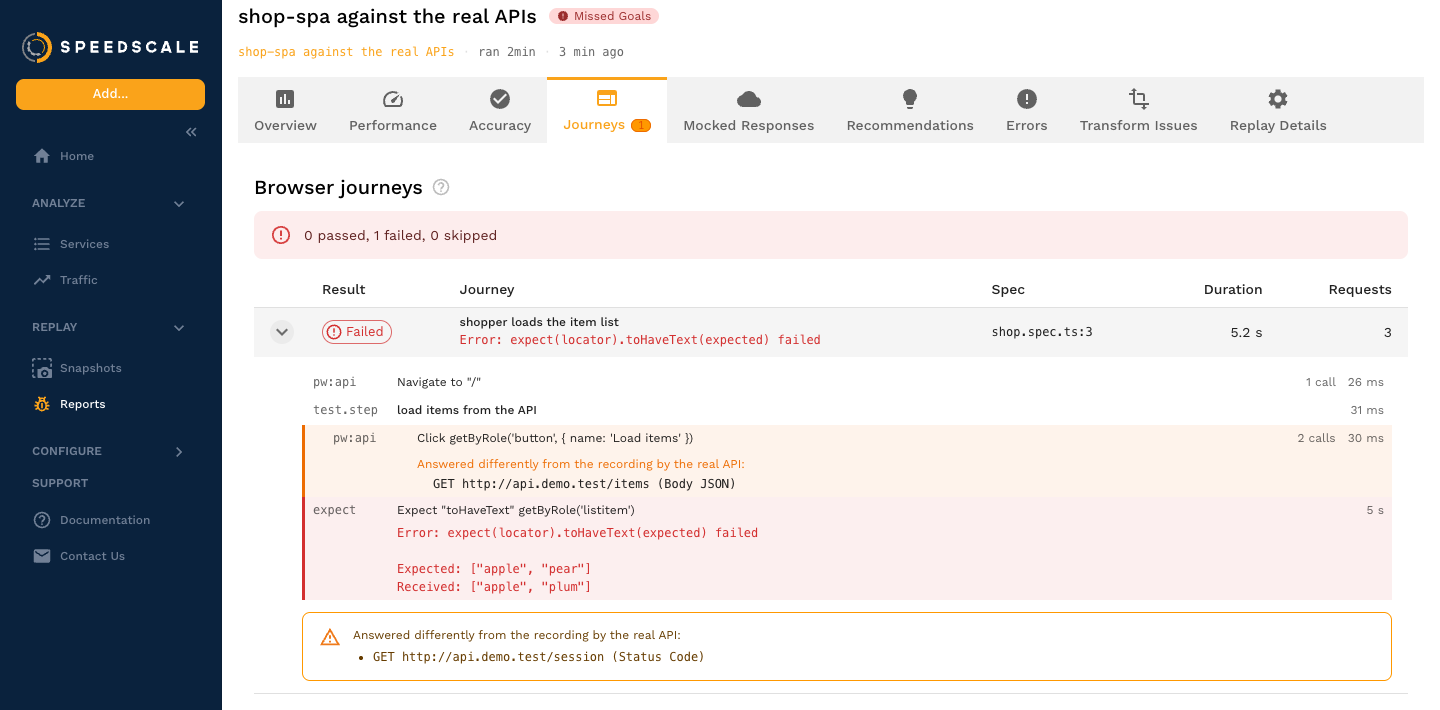
In a Speedscale cloud report, the analyzer also scores each observed call (see [How each call is scored](https://docs.speedscale.com/guides/browser-journeys/mocks-and-real-apis/#how-each-call-is-scored)). It uses the test config's assertions when the config sets any, so you can ignore those changing fields there, and status code and response body otherwise. A cloud-free cluster replay does not score observed calls; run it with `--snapshot-source cloud` to get them scored.
## How each call is scored
Each browser call the proxy answered becomes a **Browser Call** assertion in the report, counted in the replay's success rate like any other assertion:
| Verdict | Assertion |
| --- | --- |
| Hit | Passes. |
| Miss | Fails: the recording could not answer the call. |
| Passthrough | Fails: the call reached the real host instead of the recording. |
| Observed | Passes when the real response matches the recording, and fails naming what differed. |
Calls the proxy did not answer, such as calls to hosts the recording has no traffic for, are not scored. A journey's own pass or fail is Playwright's, from the journey's assertions, whatever its calls scored.
## Response headers
The proxy marks each response it handles, so the browser's own capture, and you in the trace viewer's network tab, can see how a call was answered:
| Header | Meaning |
| --- | --- |
| `X-Speedscale-Cache-Miss` | `true` for a miss or passthrough, `false` for a hit or an observed call. |
| `X-Speedscale-Cache-Passthrough` | `true` when the real host answered. |
| `X-Speedscale-Ref-UUID` | The recorded call that matched, for a hit or an observed call. |
| `X-Speedscale-Observed-Diff` | For an observed call whose real response differs from the recording, what differed. |