---
title: "AWS Elastic Beanstalk | Speedscale Docs"
description: "This documentation provides a step-by-step guide for installing Speedscale on AWS Elastic Beanstalk, focusing on configuration and deployment best practices. It ensures seamless integration and optimal performance for applications running in the cloud environment."
canonical: "https://docs.speedscale.com/getting-started/installation/install/beanstalk/"
---
[Documentation index](https://docs.speedscale.com/getting-started/llms.txt) | [Markdown](https://docs.speedscale.com/getting-started/installation/install/beanstalk/index.md) | [Canonical page](https://docs.speedscale.com/getting-started/installation/install/beanstalk/)
# AWS Elastic Beanstalk
caution
This workflow is currently in preview status. Please provide feedback in our [slack community](https://slack.speedscale.com/).
## Prerequisites
1. [Speedctl is installed](https://docs.speedscale.com/getting-started/quick-start/)
2. Access to the client application to configure proxy settings and trust certificates.
3. Application is using Beanstalk with [Docker Platform (ECS managed or otherwise)](https://docs.aws.amazon.com/elasticbeanstalk/latest/dg/create_deploy_docker.html)
## Working with Beanstalk
This guide uses a `docker-compose.yml` and not a [Dockerrun.aws.json](https://docs.aws.amazon.com/elasticbeanstalk/latest/dg/create_deploy_docker_v2config.html#create_deploy_docker_v2config_dockerrun) file although it is quite easy to convert between the two formats. We'll set up a forwarder and goproxy container alongside your existing application in order to capture traffic and then optionally add a one time generator container to run a replay test.
We'll use a simple service called `notifications` as our sample app that serves on port `8080`.
```yaml
version: "3"
services:
notifications:
image: gcr.io/speedscale-demos/notifications
ports:
- 80:8080
```
### Create TLS secrets
To capture outbound TLS calls, we need to setup TLS certs to be used by the services. Create a directory called `certs` and run this command
```bash
openssl genrsa -out tls.key 4096
openssl req -new -key tls.key -x509 -days 365 -out tls.crt -subj "/C=US/ST=Georgia/L=Atlanta/O=Speedscale/CN=speedscale.com"
```
### Environment Prep
Using the [manifests](https://docs.speedscale.com/getting-started/installation/install/beanstalk/#manifests)
* Populate the values inside `.env` from your `~/.speedscale/config.yaml` file
* Edit your `docker-compose.yml` and add the `forwarder` and `goproxy` sections:
* `APP_LABEL` and `APP_POD_NAME` if you want to change the service name that will be shown in the Speedscale Traffic Viewer.
* `CLUSTER_NAME` and `APP_POD_NAMESPACE` so that you can filter by namespace and cluster as you would for a Kubernetes installation.
* `REVERSE_PROXY_{HOST/PORT}` will be the name of service in the compose file and the port it's running on
* Remove the port binding of `80:{YOUR_APP_PORT}` (commented out in the manifest) from your app. Goproxy will become the new entrypoint for incoming requests.
We're also configuring our app to use `goproxy` as an outbound http proxy so that we can capture outbound requests. Our example `notifications` app uses Golang so the variables are set accordingly in the manifest. The environment variables depend on the language of your app so refer to [proxy server configuration](https://docs.speedscale.com/getting-started/installation/sidecar/proxy-modes/#configuring-your-application-proxy-server) and [trusting TLS certificates](https://docs.speedscale.com/getting-started/installation/sidecar/tls/#trusting-tls-certificates).
### Analyze Traffic
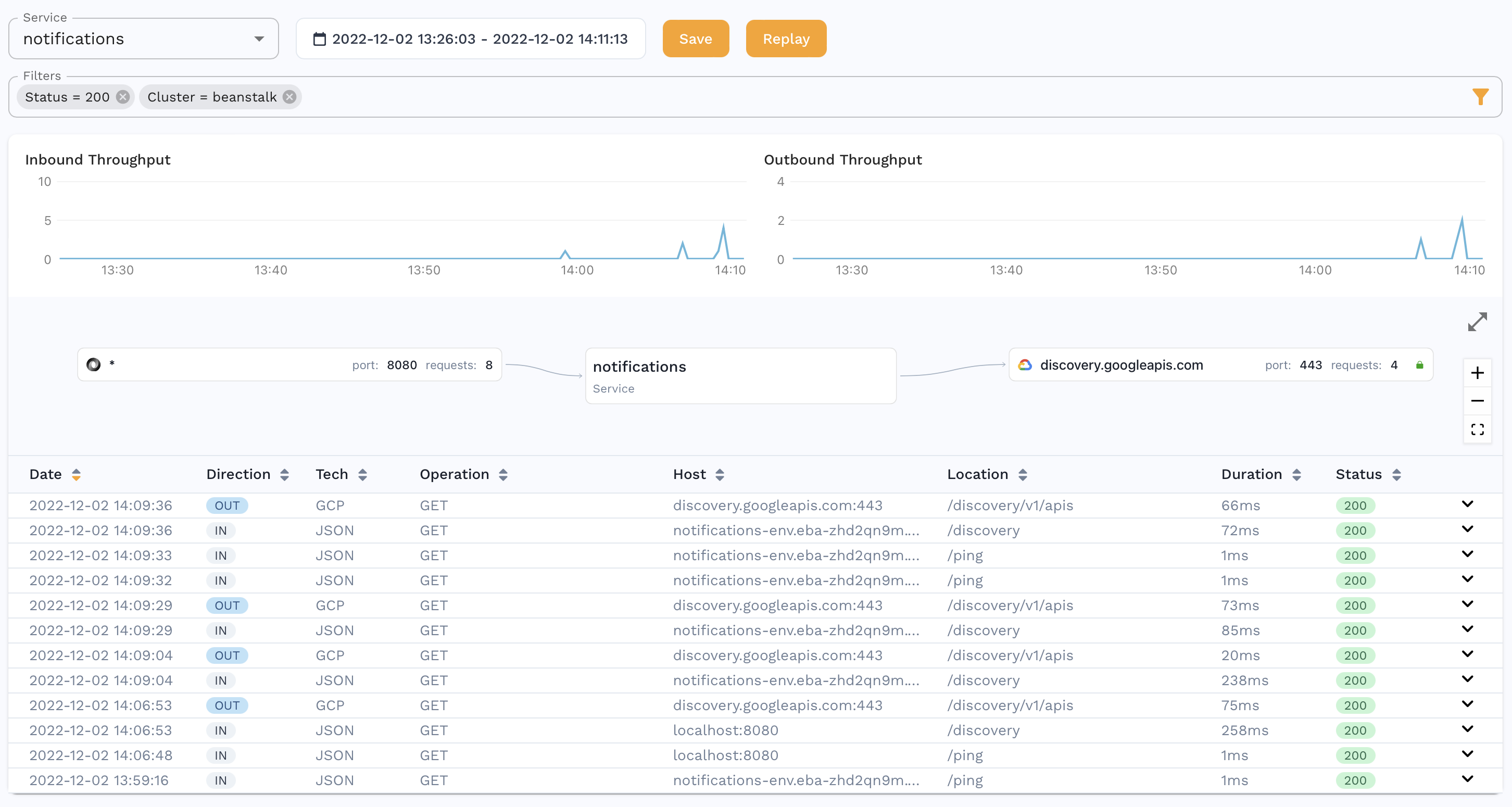
You should be able to see traffic in the Speedscale UI after a few minutes and now you can using this traffic to [create a snapshot](https://docs.speedscale.com/guides/creating-a-snapshot/).
### Replaying traffic
If you've created a snapshot, you can replay it in Beanstalk as well. Take the ID of the snapshot you created (something like `b973b5e2-651f-4a30-8c69-7bd62a678544`) and fill it in the `SCENARIO_ID` variable shown in the [generator snippet](https://docs.speedscale.com/getting-started/installation/install/beanstalk/#manifests). This container has `restart: no` so that it only runs once. You can also run this same generator snippet locally against your deployment by changing the `CUSTOM_URL` to your internet facing Beanstalk URL.
You can also change the `TEST_CONFIG_ID` to a [custom config](https://docs.speedscale.com/reference/configuration/) you may have created. Paste that snippet into your `docker-compose.yaml` file and run `docker compose up -d` again to start the test.
This will generate a report which you can find more details for [here](https://docs.speedscale.com/guides/reports/).
## Manifests
Zip structure (`.ebextensions` are optional but usually present for Beanstalk apps)
```text
├── .ebextensions
│ └── options.config
├── .env
├── certs
│ ├── tls.crt
│ └── tls.key
└── docker-compose.yaml
```
.env
```conf
LOG_LEVEL=info
SPEEDSCALE_API_KEY=
SPEEDSCALE_APP_URL=app.speedscale.com
SUB_TENANT_NAME=default
SUB_TENANT_STREAM=
TENANT_REGION=us-east-1
TENANT_BUCKET=
TENANT_ID=
TENANT_NAME=
```
docker-compose.yaml
````yaml
version: "3"
services:
notifications:
image: gcr.io/speedscale-demos/notifications
# ports:
# - 80:8080
env_file:
- .env
environment:
- SSL_CERT_FILE=/etc/ssl/capture/tls.crt
- HTTP_PROXY=http://goproxy:4140
- HTTPS_PROXY=http://goproxy:4140
volumes:
- ./certs:/etc/ssl/capture
goproxy:
image: gcr.io/speedscale/goproxy:v2.3.586
ports:
- 80:4143
volumes:
- ./certs:/etc/ssl/capture
env_file:
- .env
environment:
- FORWARDER_ADDR=forwarder:8888
- TLS_OUT_UNWRAP=true
- TLS_CERT_DIR=/etc/ssl/capture
- CAPTURE_MODE=proxy
- PROXY_TYPE=dual
- PROXY_PROTOCOL=tcp:http
- REVERSE_PROXY_HOST=notifications
- REVERSE_PROXY_PORT=8080
- APP_LABEL=notifications
- APP_POD_NAME=notifications
- APP_POD_NAMESPACE=notifications
forwarder:
image: gcr.io/speedscale/forwarder:v2.3.586
env_file:
- .env
environment:
- CLUSTER_NAME=beanstalk
generator snippet
```yaml
generator:
image: gcr.io/speedscale/generator:v2.3.586
restart: "no"
env_file:
- .env
environment:
- SCENARIO_ID=8d64d9cf-92b9-455f-9d78-24af52ddd17e
- TEST_CONFIG_ID=standard
- CUSTOM_URL=http://notifications:8080
- LOCAL_REPLAY_MODE=true
````