---
title: "Schedules | Speedscale Docs"
description: "Create and manage schedules in Speedscale to automate actions like snapshots and replays, enhancing your API testing and traffic replay processes."
canonical: "https://docs.speedscale.com/concepts/schedules/"
---
[Documentation index](https://docs.speedscale.com/concepts/llms.txt) | [Markdown](https://docs.speedscale.com/concepts/schedules/index.md) | [Canonical page](https://docs.speedscale.com/concepts/schedules/)
# Schedules
Schedules provide a way to run Speedscale actions on a regular basis. Actions like creating a fresh snapshot from a running service or running a replay. Running replays on a schedule enables regular testing when running Speedscale inside CI/CD is not feasible.

## Cron Expressions
Speedscale schedules use a [cron expression](https://en.wikipedia.org/wiki/Cron) to define when the actions should run, but there are several predefined intervals to get up and running right away.
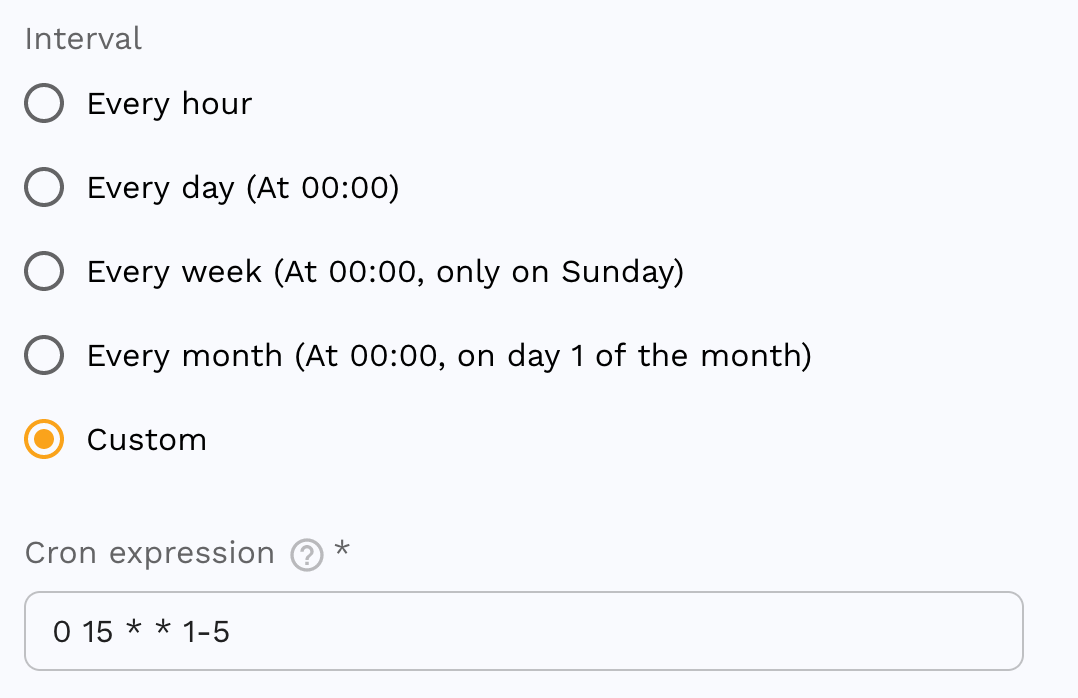
The cron expression here, `0 15 * * 1-5`, defines a schedule which will run every day at 15:00 UTC, Monday through Friday.
Visit [crontab.guru](https://crontab.guru/) for help creating and understanding cron expressions.
## Actions
There are several actions to choose from which can be re-ordered as necessary.
### Snapshot
Creates a fresh snapshot from a service running in your cluster. The service must have recorded traffic during the window specified or the snapshot will fail.
### Replay
Runs a replay, generating a report, from an existing snapshot. The replay may use an existing snapshot, or one created from a previous action.
### Sidecar
Legacy capture action
The Sidecar action applies only to existing sidecar deployments. New Kubernetes installations should use [eBPF capture](https://docs.speedscale.com/reference/ebpf-traffic-collection/) and control recording windows through capture targets or the `capture.speedscale.com/enabled` annotation.
Ensures the Speedscale sidecar exists, or does not exist, on a workload running in your cluster. A workload must have the sidecar attached to capture traffic. This action is useful for ensuring a workload is capturing traffic, or turning capture on and off to capture for a schedule without capturing traffic continuously.
info
The sidecar action asynchronously sends a command to add the sidecar to a workload but does not wait for it to complete. Traffic will also take up to 2 minutes to be visible in the Speedscale cloud after capture so it may be necessary to use a Wait action after the sidecar action to achieve consistent results.
### Wait
Waits before advancing to the next action. This is useful for waiting for traffic after ensuring a sidecar exists on a workload, or when some out of band work is performed in between actions.
### Notify
Sends a notification when the action is reached during execution. Place this action anywhere in the sequence, for example at the end to report the overall outcome, or immediately after a replay to alert on test failures.
#### Trigger conditions
| Trigger | When it fires |
| --- | --- |
| **Always** (default) | Every time the action is reached, regardless of prior results |
| **On failure** | Only when at least one earlier action in the job recorded an error |
| **On success** | Only when all earlier actions completed without error |
#### Channels
**Webhook** sends an HTTP POST to a URL you provide. By default the request body is a structured JSON object:
```json
{
"job_id": "my-job",
"job_description": "Nightly regression",
"execution_id": "3f7a...",
"start_time": "2024-05-01T15:00:00Z",
"status": "failure",
"failed_tasks": [
{ "index": 1, "message": "Error: report completed with errors: [timeout]" }
],
"snapshot_id": "abc123",
"report_id": "def456",
"schedule_url": "https://app.speedscale.com/schedules/my-job",
"report_url": "https://app.speedscale.com/reports/def456"
}
```
To pass additional headers (for example, an authorization token) use the **Headers** field when configuring the action.
#### Message template
Some services, including Slack, require a specific JSON shape and will reject the default payload. Set the **Message template** field to a [Go template](https://pkg.go.dev/text/template) string; when present the request body becomes `{"text": ""}` instead.
Available template variables:
| Variable | Description |
| --- | --- |
| `{{.JobID}}` | Schedule ID |
| `{{.JobDescription}}` | Schedule description |
| `{{.ExecutionID}}` | Unique ID for this run |
| `{{.StartTime}}` | Execution start time (UTC) |
| `{{.Status}}` | `success` or `failure` |
| `{{.FailedTasks}}` | Slice of failed actions; each has `.Index` and `.Message` |
| `{{.SnapshotID}}` | ID of the most recent snapshot created in this run |
| `{{.ReportID}}` | ID of the most recent replay report created in this run |
| `{{.ScheduleURL}}` | Link to this schedule in the Speedscale dashboard |
| `{{.ReportURL}}` | Link to the most recent replay report in the dashboard |
#### Slack
1. [Create a Slack incoming webhook](https://api.slack.com/messaging/webhooks) for the channel you want to post to and copy the webhook URL.
2. Paste the URL into the **URL** field.
3. Set **Message template** to a string such as:
```text
*{{.JobID}}* finished with status *{{.Status}}*
Started: {{.StartTime}}
Schedule: {{.ScheduleURL}}{{if .ReportURL}}
Report: {{.ReportURL}}{{end}}
```
The dashboard's **Use Slack default** button pre-fills this template for you.
For failure details you can iterate over `FailedTasks`:
```text
*{{.JobID}}* failed: {{range .FailedTasks}}task {{.Index}}: {{.Message}} {{end}}
```
Slack validates that the posted JSON contains a `text` field and returns `400 no_text` without one, so the Message template field is required when posting to Slack.
**Email** support is coming in a future release.
tip
Combine the Notify action with **On failure** and `continue_on_failure` enabled to get an alert any time a scheduled replay misses its goals without stopping the rest of the job.